

Offers and messages
itsPass prices: members-only promotions
An itsPass price is a promotion only your itsPass members get. Members pay it when they scan itsPass at the till or sign in to your online store; everyone else pays the regular price and sees what they'd save by joining. In our test shop, Nescafe Original Instant Coffee 300g is £9.50, and £8.50 with itsPass.
For: Owners, Admins and Shop managers4 min read
Before you start
- Owners, Admins and Shop managers make promotions; Shop managers within their own discount limits. See Promotions.
- itsPass members shows as a choice once your plan has itsPass (every plan does).
- Needs itsPOS Till 0.5.28 or later. Older tills can't give itsPass prices, so they don't give the promotion at all, and your offers flyer won't advertise it at that shop until its tills are updated.
Make an itsPass price
- Go to Catalogue › Promotions and press Add promotion.
- What kind?: choose Money off products (or a category, brand or tag, or a multi-buy). Press Continue.
- How much?: choose the products, for example Nescafe Original Instant Coffee 300g, and the benefit, for example A new price for each £8.50. Give it a name shoppers understand, such as "itsPass price: Nescafé 300g £8.50". Press Continue.
- When and where?: under Who can get it, choose itsPass members: "An itsPass price: members get it when they scan itsPass at the till or sign in online. Everyone else pays the regular price." The note under it says "Shoppers see the regular price beside the itsPass price."
- Leave Automatic group on Every itsPass member, or choose one, for example only Regulars. A promotion for one automatic group isn't shown in the offers flyer.
- Choose where (Till and online, Till only or Online only), the shops and the dates, and whether to Show in the offers flyer. Press Continue.
- Check: "Who gets it" says "itsPass members (an itsPass price)". Press Save promotion.
The list shows it with an itsPass price tag, for example "Now £8.50 each".
What happens next
- On the till: tills get it within a minute. When a member is on the sale (scanned or found by mobile), the price drops to £8.50; without a member it stays £9.50. See Add a customer or itsPass member to a sale.
- In your offers flyer and on your Offers page: "£8.50 with itsPass · Regular £9.50", with the price per kg for both and the line "itsPass prices need itsPass: scan it at the till." See Make your offers flyer.
- In your online store: members who signed in with itsPass pay the itsPass price; others see it with the regular price.
- On the receipt: the saving shows on the line, like any promotion.
If something goes wrong
- The till charges the regular price to a member: check the member is on the sale before Pay, and that the till is itsPOS Till 0.5.28 or later.
- The flyer says to update tills: "Update the tills at Green Street Grocer to itsPOS Till 0.5.28 or later before advertising itsPass prices: older tills can't give them." Update the tills (they update by themselves after the shift is closed).
- You can't choose itsPass members: it isn't offered for a Markdown at the end of the day, which is the same for everyone.
What shoppers see
On your shop's page in itsPass, Offers now shows each itsPass price beside the regular price, for example itsPass price "£2.80" with "Regular £3.50". Tapping it shows How to get this price: pick it up as normal, show your code at the till, and the till takes off the difference.
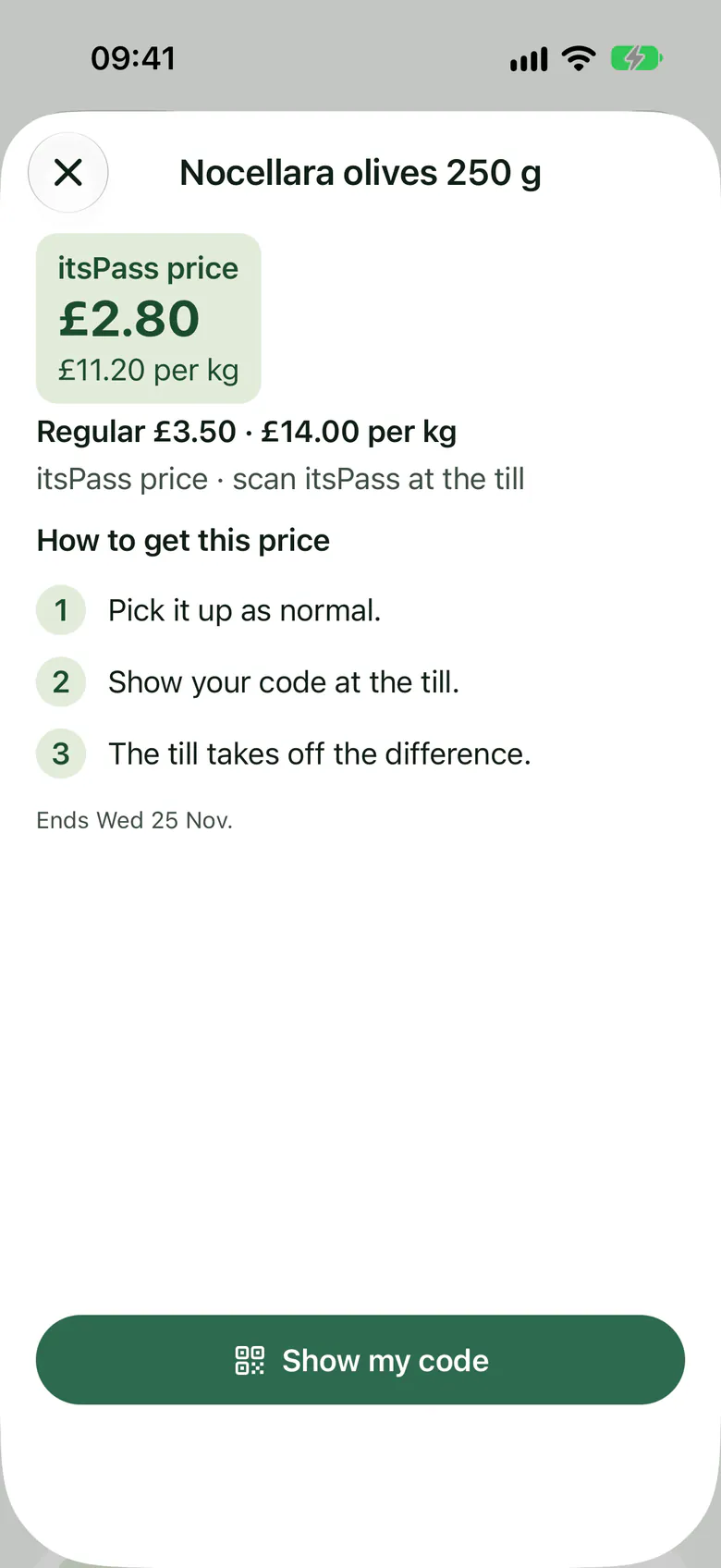
See Offers in itsPass.
Still stuck?
The itsPOS support team is here 08:00 to 20:00 every day except Christmas Day.
- Call or WhatsApp: +44 7488 880320
- Email: support@itspos.io
- In the back office: Help › Contact support, or go to app.itspos.io/help/contact after you sign in
- On our website: itspos.io/contact
Tell us your shop's name and what you were trying to do. A screenshot of the screen helps.