

Getting started
Your first shift as a supervisor
A supervisor runs the till on the shop floor: you sell like a cashier, approve what cashiers can't do on their own, and look after the cash. Supervisors use the till only, not the back office.
For: Supervisors3 min read
First, the cashier's list
- Read Your first shift as a cashier: signing in, selling, payment, receipts, refunds, age checks and working offline. You do all of it too.
Approving for others
Your PIN has 6 digits because you approve other people's actions. When a cashier goes over their limit, Approval needed opens on their till with who wants what, for example "Sam (Cashier) wants to: Give a 10% discount off the basket (limit 5%)".
- Type your PIN and tap Approve, or tap Tap manager badge and hold your badge on the reader. Both work without the internet.
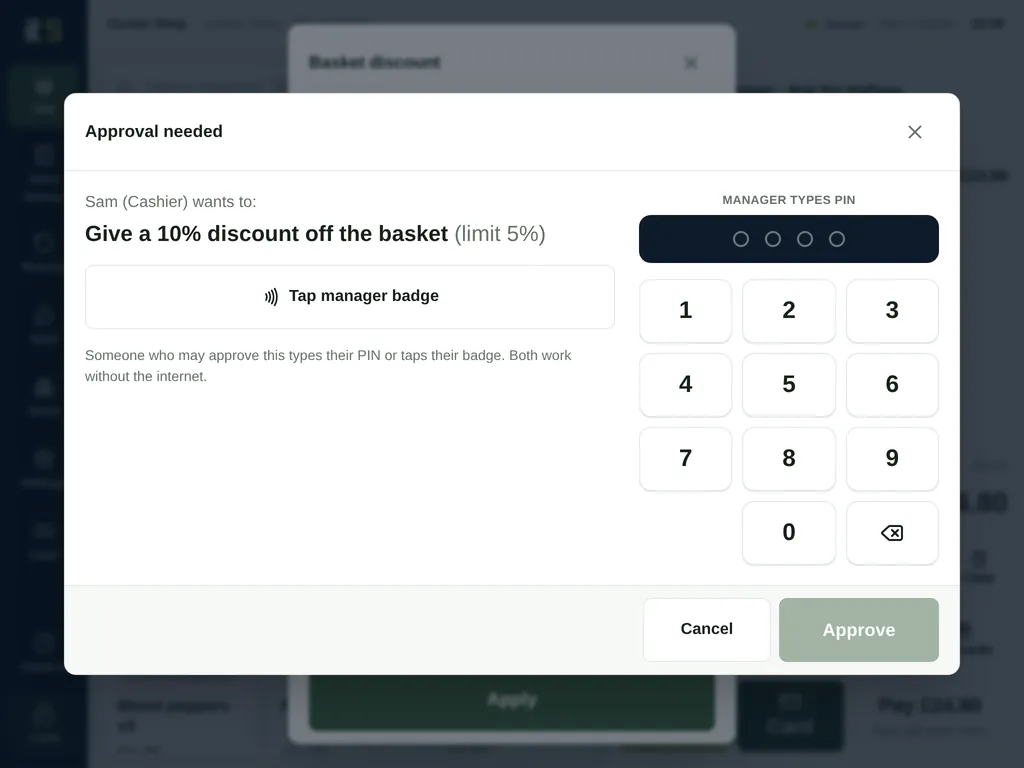
Approval needed on the till - You can only approve what you may do yourself, and never your own action.
To start with, a supervisor may:
- refund up to £200 with a receipt (£300 a shift);
- give a manual discount up to 15% (£75 a shift);
- open the drawer without a sale 10 times a shift.
These are itsPOS's starting limits: your business can change them. Over your limit, a Shop manager approves.
- Discounts, coupons, offers and charges: what a discount does to the sale, and coupons.
- Exchanges: swap an item for another and pay or refund the difference.
Looking after the cash
- Open a shift and count the float: count the notes and coins in at the start of the day.
- Cash in, cash out and No sale: change from the office, and opening the drawer without a sale.
- Safe drops: when the drawer holds too much cash, move some to the safe in a numbered bag.
- Pay for something from the till: the window cleaner or milk for the staff room, with the receipt.
- Shift figures and the X report: how the shift is going, without closing it.
- Close the shift and cash up: count the drawer, check the card machine total, explain a difference, print the Z report.
When something goes wrong
- What each message on the till means: what the till's words mean and what to do.
- Selling without the internet: what keeps working, and what waits until the till is back online.
Train in the Practice shop first: ask a Shop manager to switch a till to it. See Train staff in the Practice shop.
Still stuck?
The itsPOS support team is here 08:00 to 20:00 every day except Christmas Day.
- Call or WhatsApp: +44 7488 880320
- Email: support@itspos.io
- In the back office: Help › Contact support, or go to app.itspos.io/help/contact after you sign in
- On our website: itspos.io/contact
Tell us your shop's name and what you were trying to do. A screenshot of the screen helps.