

Selling at the till
Refunds with a receipt
Refund what a customer brings back with their receipt. In our test, a customer bought 3 × Heinz Baked Beans in A Rich Tomato Sauce 415g and a Coca-Cola Zero Sugar 500ml on receipt MAI58-000001 and brought one tin back.
For: Owners, Admins, Shop managers, Supervisors and Cashiers4 min read
Needs itsPOS Till 0.5.33 or later.
Before you start
- Who can refund (rule "Refund with a receipt"; your business can change these): Owners, Admins and Shop managers any amount; Supervisors up to £200 a refund and £300 a shift; Cashiers up to £20 a refund and £100 a shift. Above that a manager approves.
- Your rules are in Settings › Selling rules › Returns: Returns allowed within (30 days in our test shop), Refund to, Refunds without a receipt and Returns at another of your shops.
Find the sale
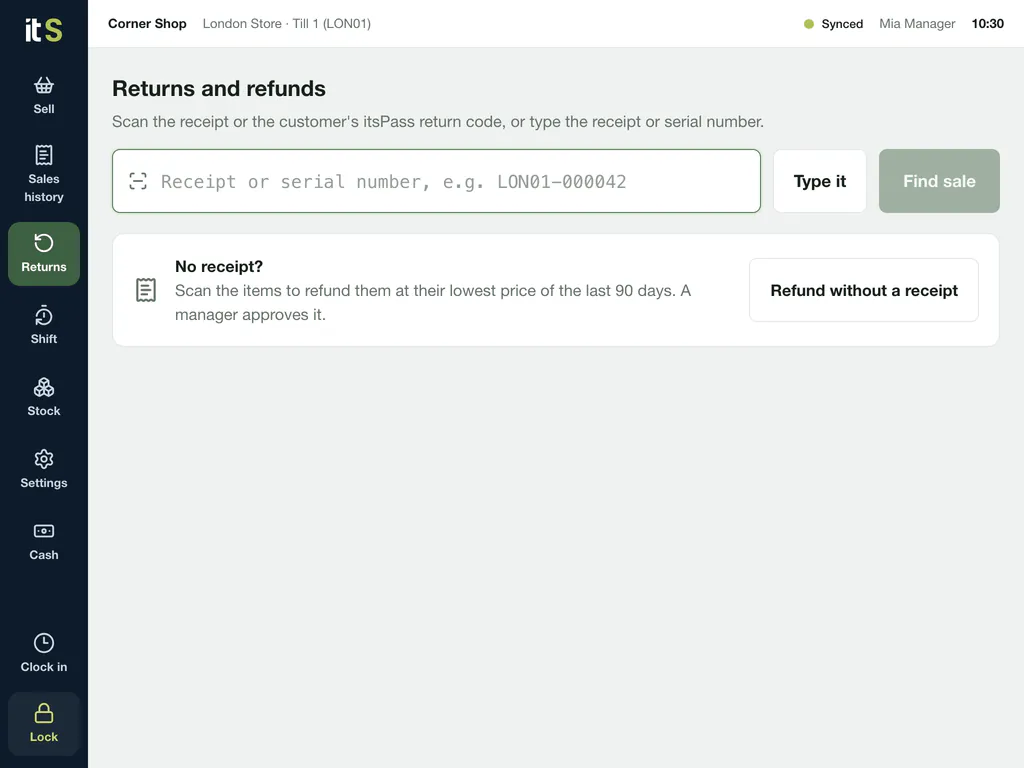
- Tap Returns in the menu. If a sale is in the basket, finish or park it first.
- Scan the receipt's barcode, the customer's itsPass return code, or the item's serial number. Or tap Type it and type the receipt number (for example MAI58-000001), then Find sale.
- The sale shows with its date, customer and total, and each line with what's left to refund, for example "Bought 3 · £1.55 each".
Online, the till sees refunds made on every till; offline it shows "Offline: refunds on other tills can't be seen." A sale from another of your shops says "Sold at Leith Larder. Stock comes back to this shop."
Choose what comes back
- Use the large − and + on each line, or tap the number to type it. Return everything ticks it all.
- For each item, choose where it goes: Back on the shelf, Waste (with a reason such as Damaged or Out of date) or Return to supplier. Your shop's rules may set this for you: "Your shop's rules set what happens to each item. A manager can change it."
- Choose the Reason: your shop's list, for example Faulty, Changed mind, Wrong size or Other.
- Tap Refund £1.55.
Refund the money
- The basket shows "Refund for MAI58-000001" and the button says Refund £1.55. Tap it.
- The payment screen says Refund due and offers only the way the customer paid. "The refund goes back the way the customer paid."
- Tap the way they paid: Cash for a cash sale (the drawer opens), Card for a card sale (the card machine refunds the same card). A sale paid in cash is refunded in cash.
- Complete the refund. The till says Refund complete and prints the refund receipt.
- Store credit instead: when Refund to is "The original payment method or store credit", tap Customer agreed to store credit, only if the customer asks for it (the customer must be on the sale; needs a Store credit payment in Settings › Payments). With "The original payment method" (the default) the till doesn't offer it.
- Cash for a card sale: giving cash back for a card payment follows the rule "Cash refund for a card sale"; Supervisors and Cashiers need a manager.
- A card the sale wasn't paid with: only roles with "Card refund not linked to a sale" may, Owners, Admins and Shop managers by default.
Faulty, late and staff purchases
- Faulty within 30 days: "Customer is entitled to a full refund (faulty within 30 days)." No manager is needed, whatever your returns window.
- Older than your returns window: "Sold 45 days ago. Returns are within 30 days, so a manager approves this refund."
- Your own staff purchase: "This is your own staff purchase. Someone else approves the refund."
- An item that can't be returned: see Serial numbers and items that can't be returned.
What happens next
- The refund is a sale of its own in Sales › Sales history, linked to the original; the original shows what was refunded.
- Items back on the shelf go back into stock (and into their batch); waste is recorded as waste.
- The back office lists refunds a manager may want to look at in Sales › Things to check, for example "Refund soon after the sale" or "Refund over what was sold". Nothing there changes the refund.
If something goes wrong
- "Already refunded" on a line: that item has already come back.
- The sale can't be found: check the receipt number, or that the till is online for sales from other tills; refund it without a receipt if your shop allows it (Returns, Refund without a receipt).
Still stuck?
The itsPOS support team is here 08:00 to 20:00 every day except Christmas Day.
- Call or WhatsApp: +44 7488 880320
- Email: support@itspos.io
- In the back office: Help › Contact support, or go to app.itspos.io/help/contact after you sign in
- On our website: itspos.io/contact
Tell us your shop's name and what you were trying to do. A screenshot of the screen helps.