

Selling at the till
What your customers see: display, receipts and itsPass
A sale has three things the customer sees: the customer display while you serve them, the receipt, and, for itsPass members, the receipt and points in itsPass.
For: Owners and Shop managers2 min read
Needs itsPOS Till 0.5.33 or later.
On the customer display
When your till has a customer display (see The customer display to set it up), it follows the sale:
- Between sales: "Welcome to" your shop, with pictures and videos chosen by itsPOS.
- While you scan: each line with its price, offers, and the Total. A weighed item shows its Weight, Unit price and Price; a scale not yet approved for trade shows "Not for trade use".
- At payment: To pay and what's left; for a card, "Follow the instructions on the card machine".
- Paid: "Thank you", Your change for cash, "Refund complete" for a refund, or "Receipt sent to itsPass" for a member with no paper receipts.
- After a sale with no member: your itsPass join QR and welcome line for 10 seconds, when your shop shows it. After a member's sale: "Thanks Sam · +42 points" (first name and what they earned, never a balance).
On the printed receipt
Your shop's name and address, the lines with offers and discounts, VAT included, how it was paid, the receipt number and your returns policy (in our test shop "Please keep your receipt. You can return unused items within 30 days."). What's printed and how it looks is set in the back office under Settings › Receipts. If your shop shows the itsPass receipt QR, a customer who isn't a member can scan it to keep the receipt in itsPass for 30 days.
In itsPass
An itsPass member gets the receipt in the app's Receipts tab straight after the sale, with the points they earned, and a message behind the bell on My code. Members who chose no paper receipts get it there only: "No paper was printed for this sale. This is your receipt."
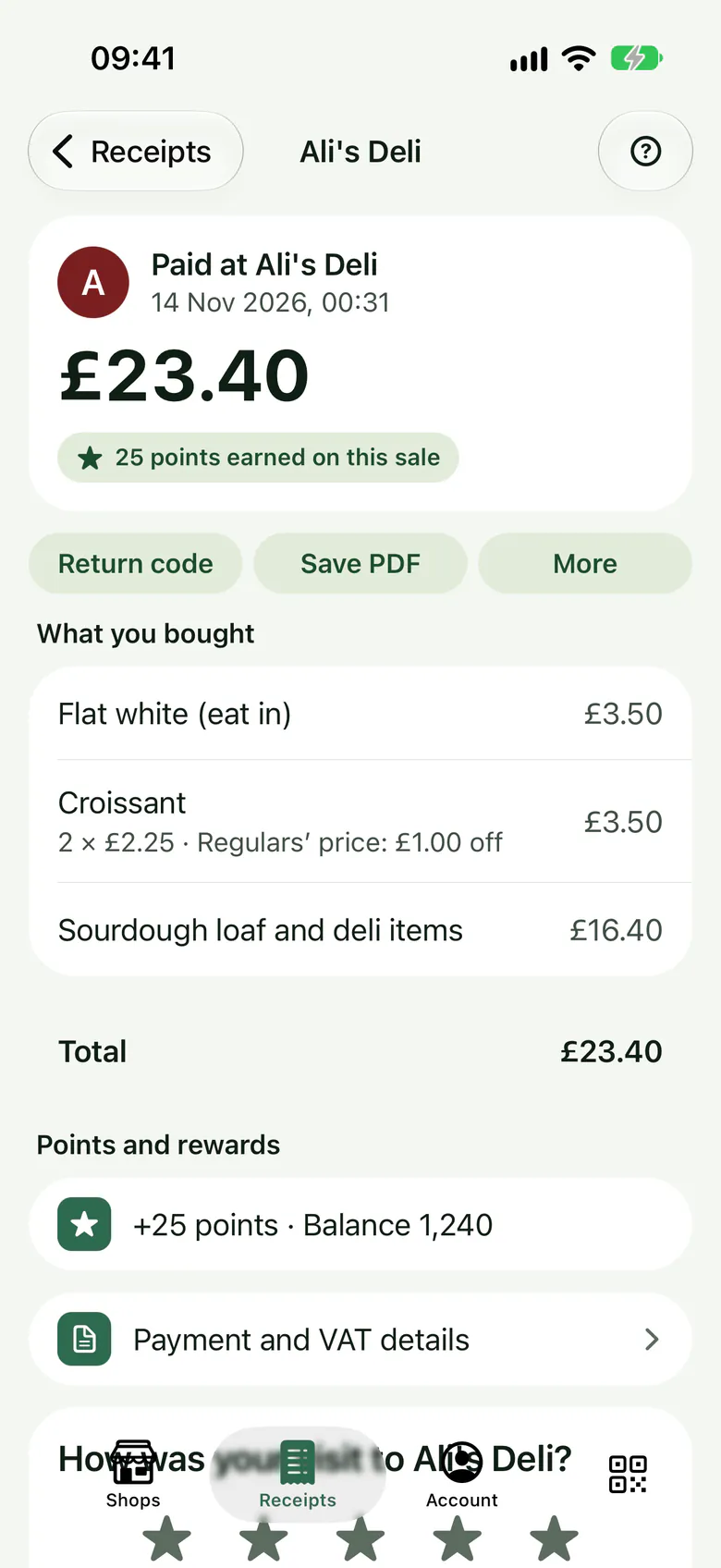
See Receipts in itsPass and What your shoppers see in itsPass.
Still stuck?
The itsPOS support team is here 08:00 to 20:00 every day except Christmas Day.
- Call or WhatsApp: +44 7488 880320
- Email: support@itspos.io
- In the back office: Help › Contact support, or go to app.itspos.io/help/contact after you sign in
- On our website: itspos.io/contact
Tell us your shop's name and what you were trying to do. A screenshot of the screen helps.