

Settings
Age checks: Challenge 25, refusals, tobacco from 2027 and age limits on categories
The till checks age for every product with an age limit, and keeps a record when a sale is refused. In the back office you choose how strict the check is, which categories have an age limit, and a manager signs off each week's refusals. Cashiers and supervisors see the result at the till (see Age-restricted sales and refusals).
For: Owners, Admins, Shop managers, Supervisors and Cashiers5 min read
Before you start
- Owners and Admins change these settings in Settings › Compliance. Shop managers can look, and sign off refusals.
- A product's age limit is set on the category (below) or on the product itself (see Legal flags on products). In the test shop, Utility Knife Break Off has 18 or over, Red Bull Energy Can 250ml 16 or over and Green Street Pale Ale 4.2% 500ml 18 or over.
Choose how the till checks age
Open Settings › Compliance. Under Age-restricted sales:
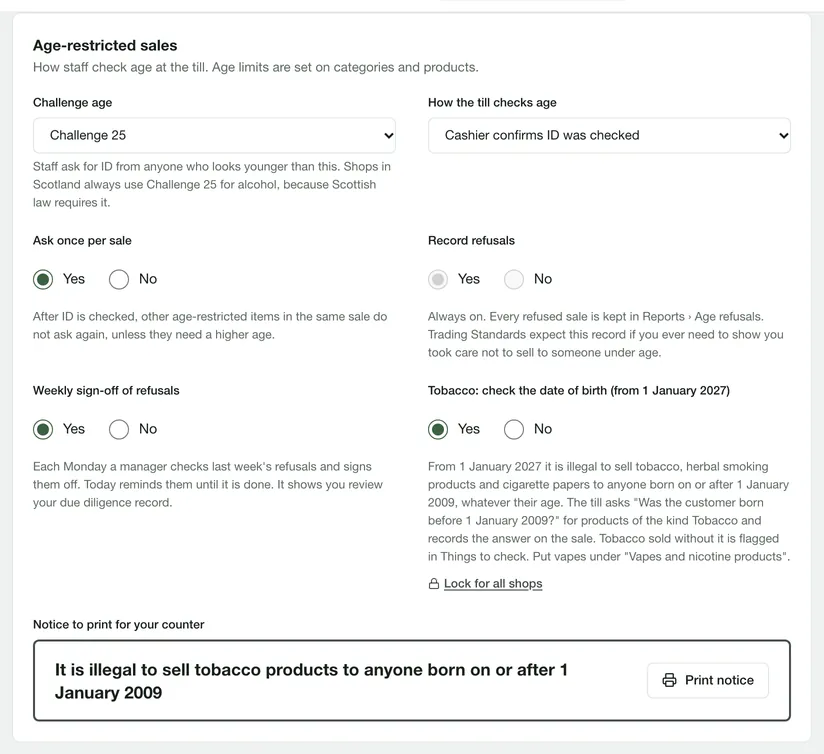
Age-restricted sales Challenge age: Challenge 25 (the default) or Challenge 21. Staff ask for ID from anyone who looks younger than this. Shops in Scotland always use Challenge 25 for alcohol, because Scottish law requires it.
How the till checks age: Cashier confirms ID was checked (the default), or Cashier types the date of birth from the ID and the till works out the age.
Ask once per sale: Yes (the default): after ID is checked, other age-restricted items in the same sale don't ask again, unless they need a higher age.
Press Review and publish. Review changes shows the old and the new value (Challenge 25, Challenge 21), "This affects 3 shops and 4 tills." and When should this start?: Now or At a set time. Add a note if you like and press Publish: "Published. Tills get this change within 1 minute."
Record refusals is always on: every refused sale is kept in Reports › Age refusals with the date, time, product, member of staff and reason. Trading Standards expect this record if you ever need to show you took care not to sell to someone under age. How long refusals are kept is in Settings › Customers and privacy (3 years by default, see Customers and privacy).
Give a whole category an age limit
- Scroll to Age limits on categories. "Products follow their category's age limit unless they have their own (Catalogue › Products). Changes reach tills within a minute."
- The list shows Only categories that look age-restricted or have a limit. Untick it to see every category, with Products, Age limit now and Change to.
- Under Change to, choose the limit, for example Alcohol: 18 or over, Tobacco (born before 1 Jan 2009): 18 or over, Vapes and nicotine products: 18 or over, Knives and blades: 18 or over, Fireworks: 18 or over, Solvents and lighter refills: 18 or over, Lottery and scratchcards: 18 or over, Energy drinks (voluntary): 16 or over, Painkillers (most 2 per sale), No age limit or Same as the parent category. Keep as it is leaves it.
- Press Save.
"Need a limit on one product only? Open it in Catalogue › Products." Painkillers (most 2 per sale) has no age limit: it stops the till selling more than 2 packs in one sale (the test shop's Anadin Paracetamol).
Sign off last week's refusals
Each Monday a manager checks last week's refusals at each shop and signs them off. The Today list reminds them until it's done (Weekly sign-off of refusals, on by default).
- Open Settings › Compliance › Refusals, or the reminder on the Today list.
- Each shop shows last week and how many refusals, for example "Atelier · Last week (9–15 Nov) · No refusals" and "Not signed off yet".
- Look at them with View the age refusals report.
- Press Sign off last week. "Last week's refusals are signed off." The shop shows "Signed off by" your name and the time.
A week can be signed off once, after it has ended.
Tobacco from 1 January 2027
From 1 January 2027 it's illegal to sell tobacco, herbal smoking products and cigarette papers to anyone born on or after 1 January 2009, whatever their age.
- Tobacco: check the date of birth (from 1 January 2027) is on by default. The till asks "Was the customer born before 1 January 2009?" for products of the kind Tobacco and records the answer on the sale. Tobacco sold without it is flagged in Sales › Things to check. Vapes go under "Vapes and nicotine products", not Tobacco.
- Notice to print for your counter: Print notice prints "It is illegal to sell tobacco products to anyone born on or after 1 January 2009" for your counter.
- Turning the check off asks first: "If you turn this off, the till won't check it. Your business is responsible for following the law." Press Keep it on unless you're sure.
What happens next
- At the till: every till asks for ID as you set it, within 1 minute and offline too. A cashier under 18 needs someone 18 or over to approve each alcohol line (see Age-restricted sales and refusals).
- Online store: a shopper buying an age-restricted product ticks that they're old enough at checkout, and staff see the age to check when the order is collected or delivered.
- Reports: Reports › Age refusals lists every refusal, and the sign-offs.
If something goes wrong
- The till doesn't ask for ID: check the product's age limit (on the product or its category) and that the till is online to take the change.
- Leith Larder asks Challenge 25 for alcohol although you chose Challenge 21: that's Scottish law; other products follow your choice.
Still stuck?
The itsPOS support team is here 08:00 to 20:00 every day except Christmas Day.
- Call or WhatsApp: +44 7488 880320
- Email: support@itspos.io
- In the back office: Help › Contact support, or go to app.itspos.io/help/contact after you sign in
- On our website: itspos.io/contact
Tell us your shop's name and what you were trying to do. A screenshot of the screen helps.