

Settings
Deposit return scheme: deposits on drinks in plastic bottles and cans
From 1 October 2027 shops in the UK charge a 20p deposit on drinks in plastic bottles and cans from 150 ml to 3 litres, and grocery shops take the empty containers back. itsPOS adds the deposit as its own line at the till and online, and pays it back when containers come back. Owners and Admins set it up in Settings › Compliance › Deposit return.
For: Owners and Admins4 min read
Before you start
- Register with the scheme and add your registration in Settings › Business details.
- Know which of your drinks are in the scheme. Milk bottles, cartons and pouches are not. In the test shop, Volvic Natural Mineral Water Pet 500ml, Coca-Cola Zero Sugar 500ml and the cans are.
Get ready
Open Settings › Compliance and scroll to Deposit return.
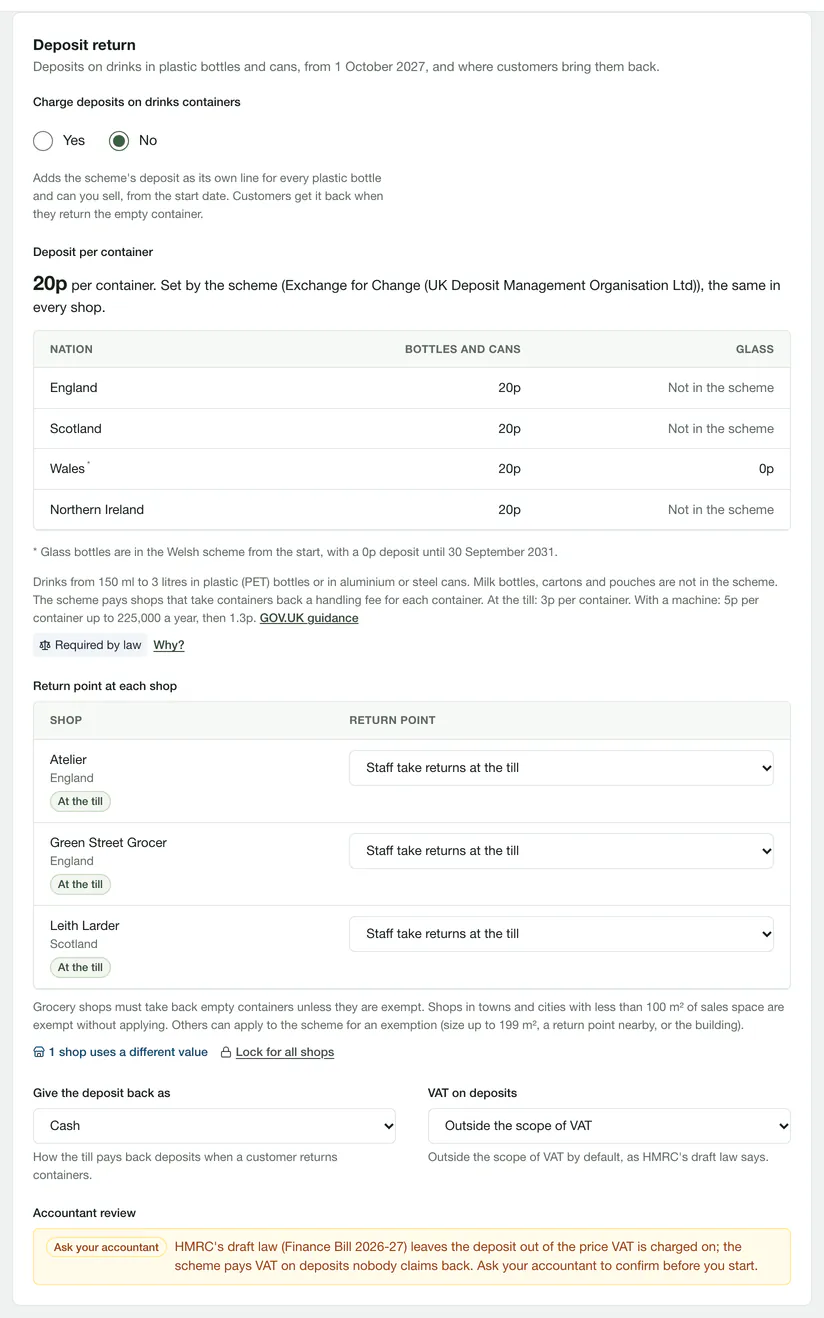
Deposit return Deposit per container shows the scheme's amounts: "20p per container. Set by the scheme (Exchange for Change (UK Deposit Management Organisation Ltd)), the same in every shop." Glass bottles are in the Welsh scheme only, with a 0p deposit until 30 September 2031. It's Required by law: you can't change it.
Return point at each shop: for each shop choose Staff take returns at the till (the default), Reverse vending machine or None (exempt), then Save: "Saved. Tills at this shop get it within a minute." A shop with None (exempt) needs Why this shop is exempt: Shop in a town or city with less than 100 m² of sales space, The scheme granted this shop an exemption or Not a grocery shop (no duty to take containers back).
Give the deposit back as: Cash (the default), Voucher or Card.
VAT on deposits: Outside the scope of VAT (the default, as HMRC's draft law says) or Same VAT as the drink. "Ask your accountant to confirm before you start."
Charge deposits on drinks containers: Yes. Then Start charging deposits on shows the date, 1 October 2027.
Products with a deposit shows how many products have one. To give a whole category its deposit, choose the Category, type Containers in each product (a 6-pack of cans holds 6 containers, so it charges 6 deposits), choose Made of and press Apply to the category. "Every product in the category and its subcategories gets this number. Enter 0 to take the deposit off." One product at a time is in Legal flags on products.
Press Review and publish, check the change ("This affects 3 shops and 4 tills.") and press Publish.
You can publish this long before the start: tills get the change early and start charging at midnight on the start date, even when offline. Changed your mind before publishing? Discard draft on the banner "This page has a draft that is not published yet".
What happens next
- At the till: from the start date, a drink with a deposit adds the deposit on its own line, on the till and the receipt. Container return pays deposits back the way you chose (see Deposits and container returns).
- Online store: the basket and checkout add deposits to drinks in the scheme.
- Deliveries: Drinks deposits on deliveries (on by default under Stock and suppliers) splits the deposit you pay the supplier from the cost, so it's not in the stock value or the VAT. Returnable crates and kegs between you and your suppliers are in Containers.
- Unit prices on labels and online leave out the deposit.
- Status: Settings › Compliance › Status shows "Deposit return scheme starts 1 October 2027: not set up yet" until you turn it on.
If something goes wrong
- Save is greyed out for a shop with None (exempt): choose Why this shop is exempt first.
- A drink doesn't charge a deposit: check its containers on the product, and that the start date has passed.
- The scheme pays you a handling fee for each container you take back (3p at the till, 5p with a machine up to 225,000 a year, then 1.3p). That comes from the scheme, not from itsPOS.
Still stuck?
The itsPOS support team is here 08:00 to 20:00 every day except Christmas Day.
- Call or WhatsApp: +44 7488 880320
- Email: support@itspos.io
- In the back office: Help › Contact support, or go to app.itspos.io/help/contact after you sign in
- On our website: itspos.io/contact
Tell us your shop's name and what you were trying to do. A screenshot of the screen helps.