

Settings
Compliance: the UK rules for your shops in one place
Settings › Compliance (UK) checks that your business meets the UK rules a shop has to follow: age checks, carrier bags, the deposit return scheme, stock and suppliers, weighed goods and unit prices. Owners and Admins change it; Shop managers and Accountants can look. Each rule is explained in its own article, linked below.
For: Owners and Admins7 min read
What this page is for
- One list of what's done and what still needs action, checked every day.
- The rules the till follows for age checks, bags, deposits, alcohol prices and offers.
- The records Trading Standards or the council may ask for: refusals, bag records, meat and beef intake.
Status
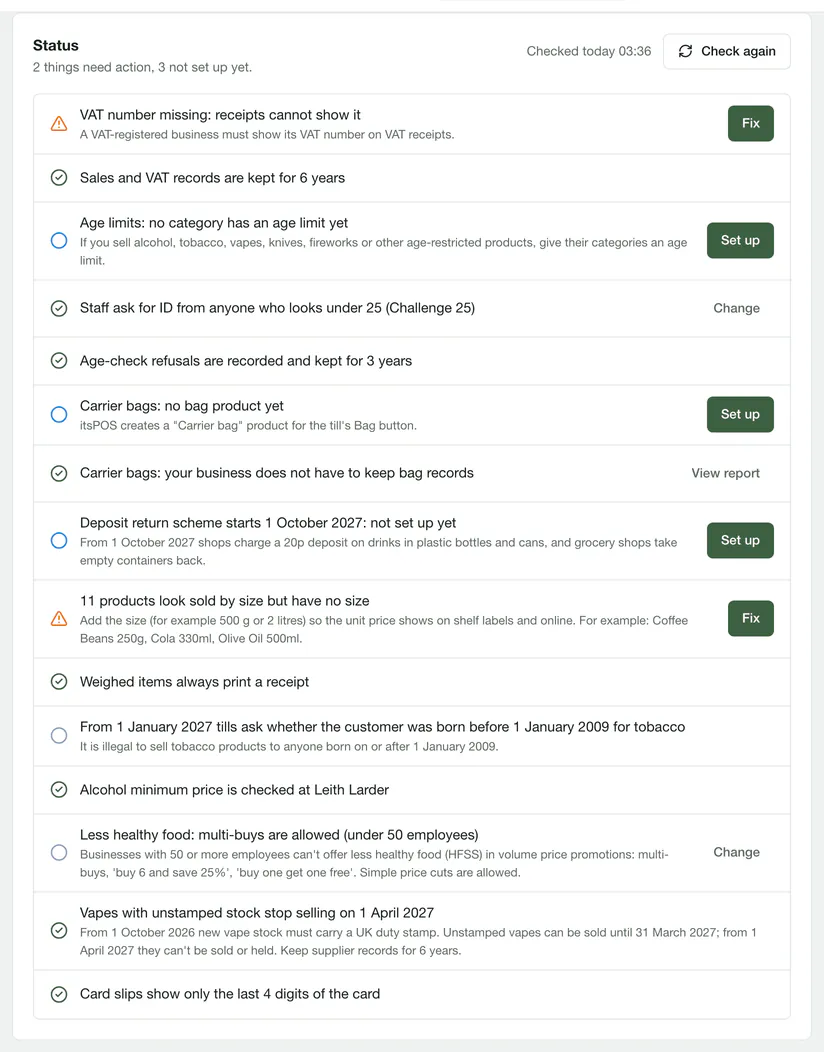
The Status card lists each rule for your business with a mark: done, needs action or not set up yet, for example "2 things need action, 3 not set up yet." Each line has a button that takes you to the fix: Fix, Set up, Change or View report. Examples from the test shop:
- "VAT number missing: receipts cannot show it" with Fix (Business details).
- "Age limits: no category has an age limit yet" with Set up (age limits on categories, below).
- "Carrier bags: no bag product yet" with Set up.
- "Deposit return scheme starts 1 October 2027: not set up yet" with Set up.
- "11 products look sold by size but have no size" with Fix.
- "Staff ask for ID from anyone who looks under 25 (Challenge 25)" with Change.
"Checked today 03:08" says when itsPOS last looked; Check again looks now.
Company and one shop
Company shows the values for the whole business. Shop: shows one shop's values. A few rules can differ per shop (the tobacco date of birth check, alcohol minimum price, offers on "no promotions" products, less healthy food and the deposit return point). Lock for all shops next to one of them stops shops having their own. View activity shows who changed what.
Legal locks and turning a check off
- A rule marked Required by law can't be changed. Why? gives the law and a GOV.UK link, for example "Goods sold by weight need a printed receipt showing the weight and price (Weights and Measures Act 1985)."
- Turning off a check the law expects asks first, for example "Turn off "Tobacco: check the date of birth (from 1 January 2027)"? If you turn this off, the till won't check it. Your business is responsible for following the law." with Keep it on and Turn off.
- Rules that change what happens at every till (Challenge age, how the till checks age, ask once per sale, the deposit return scheme, VAT on bags in Northern Ireland) go through Review and publish: you see the change, how many shops and tills it affects ("This affects 3 shops and 4 tills."), and choose Now or At a set time. Other rules save with Save changes.
The cards
| Card | What it holds | Article |
|---|---|---|
| Age-restricted sales | Challenge 25 or 21, how the till checks age, ask once per sale, refusals and their weekly sign-off, tobacco from 1 January 2027 and the counter notice | Age checks |
| Prices and promotions | Alcohol minimum price (Scotland and Wales), Leave out products marked "no promotions" (for example infant formula and tobacco), Less healthy food: no multi-buys for businesses with 50 or more employees | Below |
| Carrier bags | Bag charge, the bag product, the records each nation asks for, online deliveries | Carrier bags |
| Deposit return | Deposits on drinks in plastic bottles and cans from 1 October 2027, the return point at each shop, refunds and VAT | Deposit return scheme |
| Stock and suppliers | Vapes, alcohol suppliers' AWRS numbers, tobacco IDs on purchase orders, drinks deposits on deliveries, VAT on staff use, beef and meat intake records, trade traceability, certified claims | Below |
| Weighed goods and Unit prices | Receipts for weighed items, trade use of your tills' scales, unit prices per kg and litre | Weighed goods and unit prices |
| Age limits on categories and Refusals | Age limits for whole categories; the weekly sign-off | Age checks |
Prices and promotions
| Option | What it does | What staff or shoppers see | Also changes |
|---|---|---|---|
| Alcohol minimum price (Scotland and Wales) | On (default). Shops in Scotland and Wales can't sell a drink for less than 65p per unit of alcohol, after every discount. Set the alcohol strength and volume on each drink. Sales on a trade price list (prices without VAT) don't count | The till raises the price to the minimum and shows "Minimum price for alcohol" | Online store prices |
| Leave out products marked "no promotions" | On (default). Products with "Leave out of promotions and loyalty points" ticked never get discounts, multi-buys, coupons, staff discounts or loyalty points | No offer on those lines | Online store, points |
| Less healthy food: no multi-buys | On (default). When your business has 50 or more employees (Business details), products marked "Less healthy food (HFSS)" are left out of multi-buys and "buy one get one free" in England, Wales and Scotland. Simple price cuts still apply | No multi-buy on those lines | Online store |
Which products are which is set on each product: see Legal flags on products.
Stock and suppliers
Each can be turned off, "but your business is then responsible for following the law."
| Option | What it does |
|---|---|
| Vapes: stop unstamped stock from 1 April 2027 | On (default). Products marked "Needs a UK duty stamp" and "Still has unstamped stock" stop selling on the tills and online that day, even without internet. Deliveries of vapes ask whether every pack has a stamp. See Vapes |
| Single-use vapes are never sold | On (default). Products marked "Single-use (disposable) vape" can't be sold on the tills or online |
| Check alcohol suppliers' numbers | Warn (default), Block alcohol orders and deliveries or Off: orders and deliveries with alcohol warn when a supplier has no AWRS number or wasn't checked in the last 12 months |
| Print tobacco IDs on purchase orders | On (default). Purchase orders to suppliers marked "Supplies tobacco" show your Economic Operator ID and the shop's Facility ID |
| Drinks deposits on deliveries | On (default). From the deposit start date, deliveries split the deposit you pay the supplier from the cost |
| VAT on staff use | On (default). Stock recorded as "Staff use" adds VAT on its cost to your VAT return |
| Beef intake records on deliveries | On (default). Deliveries of beef ask for the supplier's reference, the slaughterhouse and the cutting plants |
| Kill date and slaughter details on meat deliveries | On (default). Deliveries of lamb, pork, poultry and other meat ask for the kill date and slaughter details. Labels print the origin and batch |
| Keep batches against trade customers | On (default). Trade customers are listed when you trace or recall a batch they bought |
| Claims need a valid certificate | On (default). Halal, Kosher, Organic, Free range and other claims show on labels, receipts, the tills and online only while a valid certificate backs them |
| Warn before certificates expire (days) | Certificates expiring within these days show on the Today list. 0 to 120, default 30 |
Allergens
There's no switch for allergens: each food product carries its own allergens and ingredients, and they print on labels and show online. See Food information and allergens.
Where it shows up
- Till: age checks, refusals, the Bag button, deposit lines, alcohol minimum prices and the "no promotions" and HFSS rules reach the tills within 1 minute and work offline.
- Online store: age confirmation at checkout, alcohol minimum prices, offers, deposits, bag charges on deliveries in England and unit prices.
- Labels: unit prices, claims and the origin of meat.
- Today list and reports: the weekly refusals sign-off, certificates expiring, Reports › Age refusals and Reports › Carrier bags.
Still stuck?
The itsPOS support team is here 08:00 to 20:00 every day except Christmas Day.
- Call or WhatsApp: +44 7488 880320
- Email: support@itspos.io
- In the back office: Help › Contact support, or go to app.itspos.io/help/contact after you sign in
- On our website: itspos.io/contact
Tell us your shop's name and what you were trying to do. A screenshot of the screen helps.