

Settings
Sign-in and security: signing out of the back office, badge and PIN approvals, two-step sign-in
Settings › Sign-in and security decides how long people stay signed in to the back office, whether a manager's badge also needs their PIN for bigger approvals at the till, and shows who has two-step sign-in. Owners and Admins change it; Shop managers can look.
For: Owners and Admins3 min read
What this page is for
- Sign people out of the back office on a shared computer after a quiet spell.
- Make big refunds, discounts and cash movements at the till need the manager's PIN as well as their badge.
- See who protects their sign-in with a passkey or an authenticator app.
What you see
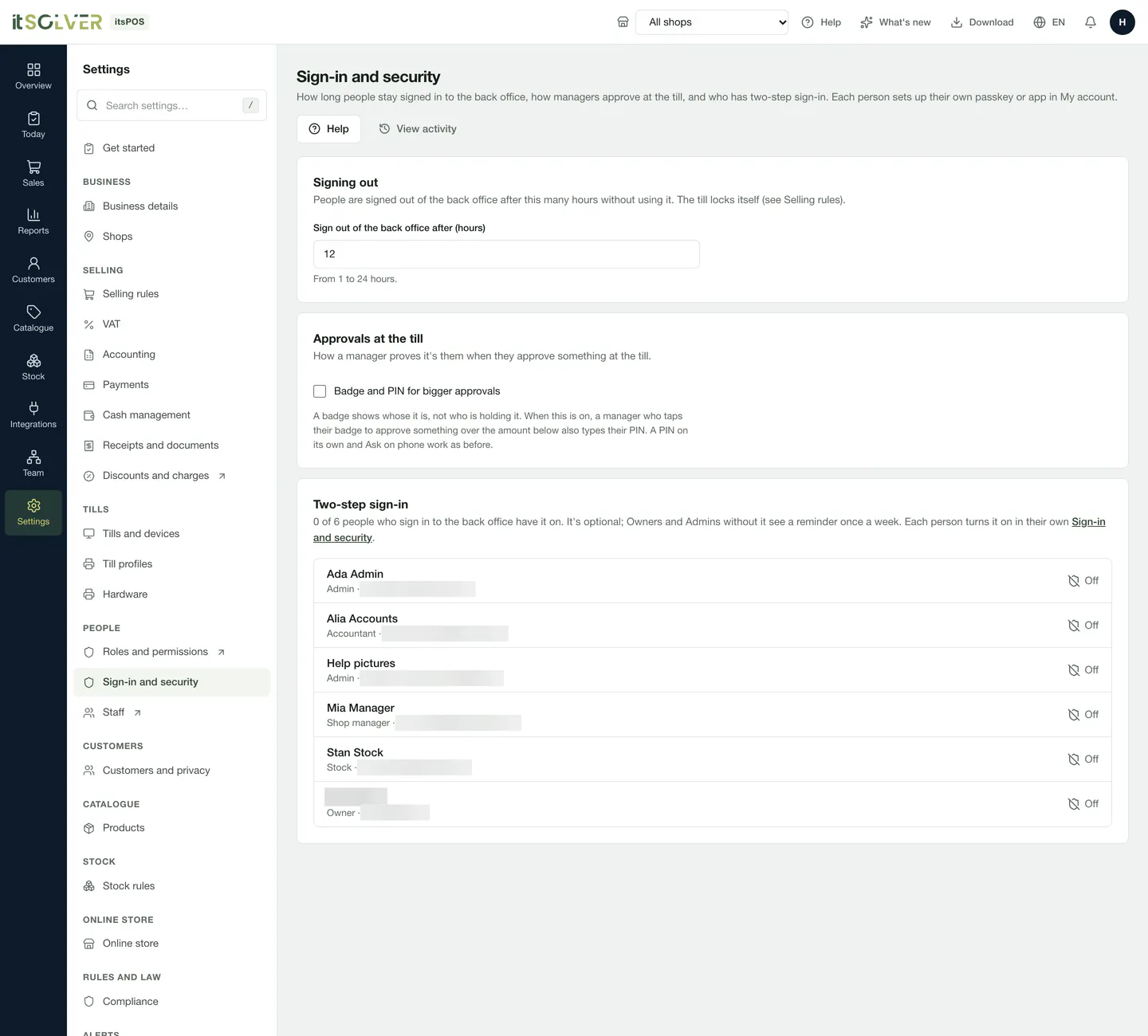
| Option | What it does | What staff see | Also changes |
|---|---|---|---|
| Sign out of the back office after (hours) | Hours without using the back office before someone is signed out, from 1 to 24. Default 12. The till doesn't use this: it locks itself after the minutes in Till profiles › Security | The sign-in page after the quiet spell | — |
| Badge and PIN for bigger approvals | Off (default). On: a manager who taps their badge to approve something over the amount below also types their PIN. "A badge shows whose it is, not who is holding it." A PIN on its own and Ask on phone work as before | The till asks for the PIN after the badge | — |
| Over this amount (£) | Shown when the switch is on. Default £50: "Refunds, discounts, price changes, removed items, cash in or out and cash differences over this amount." | — | — |
A value outside 1 to 24 hours isn't saved: "Sign out after must be between 1 and 24 hours." Press Save changes: "Saved. Tills get this change within 1 minute."
Badge and PIN at the till
- Turn on Badge and PIN for bigger approvals.
- Type the amount under Over this amount (£), for example 60.
- Press Save changes.
From the next approval, a manager approving a refund of £75 at the till taps their badge, then types their PIN. Under the amount, the badge alone still approves. "Tills need the latest update for this. Until a till has it, a badge still approves on its own there." Pairing badges is in PINs and badges; approvals at the till are in "Manager approvals at the till: every rule and who can do it" in Help.
Two-step sign-in
The card lists everyone who signs in to the back office with their role and On or Off, for example "0 of 6 people who sign in to the back office have it on." It's optional; Owners and Admins without it see a reminder once a week. Each person turns it on for themselves (passkey or authenticator app): see Signing in.
Where it shows up
- Back office: everyone is signed out after the hours you choose without using it.
- Till: the badge and PIN rule reaches every till within 1 minute. The till locks itself after the minutes in your till profile (see Till profiles).
- Activity: every change is in Team › Activity with who made it.
Still stuck?
The itsPOS support team is here 08:00 to 20:00 every day except Christmas Day.
- Call or WhatsApp: +44 7488 880320
- Email: support@itspos.io
- In the back office: Help › Contact support, or go to app.itspos.io/help/contact after you sign in
- On our website: itspos.io/contact
Tell us your shop's name and what you were trying to do. A screenshot of the screen helps.