

Settings
Design your receipt, gift receipt, VAT invoice and A4 invoice
Settings › Receipts and documents sets what prints on each kind of receipt, block by block, and shows it exactly as your tills print it. "Design each receipt once and see it exactly as your tills print it."
For: Owners, Admins and Shop managers7 min read
- Who: Owners and Admins change the business's receipts. Shop managers can change their shops' receipts as a draft; an owner or admin publishes it.
- Company or Shop: at the top: a shop can have its own text, logo and policy.
- Every change is a draft until you publish it: "Tills keep printing the old receipt until the changes are published."
The kinds of receipt
| Tab | What it is |
|---|---|
| Sale receipt | "Printed after every sale. Refund receipts use it too, with a "Refund" heading." |
| Gift receipt | "No prices. The customer can still bring the item back with it." |
| VAT invoice | "A full VAT invoice from the till, with the customer's name and address and the VAT on each line." |
| A4 invoice | "For trade and account customers: a PDF to download or email from Sales › Sales history." |
| Email receipt | "Sent when the customer asks for a receipt by email." |
Each block has its own text size: Small, Normal or Large. Options marked Required by law or Always printed can't be turned off; Why? says why.
Header
| Option | Default | What it prints |
|---|---|---|
| Logo | On | Your logo from Business details, in black and white. Nothing prints without a logo. Logo size Small, Normal or Large |
| Trading name and shop address | Required by law | Your trading name, the shop's name and address |
| Phone | On | The shop's phone, else the business's |
| Off | The shop's email, else the business's | |
| Website | On | Your website from Business details |
| Company number | Off | "Company No 01234567" |
| VAT number | On | "VAT No …", only when you are VAT registered |
| Text above the items | Empty | "Up to 200 characters, for example "Open 7 days"." |
Sale details
| Option | Default | What it prints |
|---|---|---|
| Receipt number, date and time | Required by law | For example "Receipt MAI11-000143 12/11/2026 10:42" |
| Till name and Till code after the till name | On | For example "Till 1 (MAI11)" |
| Served by | First name | Full name or Off |
| Customer name | Off | Masked ("J. Sm•••") when Customers and privacy says so |
Items
| Option | Default | What it prints |
|---|---|---|
| Product name, quantity, price and line total | Required by law | Each line |
| VAT letter on each line | On | S, R, Z or E next to each line |
| Weight and price per kg on weighed items | Required by law | For example "0.812 kg @ £1.20/kg" |
| Discount under the item | On | The discount on its own line |
| Line notes | On | Notes staff added, for example "Gift wrap" |
| Product barcode | Off | The barcode under each item |
| Batch and expiry | Off | The batch and date sold |
| Warranty under the item | On | "Warranty: 2 years, until 8 Nov 2028", for products with a warranty |
| Serial number under the item | On | "Serial: SN-20391", for products that record one |
| "Not returnable" under the item | On | For products marked "Can't be returned" |
| Deposit as its own line | On | Container deposits |
| Item order | As scanned | Or A to Z |
Totals and VAT
Subtotal, Discounts total, Number of items, "You saved", Total (Required by law), VAT summary by rate (net, VAT, total) (Always printed) and Rounding line ("Printed only when cash rounding is used."), all on unless you turn them off. The VAT lines print only when your business is VAT registered and has a VAT number.
Payments
How the customer paid, and cashback (Always printed), Cash given and change, Card details from the card machine (Always printed: only the last 4 card digits) and Loyalty points and gift card balance.
Invoice (A4 invoice only)
Bank details ("From Business details, for customers who pay by bank transfer.") and More payment terms (optional), up to 1,000 characters. When something is still owed, the invoice says "Payment due within 14 days of the invoice date" from your trade payment terms.
Footer
| Option | Default | What it prints |
|---|---|---|
| Returns policy | On | The policy from Returns rules |
| Message | "Thank you for shopping with us" | Up to 300 characters |
| QR code | Off | Link to your digital receipt, Our offers (see Our offers QR on receipts), Link to a review page or Your own link, with QR code size |
| Receipt barcode for returns | On | "Staff scan it to find the sale for a refund." |
Preview, test print and publish
- Change what you need, for example Message to "Thank you for shopping at Green Street Grocer".
- Check Preview: choose 58 mm, 80 mm or Email, and a Sample such as Mixed VAT basket, Weighed item, Refund or VAT invoice over £250. It is exactly what the till prints.
- Press Save as draft. The page says "Changes to Sale receipt. Tills keep printing the old receipt until the changes are published."
- Under Send a test print to, choose a till that is on and press Test print: "Prints your draft, marked "TEST – NOT A RECEIPT"."
- Press Review and publish, choose Now or At a set time, and Publish. Or Discard draft.
Also about receipts
"These settings change what the till prints too. Each lives with the rule it belongs to."
- Selling rules › Print a receipt: whether the till prints after each sale. See Selling rules.
- Customers and privacy: customer names on receipts, email receipts, the Join itsPass QR and paper receipts for members. See Paper receipts for members and the join QR on receipts.
- Card machine › Card slips: the card machine's own customer and shop copies.
- Cash management › Z and X reports: see Cash management.
- Till profiles › Receipt and Printer: show the receipt first, the layout, the printer, copies and paper.
- Business details and Shops: the name, address, logo and VAT number at the top. See Business details.
Where it shows up
The till's printed receipts, email receipts, the digital receipt link and the receipt itsPass members see all use the same design. A4 invoices download from Sales › Sales history: see A4 invoices, credit notes and digital receipt links.
Scenario: a boutique's gift receipts and warranties
Atelier sells a Classic leather-strap watch with a 2-year warranty and a serial number. On the Gift receipt tab its prices are hidden; Warranty under the item and Serial number under the item stay on, so the gift receipt shows "Warranty: 2 years, until 19 Nov 2028" and the serial, and the customer can still bring it back with the receipt barcode.
The receipt in itsPass
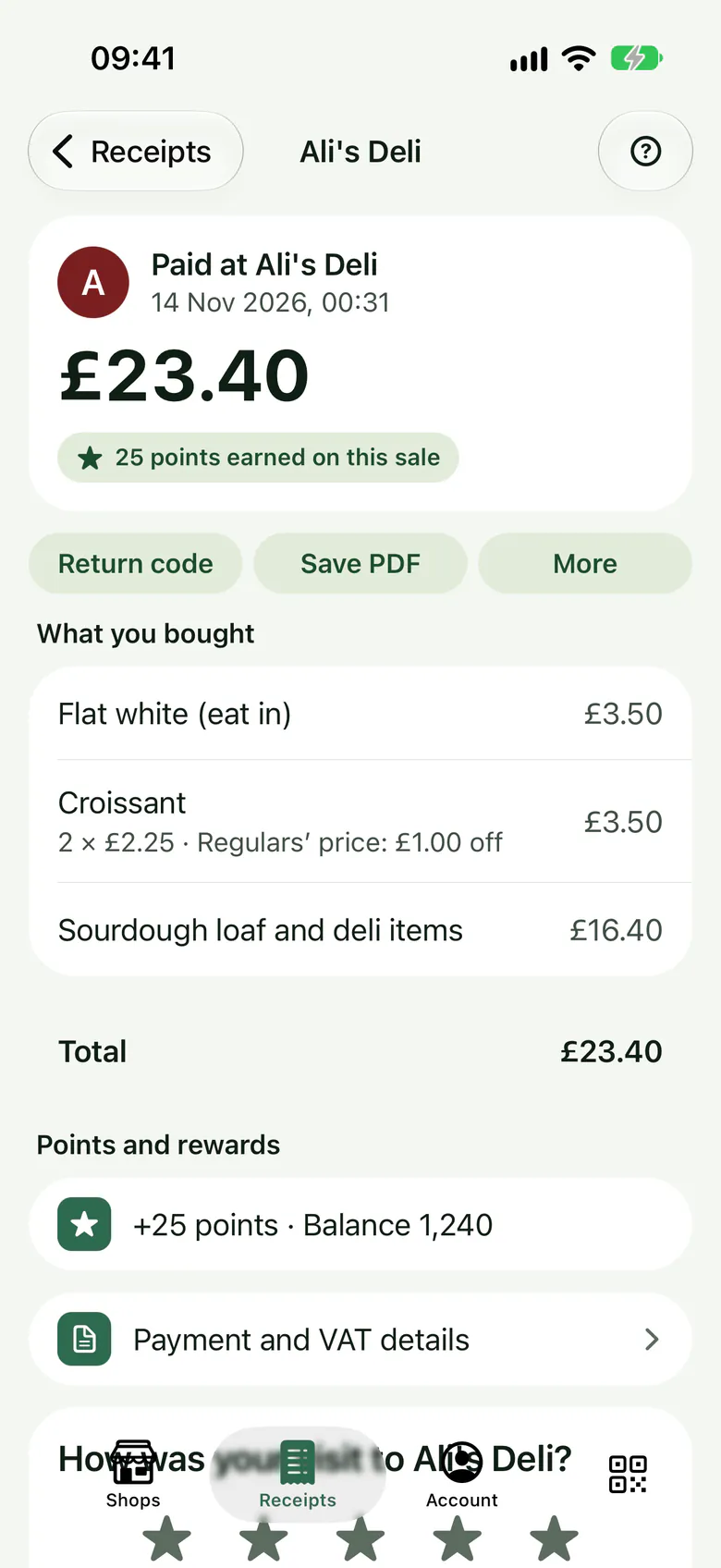
A member's receipt in the itsPass Receipts tab shows the same lines as your printed receipt: Paid at your shop, the total and points, What you bought and savings, with Payment and VAT details for how they paid, VAT and your VAT number. Your receipt lines are never translated. Members can show a Return code at the till, save a PDF, or ask for a full VAT invoice. See Receipts in itsPass.
Still stuck?
The itsPOS support team is here 08:00 to 20:00 every day except Christmas Day.
- Call or WhatsApp: +44 7488 880320
- Email: support@itspos.io
- In the back office: Help › Contact support, or go to app.itspos.io/help/contact after you sign in
- On our website: itspos.io/contact
Tell us your shop's name and what you were trying to do. A screenshot of the screen helps.