

Settings
Customers and privacy: what the till shows, receipts for itsPass members and how long you keep details
Settings › Customers and privacy decides how much of a customer the till shows, how customers agree to offers, what the till prints for itsPass members, and how long itsPOS keeps people's details before removing them for you. Owners and Admins change it; Shop managers can look. Press Save changes: "Saved. Tills get this change within 1 minute."
For: Owners and Admins5 min read
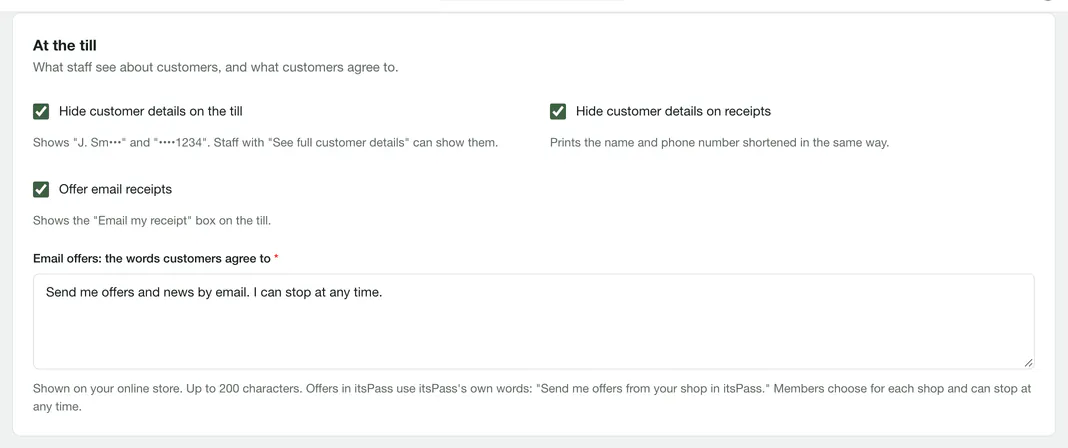
At the till
| Option | What it does | What staff or shoppers see | Also changes |
|---|---|---|---|
| Hide customer details on the till | On (default): names show as "J. Sm•••" and phone numbers as "••••1234" | The customer on the sale, shortened. Staff with "See full customer details" can show them | — |
| Hide customer details on receipts | On (default): receipts print the name and phone number shortened in the same way | Printed receipts | — |
| Offer email receipts | On (default): the till shows the "Email my receipt" box | Email my receipt on the till | Sent emails |
| Email offers: the words customers agree to | Required, up to 200 characters. Default "Send me offers and news by email. I can stop at any time." Shown on your online store | Customers tick it themselves on the online store | Who may get offer emails |
Offers in itsPass use itsPass's own words: "Send me offers from your shop in itsPass." Members choose for each shop and can stop at any time. Leaving the consent words empty isn't saved.
Receipts for itsPass members
| Option | What it does | What staff or shoppers see | Also changes |
|---|---|---|---|
| Print a Join itsPass QR on receipts of customers who aren't members | On (default). Scanning it joins your shop in itsPass and adds the sale and its points, up to 30 days after the sale | A QR code at the foot of the receipt | Customers › Store materials › Receipt footer shows how it looks |
| Don't print receipts for members who chose No paper receipts | On (default). The receipt goes to their itsPass app instead | The till says "Receipt sent to itsPass"; staff can still print one | Receipts in itsPass |
| Always print these, even for members with no paper receipts | Gift receipts, Items with a warranty or serial number, Refunds and exchanges, Collection slips for orders and deposits, Full VAT invoices: all ticked by default. Untick anything you don't need on paper | Paper for those, even for paperless members | — |
More on paperless members: Paperless receipts for itsPass members.
Keeping data
"itsPOS removes old personal details for you every night. Tills keep only members and trade accounts active in the last 24 months."
| Option | What it does | Default |
|---|---|---|
| Remove the details of customers who have not bought anything for | 1 year, 2 years, 3 years, 6 years or Never. Sales are kept; the name, email and phone are removed. Online shopper accounts are included | 3 years |
| Delete email addresses used only for receipts after | 6 months to 6 years: addresses typed in just to send a receipt are removed from the email log | 2 years |
| Keep age-check refusals for | 1 to 6 years: refusal records are deleted after this time | 3 years |
| Remove guest order contacts and delivery addresses after | 1 to 6 years, counted from when an online order without a customer account is finished or cancelled. The order and its amounts stay | 2 years |
| Remove the contact details on special orders and pre-orders after | 1 to 6 years, counted from collection or cancellation. The order and its amounts stay | 2 years |
| When a member leaves your shop | Remove their details after 30 days, or Keep them while they bought something in the last customer period. Details are kept while money is owed either way. A member who deletes their itsPass is removed straight away, or as soon as nothing is owed | Remove after 30 days |
| Keep sales and VAT records for | 6 years, "Required by law" (locked): "The law requires 6 years. Sales are never deleted sooner. Names and addresses on VAT invoices and gift records are removed after this time." | 6 years |
Changing how long you keep data asks first, for example "Save these changes? No customers will have their personal details removed tonight. Their sales stay in your reports." with Cancel and Save. When a shorter time would remove details tonight, it says how many, for example "About 12 customers will have their personal details removed tonight." Press Cancel if that's not what you meant.
What isn't on this page
- Deleting one customer's details when they ask: see "Customer privacy: consent history, data requests and removing details" in Help.
- Staff members' data: see Staff privacy.
Where it shows up
- Till: hiding details, email receipts, the Join itsPass QR and paperless receipts reach the tills within 1 minute.
- Online store: the consent words show where shoppers sign up for offer emails.
- itsPass: paperless members find the receipt in their itsPass app.
- Every night: itsPOS removes the details that are older than you chose, and keeps the sales.
Still stuck?
The itsPOS support team is here 08:00 to 20:00 every day except Christmas Day.
- Call or WhatsApp: +44 7488 880320
- Email: support@itspos.io
- In the back office: Help › Contact support, or go to app.itspos.io/help/contact after you sign in
- On our website: itspos.io/contact
Tell us your shop's name and what you were trying to do. A screenshot of the screen helps.