

Customers and itsPass
Paper receipts for members and the join QR on receipts
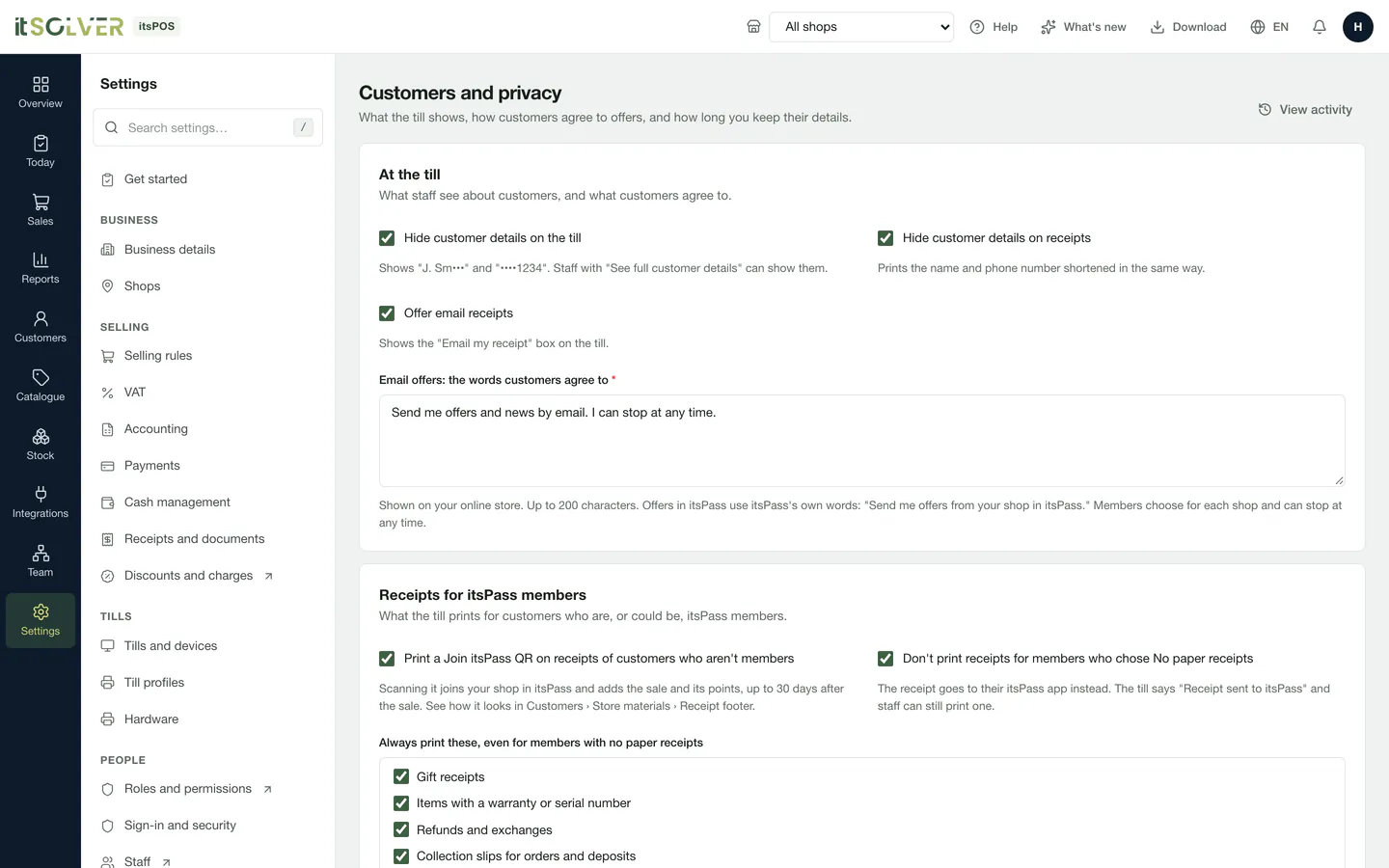
Members who choose no paper receipts get their receipt in itsPass instead, and people who aren't members can join from a QR on their receipt and still get that sale's points. Both are set in Settings › Customers and privacy, under Receipts for itsPass members.
For: Owners, Admins and Shop managers3 min read
Who can change it
Owners and Admins change these; Shop managers can see them. Press Save changes: "Saved. Tills get this change within 1 minute." The settings are for your whole business.
Receipts for itsPass members
| Option | What it does | What staff or shoppers see | Also changes |
|---|---|---|---|
| Print a Join itsPass QR on receipts of customers who aren't members (on to start with) | "Scanning it joins your shop in itsPass and adds the sale and its points, up to 30 days after the sale." | A QR at the foot of the receipt when no member is on the sale. Each QR is for that one sale | How it looks: Customers › Store materials › "Receipt footer" (80 mm and 58 mm). Off: no QR, and the shopper can't claim that sale's points later |
| Don't print receipts for members who chose No paper receipts (on to start with) | "The receipt goes to their itsPass app instead." | The till says "Receipt sent to itsPass" and staff can still tap Print anyway. The member panel shows No paper receipts | Off: the till prints for everyone, as before. The receipt is in itsPass either way |
| Always print these, even for members with no paper receipts (all 5 ticked to start with) | Paper that prints even for a paperless member: Gift receipts, Items with a warranty or serial number, Refunds and exchanges, Collection slips for orders and deposits and Full VAT invoices. "Untick anything you don't need on paper." | The till prints those as usual | Unticked ones go to itsPass only for paperless members |
The receipt itself (what's on it, the footer, the logo) is set in Settings › Receipts and documents. Its footer QR there is a different QR, for example your offers page. See Our offers QR on receipts.
What happens at the till
- A member who chose No paper receipts: after Pay the till says "Receipt sent to itsPass". If they want paper after all, tap Print anyway.
- Someone who isn't a member: their receipt prints with the Join itsPass QR. If they join within 30 days by scanning it, the sale and its points are added to their new membership.
- Offline: the till still prints the QR; the sale is matched when it reaches itsPOS.
See Receipts for everything else the till prints.
What shoppers see
- A member chooses paper or no paper in itsPass: No paper receipts for every shop in Account › Privacy and your data, or No paper receipts at your shop in your shop's Choices. "Your receipt comes to itsPass instead."
- Their receipt is in the Receipts tab within moments of the sale, with "No paper was printed for this sale. This is your receipt."
- A non-member who scans the Join itsPass QR on their receipt sees Save this receipt to itsPass, with the sale's points, and joins and saves in one go.
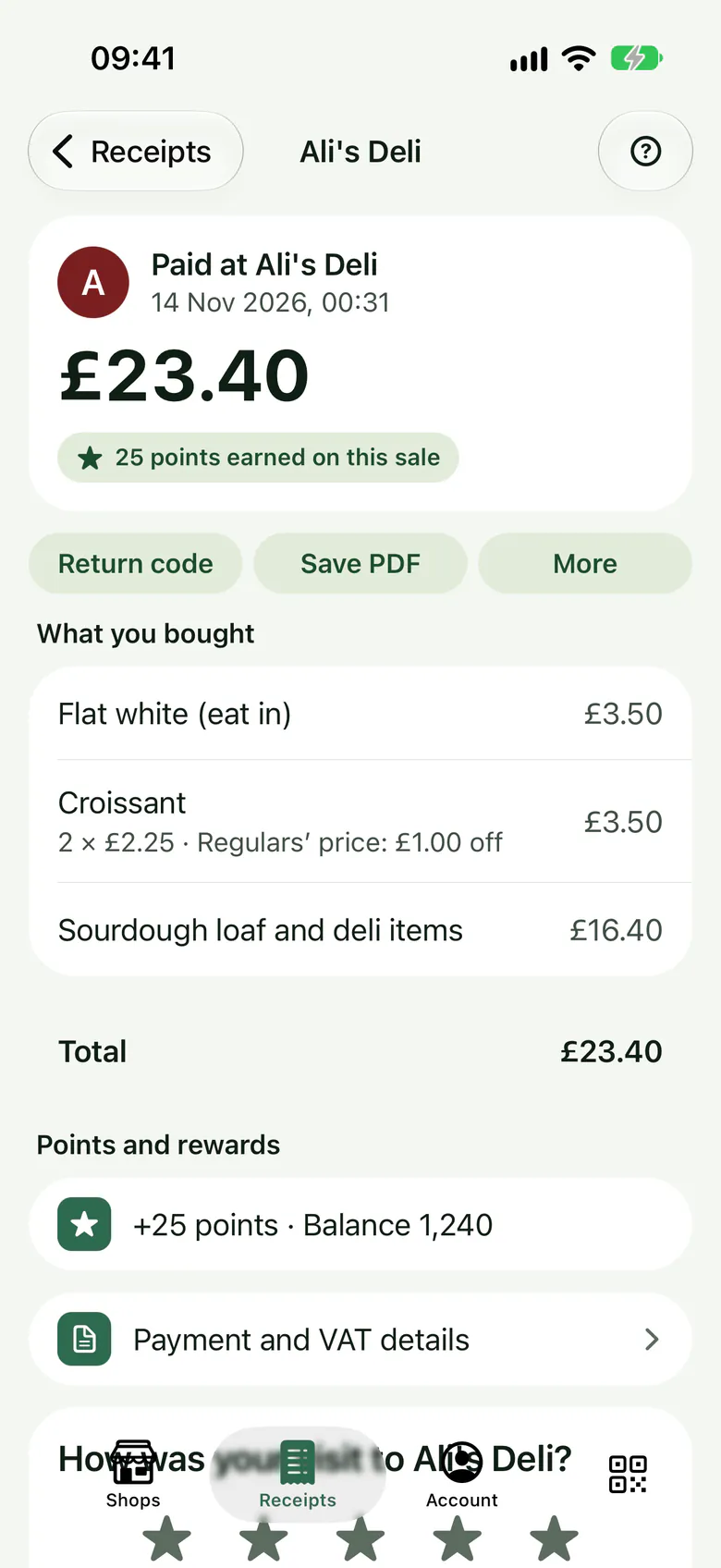
See Receipts in itsPass: return codes, PDFs and VAT invoices.
Still stuck?
The itsPOS support team is here 08:00 to 20:00 every day except Christmas Day.
- Call or WhatsApp: +44 7488 880320
- Email: support@itspos.io
- In the back office: Help › Contact support, or go to app.itspos.io/help/contact after you sign in
- On our website: itspos.io/contact
Tell us your shop's name and what you were trying to do. A screenshot of the screen helps.