

Online store
Analytics and AI crawlers
Two cards on Settings › Online store › Store settings decide who reads your store besides shoppers: your own website analytics, and AI bots.
For: Owners and AdminsOn some plans2 min read
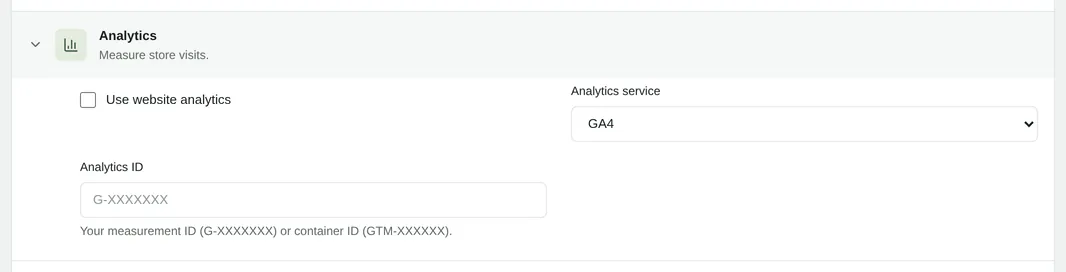
Analytics
| Option | What it does | Also changes |
|---|---|---|
| Use website analytics | Off by default. On adds your analytics to every page of the store | Shoppers see a cookie question before anything is measured |
| Analytics service | GA4 (Google Analytics 4) or Tag Manager | — |
| Analytics ID | Your measurement ID (G-XXXXXXX) or container ID (GTM-XXXXXX), from your Google account | Saving refuses an ID in the wrong shape: "Enter a valid GA4 ID, for example G-XXXXXXX" |
itsPOS doesn't see or keep your analytics. Your own privacy notice should say you use them (Information pages).
AI crawlers
| Choice | What it does |
|---|---|
| Allow AI search assistants, block AI training crawlers (default) | AI search assistants such as ChatGPT search and Perplexity may read your store, show your products to people and link back to you. Bots that copy pages to train AI models are told no |
| Allow all AI bots | Both kinds may read your store |
| Block all AI bots | Neither may |
Search engines such as Google and Bing are always allowed. "Changes reach your store within an hour."
How it works
Every website has a file called robots.txt that tells bots what they may read; yours is written by itsPOS from this setting. It also keeps bots out of baskets, checkout, accounts and order pages. Well-behaved bots follow it; it can't stop a bot that ignores the rules, and your store also limits how fast any visitor can read pages.
Search engines
Search engines read your products' titles, descriptions, prices and photos. To help them:
- give products a clear Online title and Online description, and a SEO title and SEO description if you want different words in search results (Putting products online);
- use a main photo at least 500 × 500 pixels: the product's Online store card warns "Photo too small for Google" when it isn't.
Your store also lists every product for search engines in its sitemap at your store's address followed by /sitemap.xml.
While your business is on a trial, search engines don't list your store yet. Store settings says: "Search engines such as Google list your online store once your plan starts. Shoppers can still visit your store and order." Once your plan starts, search engines can find it by themselves, on your store address and your own domain; nothing to do.
Still stuck?
The itsPOS support team is here 08:00 to 20:00 every day except Christmas Day.
- Call or WhatsApp: +44 7488 880320
- Email: support@itspos.io
- In the back office: Help › Contact support, or go to app.itspos.io/help/contact after you sign in
- On our website: itspos.io/contact
Tell us your shop's name and what you were trying to do. A screenshot of the screen helps.