

Online store
Your online store: how it works
Your itsPOS online store is a shop on the web that sells the same products, at the prices and with the stock you already keep in itsPOS. There is nothing to build or install: you choose what goes online and how it looks, and itsPOS keeps it up to date.
For: Owners, Admins and Shop managersOn some plans3 min read
Where it lives
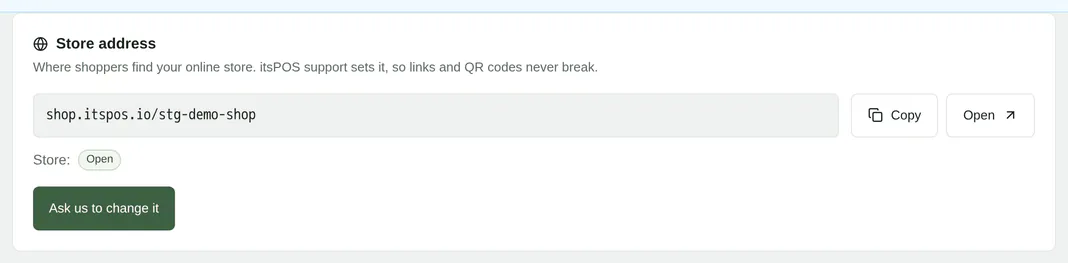
Every business has a store address such as shop.itspos.io/alis-deli, made from your shop's name. It is on Settings › Online store › Store settings in the Store address card, with Copy and Open. You can also use your own domain, such as shop.yourbrand.co.uk: see Your store address and Use your own domain.
What comes from itsPOS
| Your store shows | It comes from |
|---|---|
| Products | Every product with Sell online ticked (Putting products online) |
| Aisles and menus | Your categories with Show online ticked; the header shows up to five aisles and All products |
| Prices and offers | The Online price list (or your standard prices), promotions you allow online, and prices for itsPass members' groups (Prices online) |
| Stock | What one shop can sell, live, after what you keep back for the shop (Stock online) |
| Logo, colours, contact details and hours | Settings › Business details and the main shop you choose |
| Delivery and click and collect | Settings › Online store › Delivery and collection (Delivery and collection) |
| Orders | Sales › Online orders, and the till for click and collect (Online orders) |
A change in the back office reaches your store within about a minute. Stock changes show straight away.
What shoppers can do
Shoppers browse your aisles, search, filter by brand, allergens and price, add to the basket, choose delivery or click and collect, and pay. They can check out as a guest or Continue with itsPass to earn points and see their orders. After ordering they follow the order on its own page, and can cancel or return items there within the law's 14 days. See What shoppers see.
What is live today
- Browsing, baskets, delivery and collection choices, guest checkout and itsPass sign-in work.
- Live online card payments open soon. They go through online card payments (see "Online card payments" in Help) and open once your card payment partner has confirmed the set-up in writing. Until then shoppers see "This shop isn't taking online payments yet." at checkout, and no order can be placed.
- The online store doesn't take gift cards or pre-orders yet.
The sample store
To see a finished store before you build yours, open the sample store at shop.itspos.io/demo. Its products, prices and orders are made up, and nothing you do there is kept.
Who can do what
- Owners and Admins change Store settings, Delivery and collection and Store domain, and ask us to change the store address.
- Shop managers see the store settings and handle online orders for their shops: pick, pack, hand over, send, hold and refund.
- Supervisors and Cashiers hand over click and collect orders at the till.
Still stuck?
The itsPOS support team is here 08:00 to 20:00 every day except Christmas Day.
- Call or WhatsApp: +44 7488 880320
- Email: support@itspos.io
- In the back office: Help › Contact support, or go to app.itspos.io/help/contact after you sign in
- On our website: itspos.io/contact
Tell us your shop's name and what you were trying to do. A screenshot of the screen helps.