

Online store
Emails your shoppers get about their orders
itsPOS emails shoppers at each step of their online order, in your shop's name, with replies going to your shop's email address. You don't write or send them: each step you take sends the right one.
For: Owners, Admins and Shop managersOn some plans2 min read
The shopper's emails
| Sent when | Subject, for example | |
|---|---|---|
| Order confirmation | They pay | "Your Green Street Grocer order WEB-000102" |
| Being prepared | You press Accept and pick | "We're preparing your … order WEB-000102" |
| Ready to collect | You press Mark ready to collect | "Your … order WEB-000102 is ready to collect" |
| On its way | You press Mark sent, with the carrier and tracking number | "Your … order WEB-000104 is on its way" |
| Delivered | You press Mark delivered | "Your … order WEB-000103 has been delivered" |
| Collected | It is handed over at the till or you press Mark collected | "Thank you for collecting your … order WEB-000102" |
| Cancelled | You or the shopper cancel it, with your reason | "Your … order WEB-000107 has been cancelled" |
| Refund | A refund goes through | "Refund of £2.50 for your … order WEB-000108" |
| Return asked for, Return closed | The shopper asks to return items; you close a return | "Your return for … order WEB-000103" |
Each email has the order number and a link to the shopper's order page, where they can follow it and cancel or return items. Packing and holding an order send nothing.
The email for your staff
New online order ("New online order WEB-000110: £5.49") goes to the people who chose it, so someone starts picking. Each person chooses in My notifications; Owners and Admins set the defaults for new staff in Settings › Notifications.
See what was sent
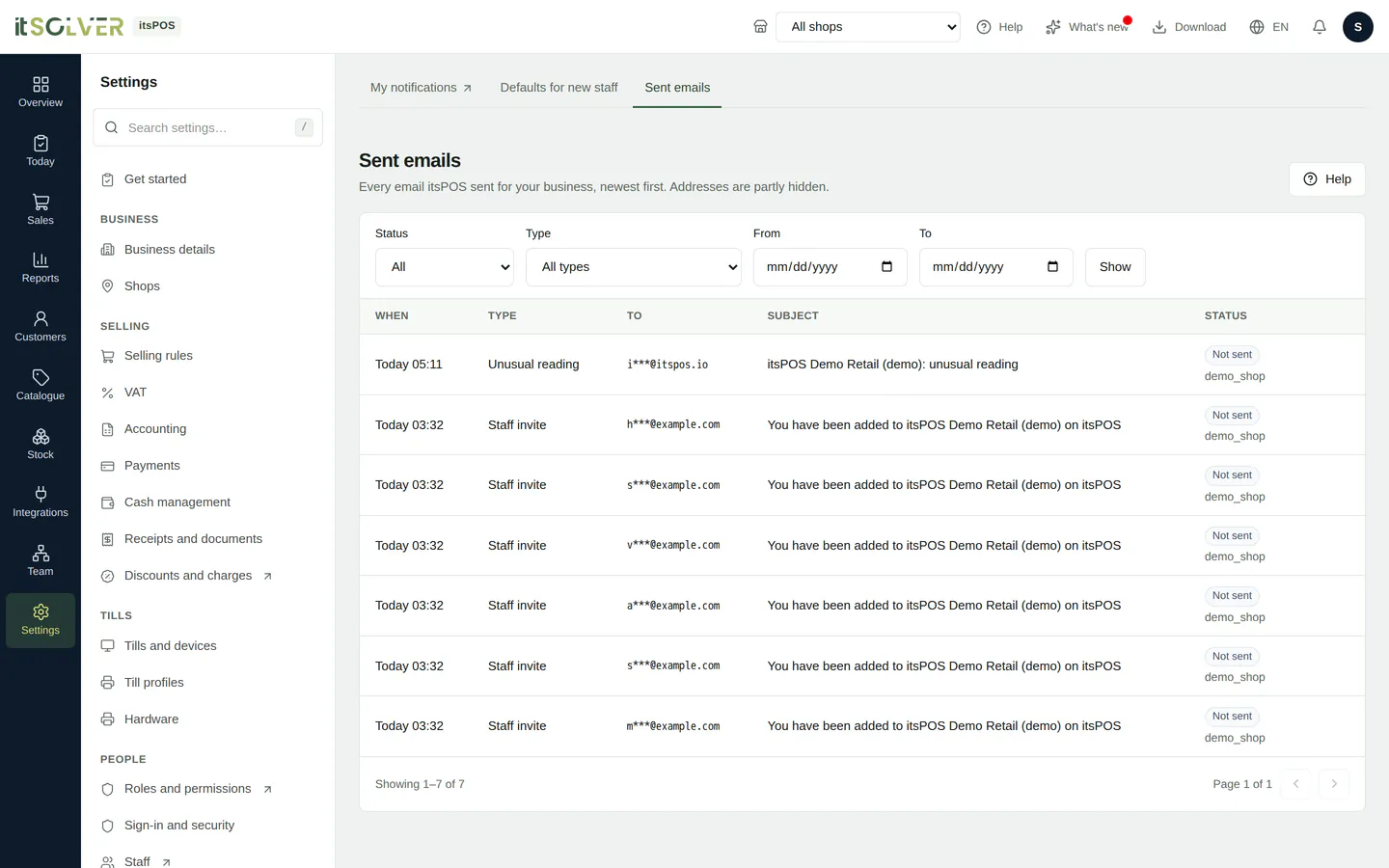
Settings › Sent emails lists every email itsPOS sent for your business, with the type, the masked address, the subject and Sent or why it wasn't sent. Choose a type such as "Online order confirmation" to see only those.
If something goes wrong
- A shopper didn't get an email: check Settings › Sent emails. If it says Sent, ask them to look in junk mail. If it failed, press Send again.
- A shopper typed the wrong email address: their order page link still works; send it to them from Sales › Online orders, where the order shows their details.
Still stuck?
The itsPOS support team is here 08:00 to 20:00 every day except Christmas Day.
- Call or WhatsApp: +44 7488 880320
- Email: support@itspos.io
- In the back office: Help › Contact support, or go to app.itspos.io/help/contact after you sign in
- On our website: itspos.io/contact
Tell us your shop's name and what you were trying to do. A screenshot of the screen helps.