

Reports and accounts
Ask itsPOS about your sales
Ask a question the way you'd ask a colleague, and itsPOS opens the report that answers it, with the right dates, shop and filters already set. The figures are always the report's own: itsPOS never makes them up.
For: Owners, Admins, Shop managers and Accountants2 min read
Steps
Go to Reports › Reports and find Ask itsPOS.
In Your question, type what you want to know, for example "Which categories sold best at Green Street Grocer last month?".
Tap Ask.
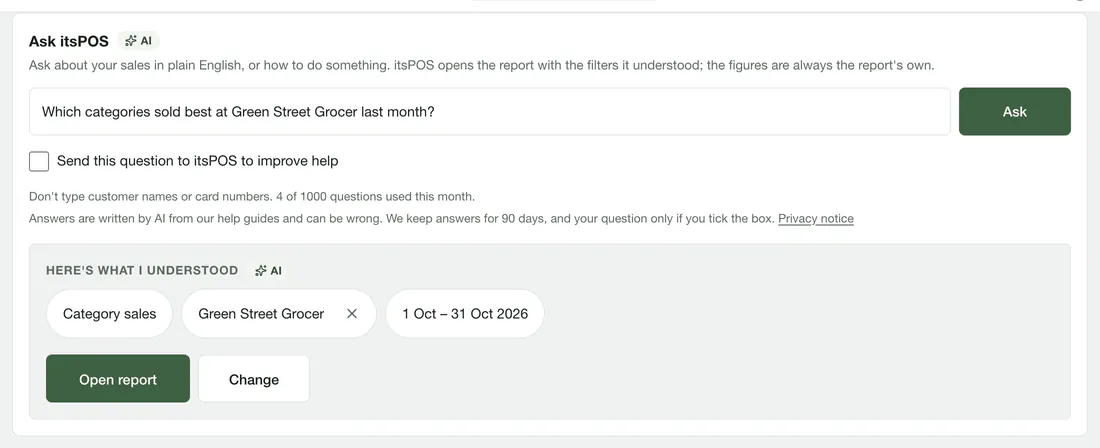
Ask itsPOS Check Here's what I understood: the report, the shop and the dates, for example Category sales · Green Street Grocer · 1 Oct – 31 Oct 2026.
Tap Open report to see it, or Change to ask differently.
You can also ask how to do something ("How do I export my sales for my accountant?"). Those answers come from the help guides, with links to them.
Good questions
- "How did we do last week compared with the week before?"
- "What sold best on Saturday?"
- "Which products did we sell below cost in October?"
- "How much VAT did we charge last quarter?"
Things to know
- Don't type customer names or card numbers.
- Your plan includes a number of questions a month; the box says how many are used, for example "4 of 1000 questions used this month". Asking the same question again on the same day doesn't use another.
- Answers are written by AI and can be wrong: check what it understood before you rely on the report.
- We keep your question and its answer for 90 days to improve help. The line under the box says so, with a link to the privacy notice.
- Questions about staff only work for people who may see staff reports.
If something goes wrong
- No Ask itsPOS box: your role may not see reports. Every plan has a number of questions a month (What.s on each plan).
- It opened the wrong report: tap Change, or ask with the report's name ("Sales by hour on Saturdays").
Still stuck?
The itsPOS support team is here 08:00 to 20:00 every day except Christmas Day.
- Call or WhatsApp: +44 7488 880320
- Email: support@itspos.io
- In the back office: Help › Contact support, or go to app.itspos.io/help/contact after you sign in
- On our website: itspos.io/contact
Tell us your shop's name and what you were trying to do. A screenshot of the screen helps.