

Reports and accounts
Files for your accountant: Xero, QuickBooks and MTD
Reports › Accounting export makes the files your accountant or accounting software needs: a journal of every trading day, sales, purchases, VAT and the figures for Making Tax Digital. Every file balances, so your books agree with your till.
For: Owners, Admins, Shop managers and Accountants4 min read
Steps
Go to Reports › Accounting export.
In Export, choose the file (see the table below).
Choose From and To. For Income and expenses (MTD for Income Tax: sole traders and partnerships) choose the Tax quarter instead (6 April quarters).
In Shop, choose All my shops or one shop. The VAT return and deferred revenue files are always the whole business.
In File, choose CSV or Excel (the Xero and QuickBooks journals are CSV only).
Tap Export CSV (or Export Excel). Up to 5,000 rows download straight away; bigger exports are prepared in the background and emailed to you.
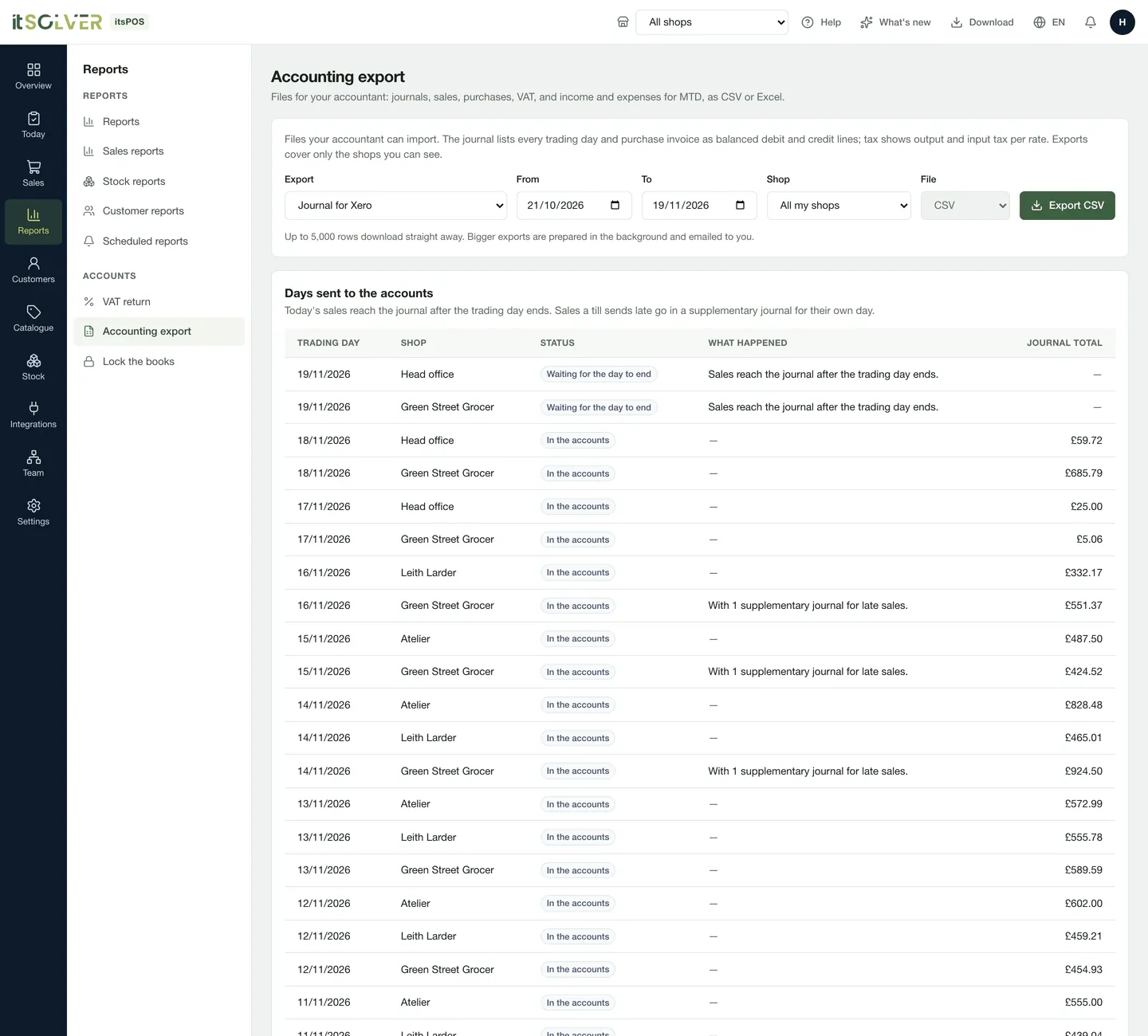
Accounting export Import the file into your accounting software, or send it to your accountant.
Each export is listed under the form with who made it and when.
The 10 files
| Export | What's in it | Use it for |
|---|---|---|
| Journal (debits and credits) | Every trading day per shop and every purchase invoice as balanced debit and credit lines, with account names | Any accounting software (Sage and others): import as a journal |
| Journal for Xero | The same journal in Xero's manual journal layout, with Xero's tax rates and the shop as tracking | Xero: Manual journals › Import |
| Journal for QuickBooks | The same journal in QuickBooks' journal layout | QuickBooks |
| Sales | Sales per day and shop | Checking takings |
| Purchases | Supplier invoices and credit notes, with the shop | Checking costs |
| Tax summary | Output and input VAT per rate | Checking VAT |
| VAT return (boxes and every line) | The nine boxes and every line behind them (only for people who may see the VAT return) | Your VAT return (more) |
| Income and expenses (MTD for Income Tax: sole traders and partnerships) | Takings by trading day and shop, other income, supplier invoices, paid-outs, card fees and bad debts, with totals per category | Making Tax Digital for Income Tax |
| Loyalty discounts by VAT rate | Points, stamps and vouchers used, by VAT rate | Your accountant's loyalty and VAT questions |
| Points and gift cards owed (deferred revenue) | What you still owe in points and gift cards | Year-end accounts |
What a day's journal looks like
One trading day at Atelier on 1 Oct 2026 in Journal for Xero: Card clearing £432.00 in, Sales - standard rated £360.01 and VAT on sales £71.99 out. The journal for all four test shops in October 2026 balanced at £42,322.93 each side and agreed with the reports:
| Account | October 2026 | Same as |
|---|---|---|
| Card clearing | £27,765.31 | Payments: Card |
| Cash in drawer | £4,107.46 | Payments: Cash |
| Sales - standard rated + Sales - zero rated | £15,711.84 + £12,826.21 = £28,538.05 | Net sales without VAT |
| VAT on sales | £3,142.22 | VAT |
| Cost of goods sold | £10,340.36 | Cost of goods by month |
| Agency takings payable + Agency commission | £182.82 + £9.68 = £192.50 | Agency takings (the lottery) |
Lottery money you owe the lottery operator goes to Agency takings payable; only your commission is income.
Days sent to the accounts
Under the form, Days sent to the accounts shows the last two weeks' trading days for each shop and whether they are In the accounts, with the Journal total.
- "Today's sales reach the journal after the trading day ends." Until then a day says Waiting for the day to end.
- "Sales a till sends late go in a supplementary journal for their own day": the day then says "With 1 supplementary journal for late sales."
- Head office is for things that belong to no one shop, such as points and gift cards sold in the back office.
Payroll
Hours for payroll (BrightPay, Sage Payroll, Xero Payroll and others) come from Team › Hours, not from here: see Staff hours.
If something goes wrong
- "You're going a bit fast. Try again in a few seconds.": you started several exports at once. Wait and tap again.
- A day is missing: it may still be Waiting for the day to end.
- Your accountant already filed a period: lock the books so later changes go into the next open day: Lock the books after filing.
Still stuck?
The itsPOS support team is here 08:00 to 20:00 every day except Christmas Day.
- Call or WhatsApp: +44 7488 880320
- Email: support@itspos.io
- In the back office: Help › Contact support, or go to app.itspos.io/help/contact after you sign in
- On our website: itspos.io/contact
Tell us your shop's name and what you were trying to do. A screenshot of the screen helps.