

Reports and accounts
Your VAT return boxes
Reports › VAT return works out the nine boxes of your VAT return for each VAT period from your accounts. itsPOS doesn't send the return to HMRC: copy the boxes into your filing software, or give your accountant the CSV.
For: Owners, Admins and Accountants5 min read
Before you start
Choose your VAT quarters in Settings › VAT › VAT return › VAT quarters: Quarters ending Mar, Jun, Sep, Dec, Quarters ending Apr, Jul, Oct, Jan, Quarters ending May, Aug, Nov, Feb, Monthly or Annual, as on your VAT registration certificate or in your HMRC online account. Until then the page says "Choose your VAT quarters". Check your VAT scheme on the same page: Standard accounting, Cash accounting or Flat Rate Scheme.
Steps
Go to Reports › VAT return. Your last 8 VAT periods are listed with Box 1 VAT due on sales, Box 4 VAT reclaimed, Box 5 Net VAT ("to pay" or "to reclaim"), Box 6 and Box 7, and whether the period is Open or Period ended.
Tap the period, for example Aug–Oct 2026.
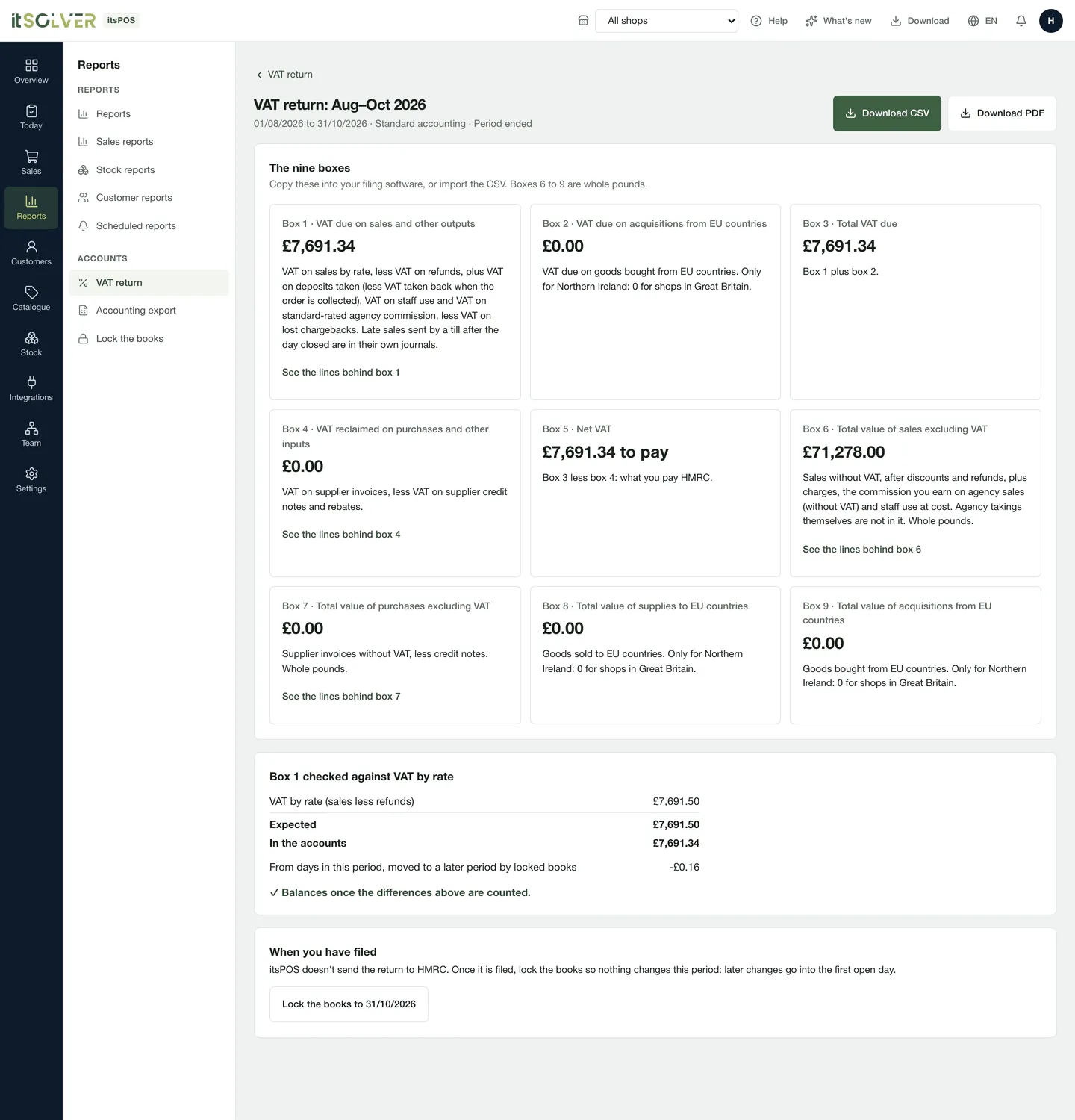
VAT return Read The nine boxes. Each says how it is worked out. Boxes 6 to 9 are whole pounds.
Check Box 1 checked against VAT by rate: it should say ✓ Balances. (or "✓ Balances once the differences above are counted." when it lists late sales moved by locked books). If it says "Doesn't balance", don't file: contact us with the period.
Tap See the lines behind box 1 (or 4, 6, 7) to see every amount in it, by source or journal by journal.
Tap Download CSV for your filing software or accountant, or Download PDF to keep.
File the return with HMRC.
Under When you have filed, lock the books to the last day of the period so nothing changes it: Lock the books after filing.
What goes in each box
| Box | What itsPOS puts in it |
|---|---|
| Box 1 VAT due on sales and other outputs | VAT on sales by rate, less VAT on refunds, plus VAT on deposits taken (less VAT taken back when the order is collected), VAT on staff use and VAT on standard-rated agency commission, less VAT on lost chargebacks |
| Box 2 VAT due on acquisitions from EU countries | Northern Ireland only; 0 in Great Britain |
| Box 3 Total VAT due | Box 1 plus box 2 |
| Box 4 VAT reclaimed on purchases and other inputs | VAT on supplier invoices, less VAT on supplier credit notes and rebates; paid-outs with a VAT receipt |
| Box 5 Net VAT | Box 3 less box 4: what you pay HMRC (or reclaim) |
| Box 6 Total value of sales excluding VAT | Sales without VAT, after discounts and refunds, plus charges, the commission you earn on agency sales (without VAT) and staff use at cost |
| Box 7 Total value of purchases excluding VAT | Supplier invoices without VAT, less credit notes |
| Box 8 and Box 9 | Supplies to and acquisitions from EU countries: Northern Ireland only |
Lottery and other agency takings aren't your sales, so they aren't in box 6. The commission the agency pays you is: it shows as "Agency commission" in the lines behind box 6, and its VAT is in box 1 when it's standard rate. Each agency product says how its commission is taxed: Catalogue › Products › the product › VAT on your commission (a lottery is Exempt unless you change it; PayPoint and parcels are usually Standard rate). Ask your accountant if you're not sure. Gift cards count when they are spent, not when they are sold.
Worked example
The test shop's VAT quarters end in Jan, Apr, Jul and Oct. For Aug–Oct 2026 (all four shops):
- Box 1 £7,691.34: the same as VAT in Sales summary and VAT by rate for 1 Aug to 31 Oct 2026.
- Box 6 £71,278.00: Net sales without VAT £71,252.60 plus £25.54 lottery commission (exempt), in whole pounds. The £508.64 of lottery takings are left out.
- Box 4 £0.00: no supplier invoices in those months.
- ✓ Balances.
Sales that arrive after you've filed
A till that was offline can send sales after the period ended. Once you have locked the books, those sales go into the accounts on the first open day, so the return you filed doesn't change. VAT by rate still shows them on the day they were made, so it can be a little higher than a locked period's box 1. In the test shop a £0.99 can of Coke sent late for 31 Oct put VAT by rate for Aug–Oct up to £7,691.50, while box 1 stayed £7,691.34 and the sale went into November's accounts. The check says so: "From days in this period, moved to a later period by locked books −£0.16" and "✓ Balances once the differences above are counted."
Who can do this
Owners, Admins and Accountants. Shop managers can't: the return covers every shop.
Still stuck?
The itsPOS support team is here 08:00 to 20:00 every day except Christmas Day.
- Call or WhatsApp: +44 7488 880320
- Email: support@itspos.io
- In the back office: Help › Contact support, or go to app.itspos.io/help/contact after you sign in
- On our website: itspos.io/contact
Tell us your shop's name and what you were trying to do. A screenshot of the screen helps.