

Reports and accounts
Set daily sales targets
Give each shop a target for each day of the week, so the Overview and the Sales against target report show how you're doing against it. Targets are Net sales with VAT, the same figure as your till's Z report.
For: Owners, Admins and Shop managersOn some plans2 min read
Before you start
You need a few weeks of sales to fill targets in for you. Without them, type your own.
Steps
Go to Settings › Reports and scroll to Sales targets.
In Shop, choose the shop, for example Green Street Grocer.
In Copy last year plus, type the percentage to add, for example 10, and tap Fill in.
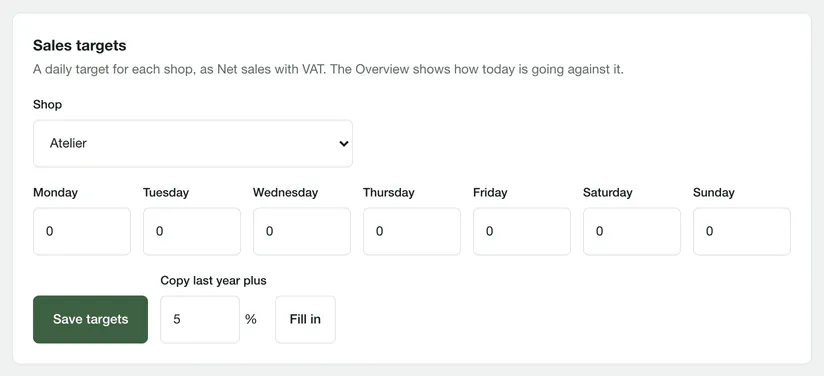
Sales targets for Green Street Grocer filled in from the last 8 weeks plus 10% With sales from a year ago, itsPOS says "Filled in from last year. Check them, then save." Without them it says "No sales a year ago: filled in from the last 8 weeks. Check them, then save."
Check each day and change any you want: in the test shop Green Street Grocer got Monday 310, Tuesday 230, Wednesday 290, Thursday 320, Friday 390, Saturday 450 and Sunday 240.
Tap Save targets. It says "Targets saved."
Choose the next shop and repeat.
What happens next
- Today so far on the Overview shows today against the day's target, for example "£0.00 of £320.00 · on track" first thing on a Thursday.
- Reports › Sales reports › Sales against target lists each day and shop with Net sales, Target, Against target and Share of target.
Christmas and busy weeks
Targets are per weekday. For a week that isn't like the others, such as the week before Christmas, set the targets higher before the week starts and put them back afterwards. Last year's figures are the best guide once you have a full year in itsPOS.
If something goes wrong
- No Sales targets panel: it's on Professional and above, and needs a role that may change reports settings (Owners, Admins and Shop managers to start with).
- "No sales to copy yet.": the shop has no sales in the last 8 weeks. Type the targets yourself.
Still stuck?
The itsPOS support team is here 08:00 to 20:00 every day except Christmas Day.
- Call or WhatsApp: +44 7488 880320
- Email: support@itspos.io
- In the back office: Help › Contact support, or go to app.itspos.io/help/contact after you sign in
- On our website: itspos.io/contact
Tell us your shop's name and what you were trying to do. A screenshot of the screen helps.