

Reports and accounts
Your Overview: how today is going
The Overview is the first page you see in the back office. It answers "How are we doing today?" in one glance: sales so far against a usual day, what needs doing, and each shop side by side.
For: Owners, Admins, Shop managers and Accountants3 min read
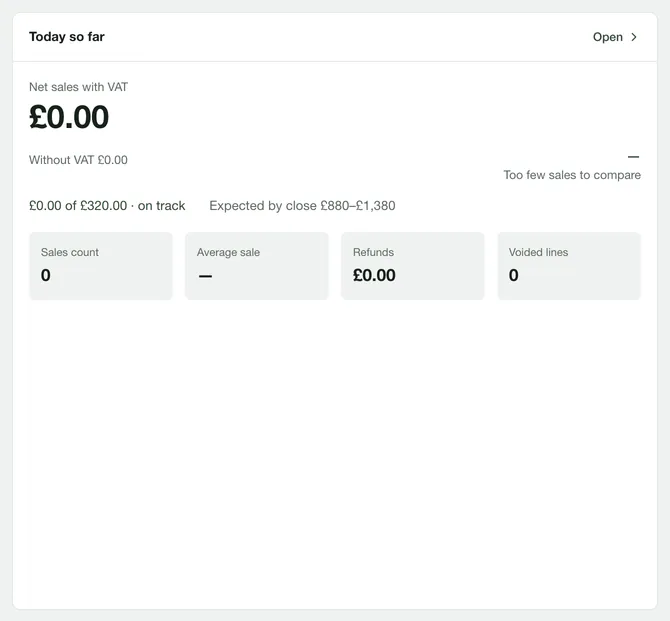
What you see
At the top, choose the period (Today, Yesterday, This week or This month) and the shop (All shops or one). A line says when the figures were worked out, for example "As of 02:36 · the till is up to date". The page refreshes itself every minute.
Two cards are always at the top:
- Today so far: Net sales with VAT (or without VAT, see below), the change against your usual day (for all four shops early on a Thursday: "▼ £861 (−82%) on last Wed at 02:36"), Expected by close, Sales count, Average sale and Refunds. Same days last week compares up to the same time of day, so a quiet morning isn't compared with a whole day.
- To do today: for each shop, the things waiting for you (drawers to count, deliveries due, dates, things to check). Each line opens the page where you do it. See The Today list.
Below them are the cards for your role. An owner starts with Things to check, Shops, Sales by hour, Cash, Online orders, Top products, Owed to us / To pay and Staff on shift. Every card is explained in Every Overview card explained.
With more than one shop, the Shops card lists them furthest below their usual first, with Sales so far, Against usual, Average sale, Refunds, Drawers to count, To do and whether the tills are up to date. In the test shop on a Thursday morning it read: Leith Larder £0.00 (▼ £284, −100%, not open yet), Green Street Grocer £190.16 (▼ £56, −23%), Atelier £0.00.
With VAT or without
The Overview shows the same figures as your till's Z report. Settings › Reports › Main figures shown chooses With VAT (matches the drawer and the Z) or Without VAT (often better for cash and carry). The Z always shows both.
What it compares with
Settings › Reports › Compare with sets what today is compared with: Same days last week, Your usual (the 4 weeks before), Same dates last year or Same weekdays last year. See Compare with last week, your usual or last year.
On your phone
The Overview works on a phone: the cards stack in the same order and every figure opens its report. Add the back office to your home screen to open it like an app.
Who sees it
Everyone who signs in to the back office has an Overview, but each person sees only the cards their role allows. Someone who can't see sales figures doesn't get Today so far figures. Owners and Admins also see the Get ready to sell checklist until it's done.
What's next
Still stuck?
The itsPOS support team is here 08:00 to 20:00 every day except Christmas Day.
- Call or WhatsApp: +44 7488 880320
- Email: support@itspos.io
- In the back office: Help › Contact support, or go to app.itspos.io/help/contact after you sign in
- On our website: itspos.io/contact
Tell us your shop's name and what you were trying to do. A screenshot of the screen helps.