

Reports and accounts
Products reports
What sells, what makes money and what sells together. Each report counts sales after refunds and uses the category a product had when it was sold. How to open and filter a report: Open a report.
For: Owners, Admins, Shop managers and Accountants5 min read
The filters these reports share are Channel, Category, Brand, Tag, Supplier and Price list. A category includes its sub-categories: choose a department such as Meat, Poultry & Fish and you see every category under it, such as Beef or Lamb.
Product sales
"What sells, and what doesn't?" Per product: Quantity, Net sales, Net sales without VAT and Share of sales. Group by › Day shows each shop, day and the price it sold at, handy after a price change. Products merged into another count under the one kept. Tap a product to see its sales. In October 2026 its total was the same as Sales summary: £31,680.27.
Category sales
"Which categories sell?" The same columns per category, as a tree: each category includes its sub-categories, and a (direct) line shows the products in the category itself. Tap the arrow beside a category to see its sub-categories, or Expand all. Each sale counts once in the total. An export has each category's Category path and Level. Group by › Product lists each category's products.
Brand sales
"Which brands sell?" The same columns per brand; products without a brand are together in one row. Useful before a rep's visit.
Sales by tag
"How do our tagged products sell?" Quantity and Net sales without VAT per tag. A product with two tags counts under both, so the tags can add up to more than your sales.
Sales by price list
"How much do we sell on each price list?" Sales count, Net sales and Average sale per price list, for example Standard Selling against Trade.
Bundles and modifiers
"Which bundles and modifiers sell?" Each bundle sold and each modifier added: Sales count, Quantity and Net sales without VAT. In October 2026 the Christmas hamper sold 8.
Sales by the case
"Do customers buy by the case?" Products sold as whole cases beside the singles sold on their own: Case of, Cases sold, Singles in those cases, Sales by the case, Singles sold on their own.
Agency sales
"What did we take for agencies?" Per shop, agency and product (lottery, bill payments, parcels): Sold, Takings, Commission and Owed to the agency. Agency takings are never sales: they are a Not sales line. On 18 Nov 2026 Green Street Grocer sold one £2.00 Lotto: commission £0.10, owed to the agency £1.90.
Margin
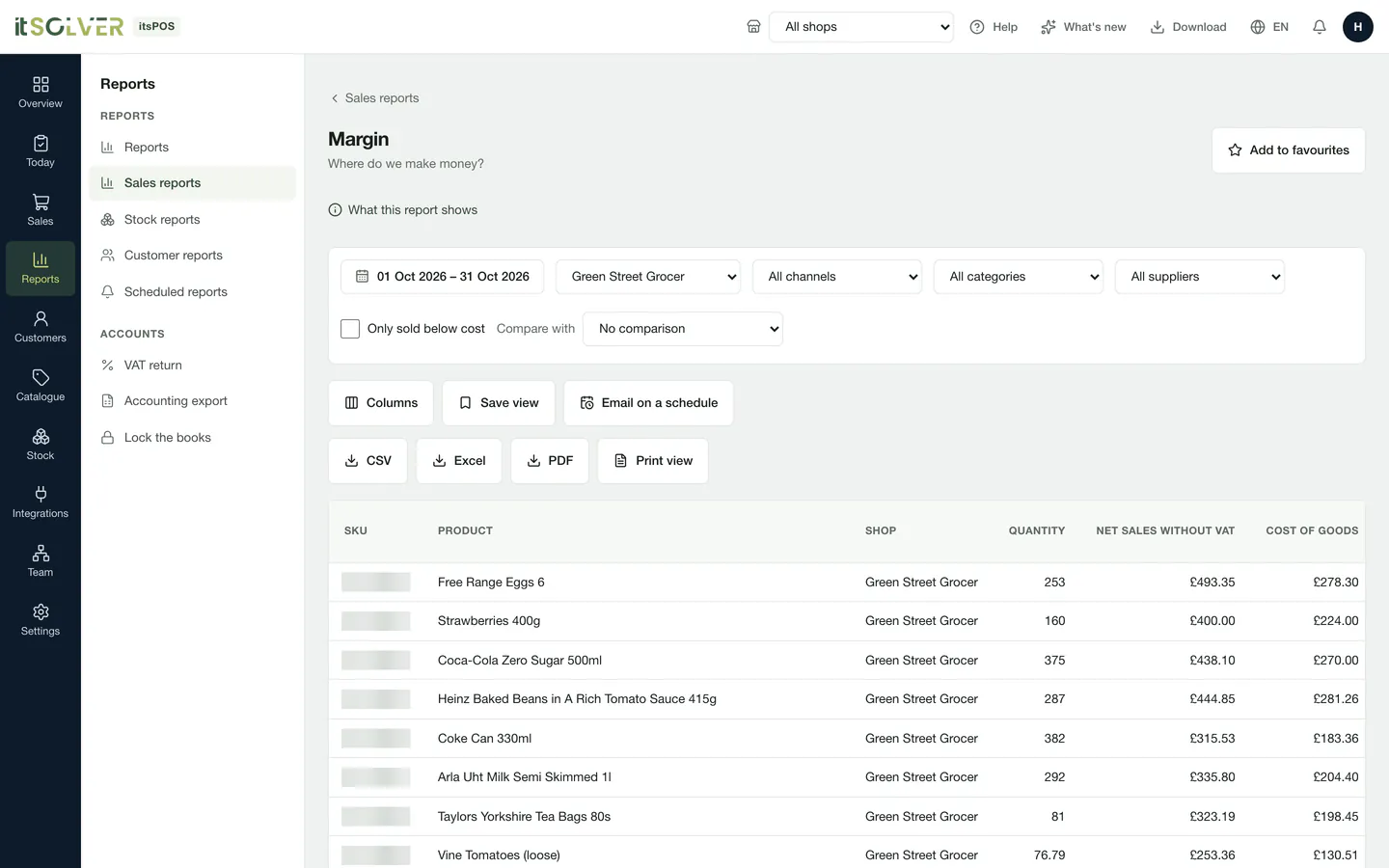
"Where do we make money?" Per product and shop: Quantity, Net sales without VAT, Cost of goods, Margin, Margin %, Unit cost and Average price without VAT, after refunds. Tick Only sold below cost to list the products sold for less than they cost. You need permission to see costs.
The cost is what the goods cost when they left stock; for anything not costed yet, the product's current cost. Margin's cost of goods is the same as Cost of goods by month's. Reports home's Margin also counts lines sold without a product (an open-price line), which have no cost and aren't in product reports. A bundle has no stock of its own: Margin costs it from the products inside it when they left stock for it, and a product's own row counts only the times it was sold on its own (Cost of goods by product still lists each product that left stock). In October 2026 the Christmas hamper sold 8 at a cost of £47.36 (£5.92 each, its five products). A bundle with no product counted in stock uses its own cost price.
Bought together On some plans
"What sells with this product?" Type a product code and tap Show: the 20 products most often in the same sale, Sales with both and the share of the product's sales they were in, from up to 90 days. Use it to decide what to put next to the meal deal.
ABC analysis On some plans
"Which products matter most?" Products ranked by Net sales without VAT: A make the first 80% of sales, B the next 15% and C the last 5%, with the Running share. Use it for range reviews: never run out of an A.
Sell-through On some plans
"Are we selling what we buy?" Per product: Stock at the start, Stock in, Sold, Sell-through (sold ÷ stock at the start plus received), Stock at the end and Weeks of cover. For a boutique's season: what's left to reduce at the end.
Still stuck?
The itsPOS support team is here 08:00 to 20:00 every day except Christmas Day.
- Call or WhatsApp: +44 7488 880320
- Email: support@itspos.io
- In the back office: Help › Contact support, or go to app.itspos.io/help/contact after you sign in
- On our website: itspos.io/contact
Tell us your shop's name and what you were trying to do. A screenshot of the screen helps.