

Reports and accounts
Sales reports
The first group in Reports › Sales reports. Every report here uses the same figures as the till's Z report and the Overview: see what each figure means and how to use a report. The other groups are Products, Money, VAT and compliance, Orders and trade, staff reports and Customer reports.
For: Owners, Admins, Shop managers and Accountants3 min read
Sales summary
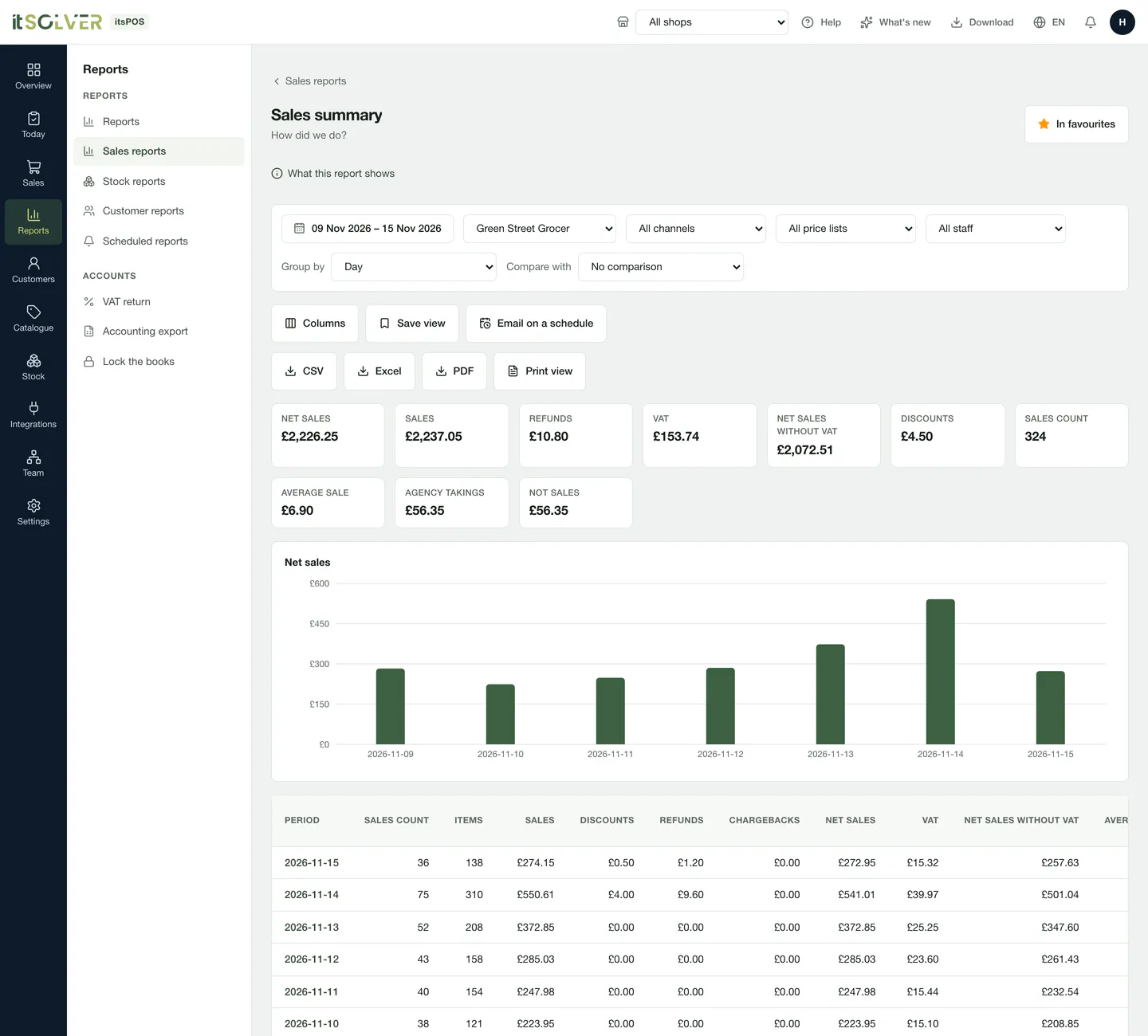
"How did we do?" Per day, week, month, weekday, shop or channel: Sales count, Items, Sales, Discounts, Refunds, Net sales, VAT, Net sales without VAT, Average sale and Items per sale. Gift cards, tab payments and deposits are listed under the totals as Not sales.
| Option | What it does |
|---|---|
| Group by | Day (default), Week, Month, Weekday, Shop, Channel |
| Channel, Price list, Staff | Narrow it to one channel, price list or person |
| Compare with | Adds the other period's Net sales |
| Tap a row | Opens that day's sales |
Your daily Z reports in one place: a row per day is the day's Z for all tills together. Green Street Grocer, 9 to 15 Nov 2026: Net sales £2,226.25, Sales count 324, VAT £153.74; Saturday 14 Nov was the busiest day at £541.01.
Sales by hour
"When are we busy?" Sales count, Items, Net sales and VAT by the shop's local hour. Look at a few weeks of the same weekday to plan your rota. With the camera add-on it adds Visitors and Conversion.
Sales by shop
"How is each shop doing?" The Sales summary's columns, one row per shop. Tap a shop for its own summary. In October 2026: three shops, Net sales £31,680.27 together.
Sales by channel
"Where do our sales come from?" Till, Online, Back office and Trade, each with the summary's columns. Use it to see whether your online store pays its way.
Sales by staff
"What did each person sell?" Sales count, Sales, Refunds given, Net sales, Discounts given, Refunds count, Average sale and Items per sale per person, sorted by name, never ranked. It's a staff report: only people who may see staff reports have it, and it says "Staff report: covered by your staff privacy notice."
Customer orders and deposits
"Which orders are open, and what deposits do we hold?" Each customer order ordered in the period: Ordered, Collect by, Status, Total, Deposit paid, Still to pay. Group by › Items still to hand over lists what you still need to have ready. See Customer orders.
Sales against target On some plans
"Are we hitting our daily targets?" Each shop's Net sales per day against its target for that weekday: Target, Against target (Net sales minus the target) and Share of target. Days without a target show the sales alone. Set targets in Settings › Reports.
Sales per staff hour On some plans
"Are we staffed for our busy hours?" Net sales divided by the hours staff were clocked in, per shop and day. It needs staff to clock in at the till (Staff hours); days with no clock-ins show no hours.
Still stuck?
The itsPOS support team is here 08:00 to 20:00 every day except Christmas Day.
- Call or WhatsApp: +44 7488 880320
- Email: support@itspos.io
- In the back office: Help › Contact support, or go to app.itspos.io/help/contact after you sign in
- On our website: itspos.io/contact
Tell us your shop's name and what you were trying to do. A screenshot of the screen helps.