

Reports and accounts
The Today list and approving from your phone
Today is your shop's to-do list for the day: only the things you can act on, each one opening where you do it. Approval requests is where a till's "ask a manager" lands when you approve from your phone.
For: Owners, Admins and Shop managers4 min read
The Today list
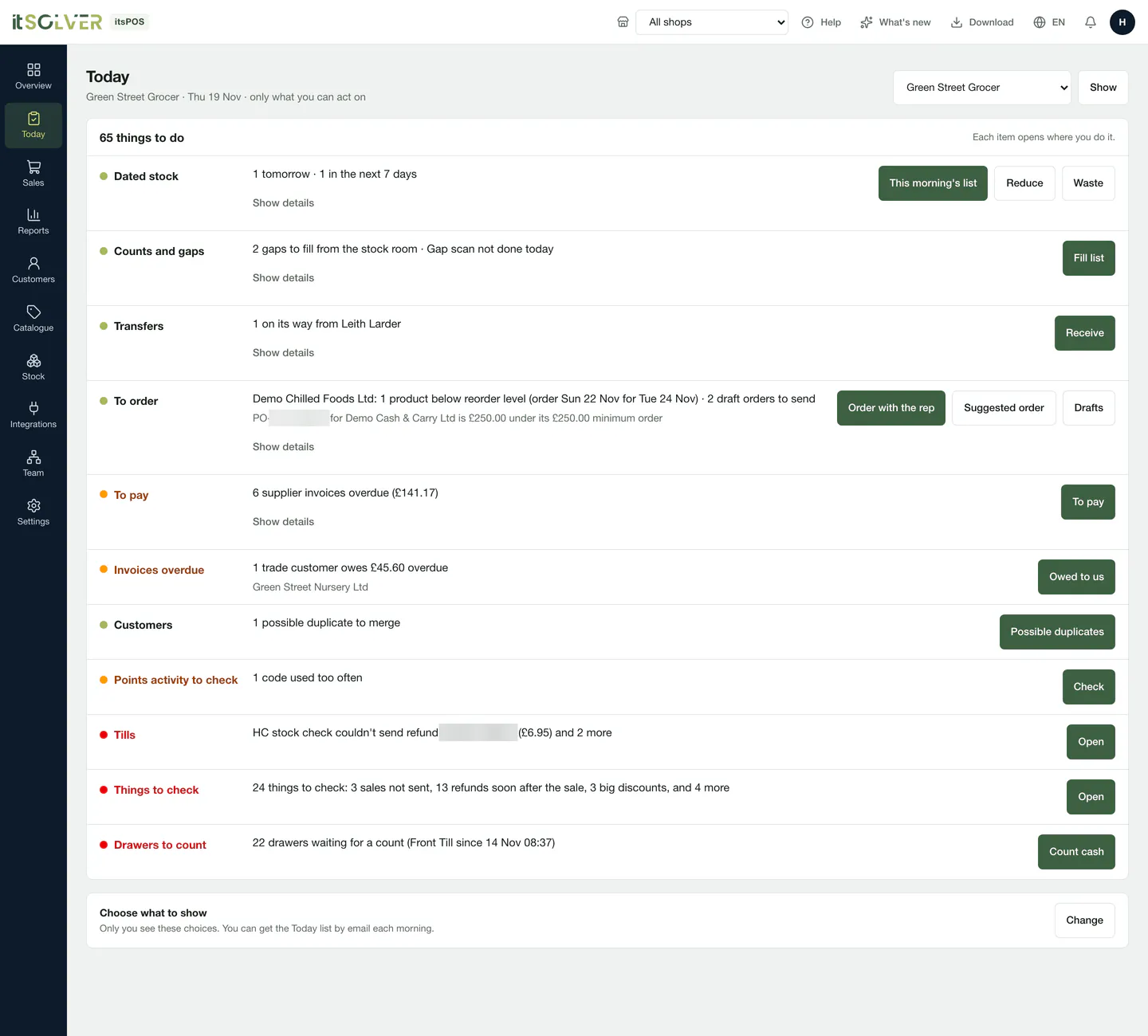
Open Today in the menu. Choose the shop at the top and tap Show. The list shows only what waits for you there today, most urgent last. At Green Street Grocer it had, among others:
- Dated stock: "1 tomorrow · 1 in the next 7 days", with This morning's list, Reduce and Waste
- Transfers: "1 on its way from Leith Larder", with Receive
- To order and To pay: suppliers to order from and invoices overdue
- Things to check: "24 things to check: 3 sales not sent, 13 refunds soon after the sale, 3 big discounts, and 4 more"
- Drawers to count: "22 drawers waiting for a count", with Count cash
"Each item opens where you do it." Tap a line to go straight to that page. Show details opens an item's first rows without leaving the list. With nothing to do it says "Nothing to do at Green Street Grocer today".
The same list per shop is the To do today card at the top of the Overview.
Choose what to show and get it by email
- Under the list, in Choose what to show, tap Change.
- Untick the kinds of item you don't want on your list (Items on my Today list).
- Tick Email me the Today list to get it by email at 7:00, and change Email it at if 7:00 doesn't suit you.
- Tap Save.
"Only you see these choices." The email lists every shop of yours with something to do, at your first shop's time. Nothing is sent on days with nothing to do.
Review who has access
Every 3 months, the people who manage your team see a Review who has access card at the top of Today. It lists the people who Can do things that matter most and the people Not seen for 90 days, with Remove access for anyone who has left. When you're done it says "Thanks. We'll ask again in three months."
Approve a till's request from your phone
When a cashier needs a manager (a big refund, a discount over their limit) and no manager is at the till, the cashier taps Ask on phone. The till shows "Asked a manager on their phone." and waits.
- Your phone shows a push. Tap it: Approval request opens with what the till is asking, the shop and till, and who asked.
- Tap Approve or Refuse. "The till waits for your answer for 90 seconds."
- The till closes the request with your answer. The approval shows with your name on the sale.
The first answer counts, so if two managers get the push, only one answer is used. After 90 seconds the request ends ("This request has ended: nobody answered in 90 seconds.") and the cashier can ask again or a manager can type their PIN.
Before you start: turn on push for Approval requests in My notifications on the phone you carry, and add the back office to your phone's home screen. Approval requests in the menu lists the requests sent to you. Phone approvals need the internet: when the till is offline it says "The till is offline. Use a PIN."
Who can do this
- Today is for everyone who signs in to the back office; each person sees their own shops and items.
- Approval requests are sent only to people who may approve that action at that shop, and never to the person asking.
Still stuck?
The itsPOS support team is here 08:00 to 20:00 every day except Christmas Day.
- Call or WhatsApp: +44 7488 880320
- Email: support@itspos.io
- In the back office: Help › Contact support, or go to app.itspos.io/help/contact after you sign in
- On our website: itspos.io/contact
Tell us your shop's name and what you were trying to do. A screenshot of the screen helps.