

Reports and accounts
Reports home: key figures and what you owe
Reports › Reports is where every report starts: the key figures for the dates you choose, what you owe customers and are owed, and the way to find any report.
For: Owners, Admins, Shop managers and Accountants3 min read
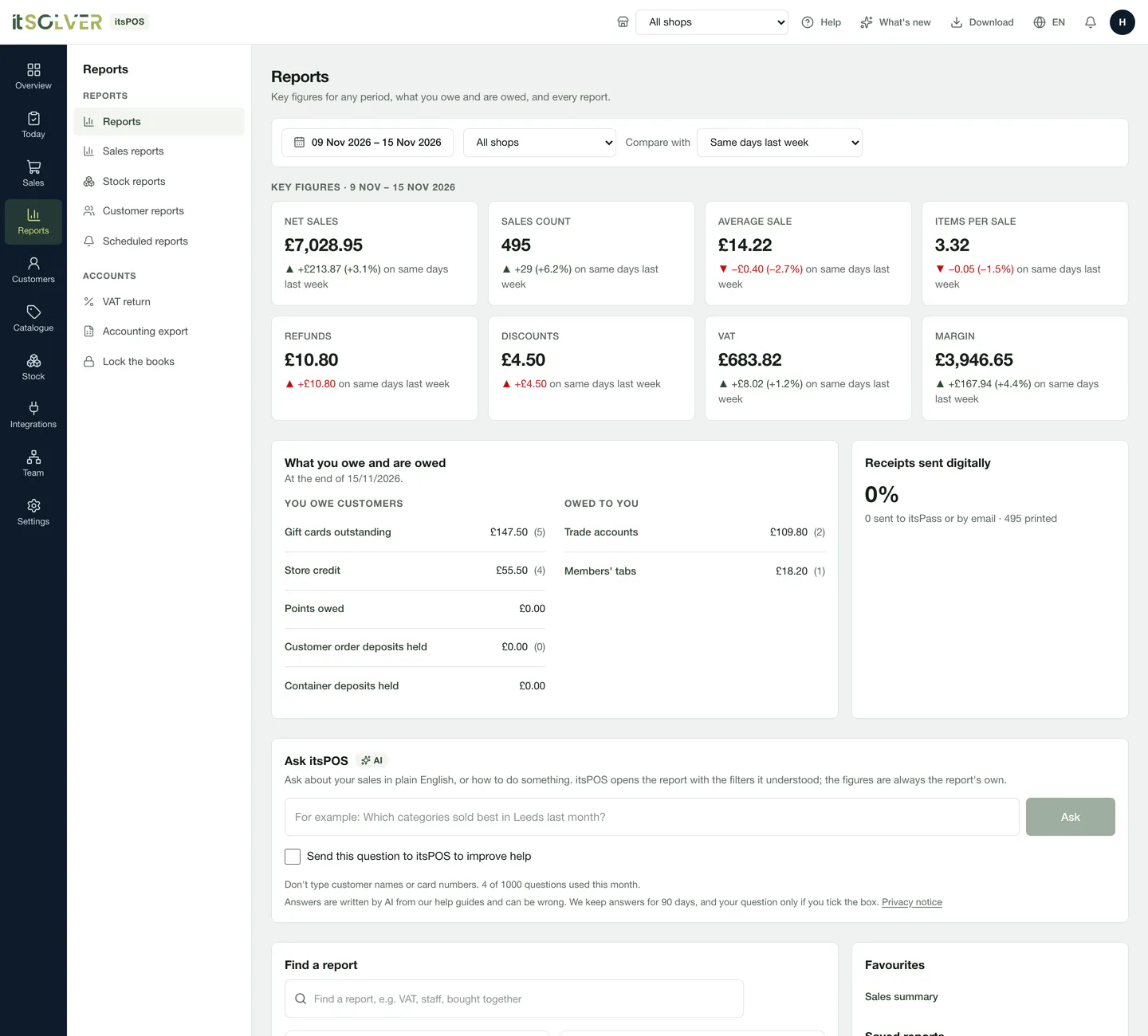
What you see
At the top choose the dates (the last 7 days to start with), the shop and Compare with.
Key figures for those dates, each with its change on the comparison, and each one opening its report:
| Figure | What it is |
|---|---|
| Net sales | Sales minus refunds, with VAT |
| Sales count | How many sales (baskets with only lottery or gift cards don't count) |
| Average sale | Net sales ÷ sales count |
| Items per sale | Items sold ÷ sales count; a weighed line counts as one item |
| Refunds | Money given back for goods |
| Discounts | Every discount given, less the discounts refunds gave back |
| VAT | VAT in Net sales |
| Margin | Net sales without VAT minus what the goods cost (needs permission to see costs) |
For all four test shops from 9 to 15 Nov 2026: Net sales £7,028.95 (▲ £213.87, +3.1% on the same days last week), 495 sales, Refunds £10.80, Discounts £4.50, VAT £683.82 and Margin £3,946.65, the same margin as Cost of goods by month for that week (£6,345.13 without VAT less £2,398.48 cost of goods). Each figure is explained in Sales, Net sales, Not sales and VAT.
What you owe and are owed, at the end of the last day you chose:
- You owe customers: Gift cards outstanding, Store credit, Points owed, Customer order deposits held, Container deposits held
- Owed to you: Trade accounts and Members' tabs
The number in brackets is how many, for example Gift cards outstanding £147.50 (5). Each line opens its own report. This is money in your accounts, not in your takings: see Gift cards, Store credit, Tabs and Trade payments and Owed to us.
Receipts sent digitally: the share of receipts sent to itsPass or by email instead of printed, for example "0 sent to itsPass or by email · 495 printed".
What you can do
- Ask itsPOS a question in plain English (every plan has a number of questions a month): Ask itsPOS about your sales.
- Find a report: type a word or a question, or open Sales reports, Stock reports, Customer reports or VAT return.
- Favourites, Saved reports and Recently opened take you back to reports you use: Choose columns, save a view and favourites.
- Scheduled reports sends reports by email: Email reports on a schedule.
Who sees it
Owners, Admins, Shop managers and Accountants to start with. Margin needs permission to see costs. Each line of What you owe and are owed needs permission for its own page.
Still stuck?
The itsPOS support team is here 08:00 to 20:00 every day except Christmas Day.
- Call or WhatsApp: +44 7488 880320
- Email: support@itspos.io
- In the back office: Help › Contact support, or go to app.itspos.io/help/contact after you sign in
- On our website: itspos.io/contact
Tell us your shop's name and what you were trying to do. A screenshot of the screen helps.