

Sales and orders
Cash drawer shifts in the back office
Sales › Cash drawer shifts lists every till drawer from the moment it opened to its cash-up: how much cash it should have had, how much was counted, the difference and why. Open a shift to see everything that happened on it.
For: Owners, Admins, Shop managers and Accountants5 min read
The till side (opening, X reports, closing) is in Close the shift and cash up and Shift figures and the X report.
What you see
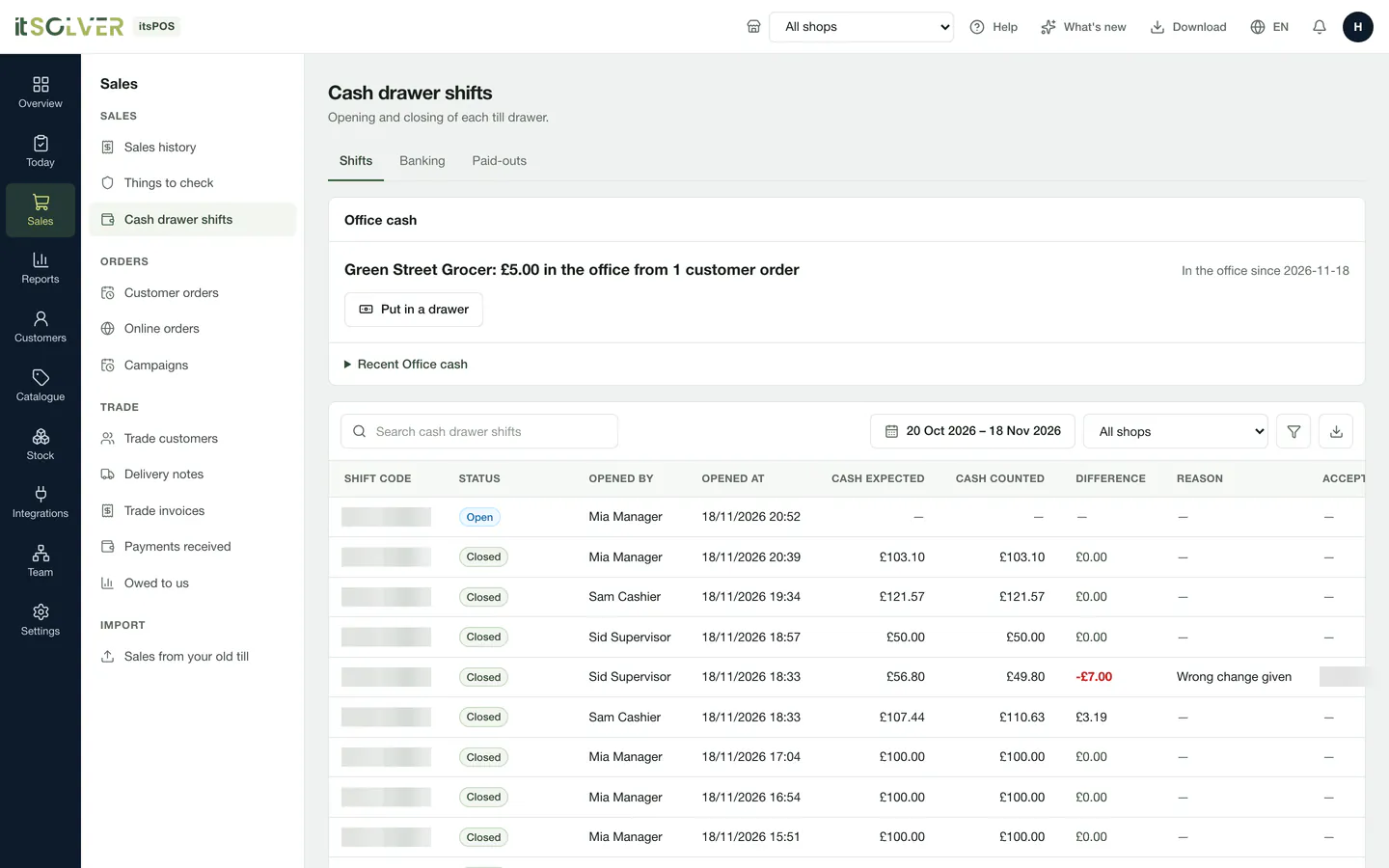
- Three tabs: Shifts, Banking and Paid-outs.
- The Office cash card when there is cash kept in the office: see Office cash, safe drops and banking.
- The dates (the last 30 days to start with), the shop, Filters and Export CSV.
- One row per shift: Shift code (the till's code and a number, for example MAI66-S00002), Status, Opened by, Opened at, Cash expected, Cash counted, Difference, Reason and Accepted by. A difference over your allowed difference says "(over the allowed difference)".
The statuses:
| Status | What it means |
|---|---|
| Open | The drawer is in use on the till |
| Waiting for count | The till closed it for a count in the office, or a manager closed it here and chose to count later. Its cash and Z report wait for the count |
| Closed | Counted. The Z report is final |
Filters has Status and Opened by. Choose Waiting for count to see the drawers to count in the office.
A shift's page
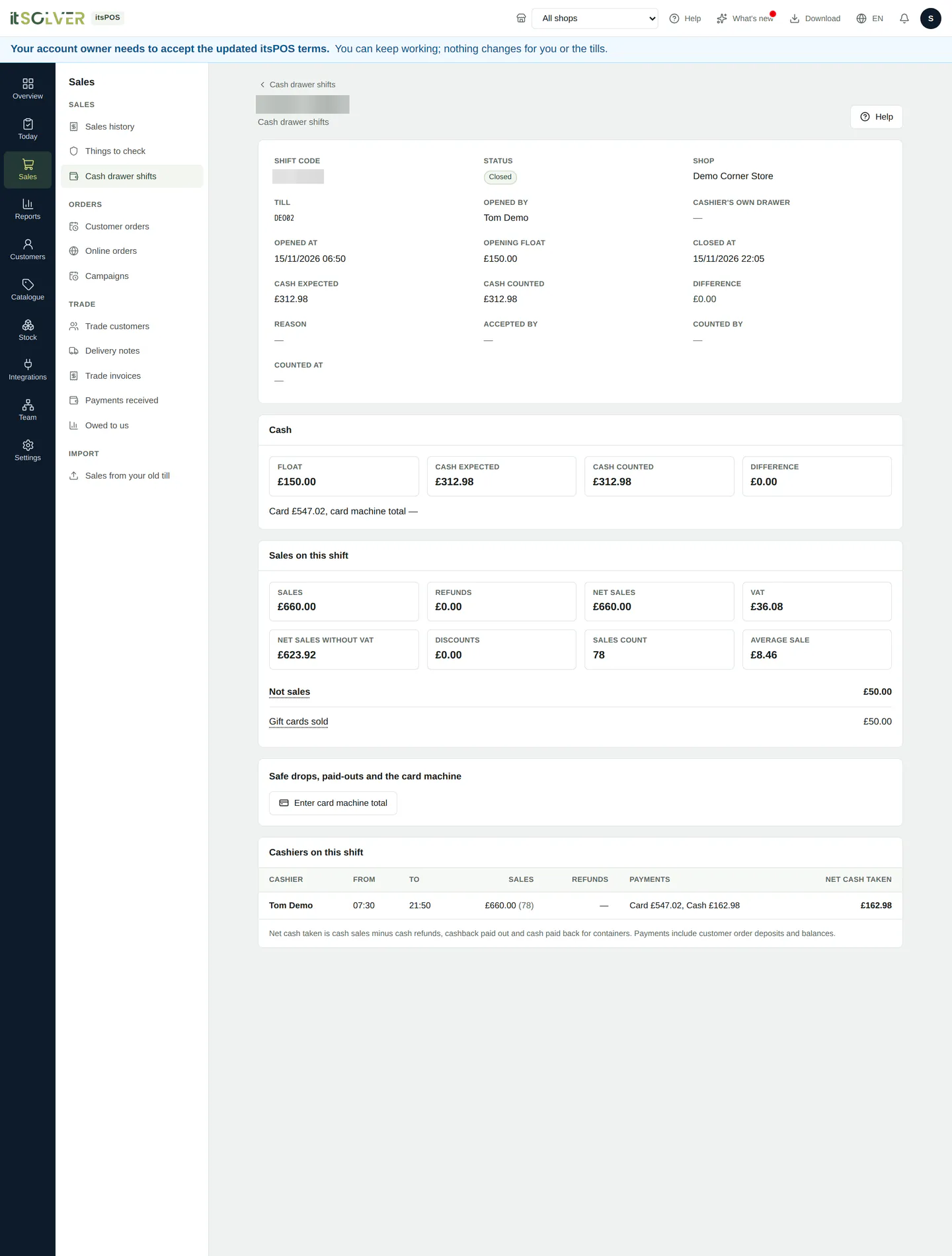
Tap a shift. The example is MAI66-S00002, opened by Sid Supervisor on the HC sales check till with a £100.00 float.
| Card | What it shows |
|---|---|
| The facts at the top | Shop, Till, Opening float, Opened at and Closed at, Cash expected, Cash counted, Difference, Reason, Accepted by, Counted by and Counted at (when counted in the office), Opened by, and Cashier's own drawer when your shop runs one drawer per cashier |
| A note | For example "Closed in the back office by … : Till broken." |
| Cash | Float, Cash expected, Cash counted, Difference, and lines such as "£5.00 put in from Office cash", each card method with the card machine total, and payment corrections ("Payment corrected: Cash −£3.19, Card +£3.19 (receipt MAI66-000003)") |
| Sales on this shift | Sales, Refunds, Net sales, VAT, Net sales without VAT, Discounts, Sales count and Average sale; and Not sales (gift cards sold, tab payments, customer order deposits), cashback and cash rounding when there are any. Tap a figure's name to see what it means |
| Safe drops, paid-outs and the card machine | Each safe drop ("Bag 20481 £50.00 at 18:33 by Sid, checked by Mia"), each paid-out, and Enter card machine total |
| Cashiers on this shift | Each person who sold on it: From, To, Sales, Refunds, Payments and Net cash taken |
| Cash moved by each person | Safe drops, cash paid in and paid out, by person |
| Drawers on the till that day | Every drawer of that till that day with its float, counted cash and difference, and a total |
Cash is the only thing counted. Card payments are takings: the card machine's own total is checked against them (see End of day card totals).
What you can do
- Count cash on a shift waiting for a count: Count a drawer in the office.
- Close this shift for a till that is broken, lost or unpaired and can't close its shift itself. When the till is back online it is told the shift is closed, and the sales it made offline are kept.
- Put in a drawer on the Office cash card, and record banking: Office cash, safe drops and banking.
Who can do it
Owners, Admins, Shop managers and Accountants see shifts. Owners, Admins and Shop managers count and close them. Accepting a difference over the limit needs the right to accept cash differences (Owners, Admins and Shop managers to start with).
Scenario: end of day cash is £7 short
MAI66-S00002 closed with £49.80 counted and £56.80 expected.
- Open the shift. Cash expected is the float (£100.00), plus cash sales (£1.80), plus £5.00 put in from Office cash, minus the £50.00 safe drop.
- Check Safe drops, paid-outs and the card machine: was a paid-out or a drop missed?
- Check Cashiers on this shift for cash refunds, and the sales for a card payment keyed as cash.
- If nothing explains it, the reason given at the count ("Wrong change given") and who accepted it stay on the shift. The difference is on Things to check as "Drawer difference".
Still stuck?
The itsPOS support team is here 08:00 to 20:00 every day except Christmas Day.
- Call or WhatsApp: +44 7488 880320
- Email: support@itspos.io
- In the back office: Help › Contact support, or go to app.itspos.io/help/contact after you sign in
- On our website: itspos.io/contact
Tell us your shop's name and what you were trying to do. A screenshot of the screen helps.