

Sales and orders
Count a drawer in the office
When your shop counts cash in the office, the till closes the shift without counting and the drawer comes to the office. Count it in the back office: the shift closes with your count and its Z report becomes final.
For: Owners, Admins and Shop managers3 min read
Before you start
- Who: Owners, Admins and Shop managers.
- Your shop counts in the office when Settings › Cash management, Where staff count the cash at the end of a shift is In the office. The till side: Close for a count in the office.
- Bring the drawer, or the bag of its cash, to a quiet place.
Count it
Go to Sales › Cash drawer shifts, press Filters and choose Status Waiting for count.
Open the shift, for example MAI66-S00001. It says "MAI66 closed this shift … for counting in the office."
Press Count cash.
Count each note and coin: press + for each one (and − to take one off), or tap the number and type how many. Counted adds up as you go.
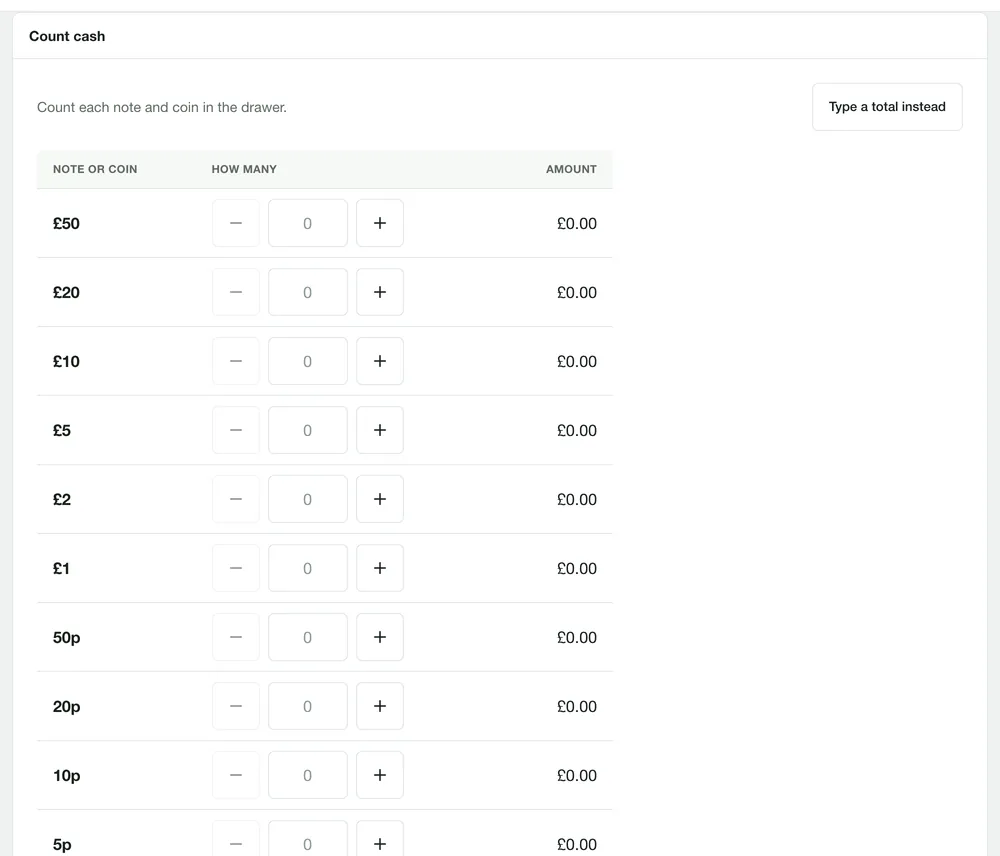
Count cash Or press Type a total instead and type the total, for example 110.63. Count notes and coins instead takes you back.
Check Counted, Expected and Difference: the difference shows once you start counting. Within your limit it says, for example, "Cash is £3.19 over. Within the allowed £5.00." A Reason is optional.
Press Save count. "Cash counted: £110.63, difference £3.19. The shift is closed and its Z report is final."
Out by more than your limit
Shift MAI66-S00002 was counted with 2 × £20, 1 × £5, 2 × £2 and 4 × 20p: £49.80 against £56.80 expected.
- It says "Cash is £7.00 short. This is more than the allowed £5.00."
- Choose a Reason: Miscount, Wrong change given, Theft or Other. Add a Note (optional).
- Tick "I accept that cash is £7.00 short" and press Save count.
If you may not accept cash differences, you see "Someone who may accept cash differences must count this shift. Ask a manager."
The allowed difference is in Settings › Cash management; the drawer goes on Things to check as "Drawer difference".
Blind counts
If your shop counts blind (Settings › Cash management), Expected says "After counting" until you press Done counting, so the count isn't steered by the figure. Then you see the result and the difference.
What happens next
- The shift is Closed with Cash counted, Difference, Reason, Accepted by, Counted by and Counted at.
- The Z report is final, and the cash-up reports have the shift.
- Bags from safe drops on that shift wait on Banking: see Office cash, safe drops and banking.
Scenario: count the drawers in the office next morning
Green Street Grocer closes at 21:00. The cashier takes the drawer to the office safe and the till prints "Cash count: waiting for the office count". At 08:30 the manager opens Cash drawer shifts, filters Waiting for count, counts each drawer with Type a total instead, and saves. Drawers still waiting after 12 hours are on the Today list.
Still stuck?
The itsPOS support team is here 08:00 to 20:00 every day except Christmas Day.
- Call or WhatsApp: +44 7488 880320
- Email: support@itspos.io
- In the back office: Help › Contact support, or go to app.itspos.io/help/contact after you sign in
- On our website: itspos.io/contact
Tell us your shop's name and what you were trying to do. A screenshot of the screen helps.