

Sales and orders
Everything on a sale's page
Open any sale from Sales › Sales history to see its whole story: what was sold, how it was paid, VAT, who served, refunds against it and what happened to it since. A refund has the same page, with "Refund" in its title.
For: Owners, Admins, Shop managers and Accountants5 min read
The example is receipt MAI66-000001 at Green Street Grocer: 2 Heinz Baked Beans, a Coca-Cola Zero, 0.512 kg of Vine Tomatoes, a Galaxy bar and Pringles, £9.13 in cash, with the Galaxy refunded later.
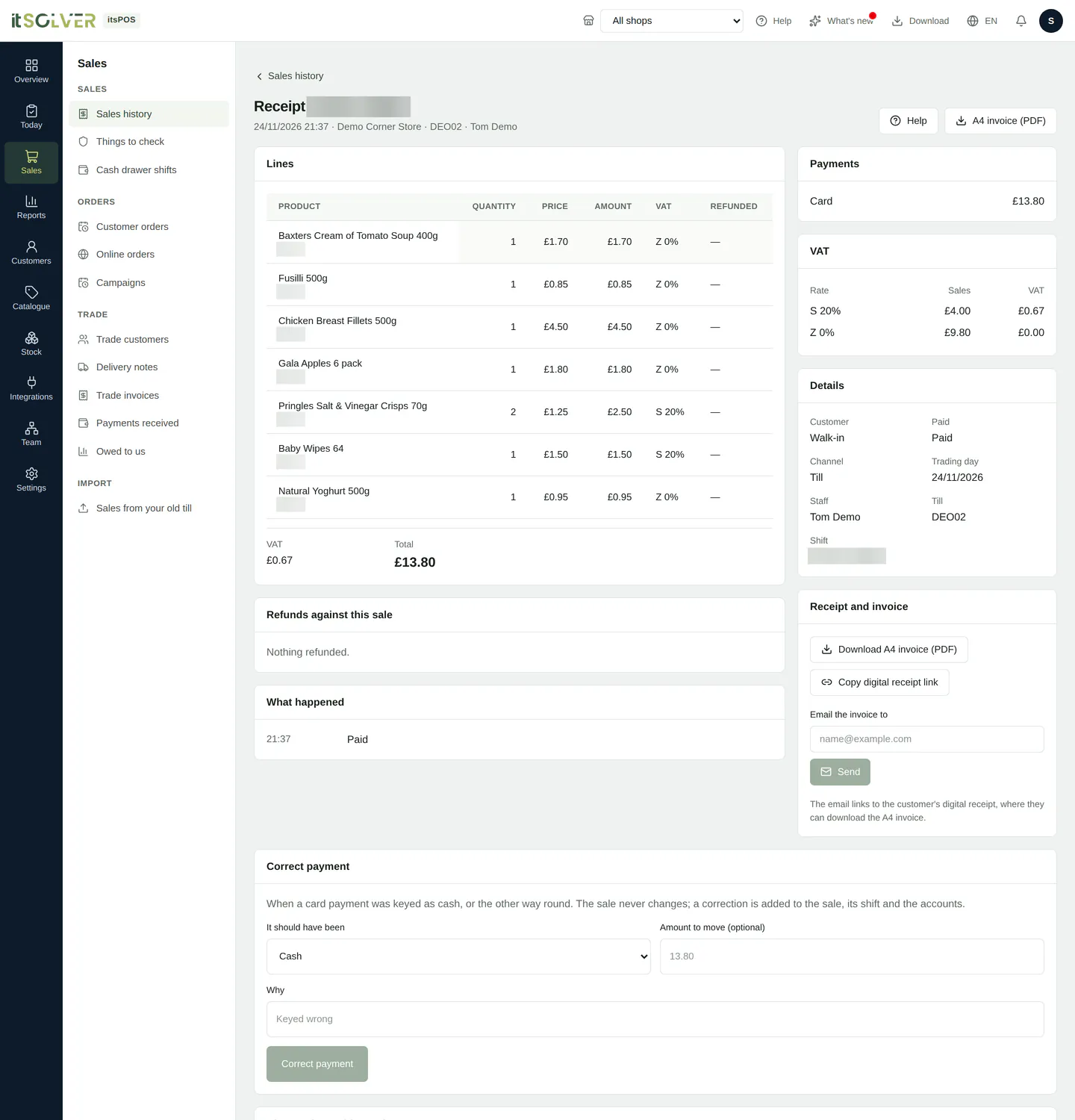
The top of the page
| Part | What it shows | Also changes |
|---|---|---|
| Title | "Receipt MAI66-000001", or "Refund MAI66-000004" for a refund | — |
| Under the title | Date and time, shop, till and the person who served: "18/11/2026 18:33 · Green Street Grocer · HC sales check · Sam Cashier" | — |
| Status badges | For example Part refunded, Corrected, Chargeback, Sent late | The same badges as the Sales history list |
| A4 invoice (PDF) / Credit note (PDF) | Downloads the sale's A4 VAT invoice, or a refund's credit note | — |
| Evidence pack (PDF) | Only when a chargeback is recorded: the receipt, VAT, payments, staff and what happened, for the bank | — |
| Archive note | "This sale is more than 13 months old, so it is kept in the archive. It opens as it was; it can still be refunded." | — |
| "Refund of receipt …" | On a refund: a link to the sale it gives back and what its credit note says | — |
| "Refund without a receipt." | On a refund given without the sale | — |
Watch video On some plans
With the camera add-on and a camera linked to the till, Watch video opens the camera's clip of the sale. Without the add-on the button isn't there.
Lines and refunds
| Part | What it shows | Also changes |
|---|---|---|
| Lines | Each product with its code, a serial number, note, line discount or approval under it; Quantity (a weighed product in kg, for example 0.51), Price, Amount, VAT (for example "Z 0%", "S 20%") and Refunded ("1 of 1") | — |
| Totals under the lines | Charges (for example a carrier bag), Discounts, VAT and Total | — |
| What was refunded (a refund) | Each item with the Reason and Where it went (back on the shelf, waste, back to the supplier) | Stock moved as it says |
| Refunds against this sale | Each refund: its receipt, date, items, amount, reason, how the money went back, "Customer agreed" for store credit and who approved it. "Nothing refunded." when there is none | — |
| "Earlier refunds gave back more than was sold or paid." | When refunds add up to more than the sale | It is also on Things to check |
Why this sale is flagged
Only on a flagged sale: each flag in words, for example "Total differs". The sale is kept as the till sent it. Someone who may update checks presses Mark as checked, types why it's OK under Why is it OK? (at least 3 letters) and presses Mark as checked again. The flag leaves Things to check; the note is kept.
What happened
The sale's timeline: "Paid", each refund ("Refund MAI66-000004 (£1.69)"), a payment corrected, the cashier changed, a customer added, a chargeback recorded, each with its time and who did it.
Payments, VAT and details
| Part | What it shows | Also changes |
|---|---|---|
| Payments | Each payment, for example "Cash £10.00, change £0.87", a card with its last 4 digits, and "Corrected: £3.19 to Card" after a correction | — |
| How the money went back (a refund) | The refund's payments, who approved it and "Customer agreed to store credit" | — |
| VAT | Rate, Sales and VAT for each VAT rate on the sale | VAT reports use the same figures |
| Details | Customer (a link, or Walk-in), Paid, Channel (Till, Online, Back office, Trade), Trading day, Staff, Till, Shift (a link to the cash drawer shift), and when they apply Approved by, Staff purchase, Online order and Customer order | — |
A sale made when an order was collected shows the order under Customer order and has no shift: the order's money was taken when it was paid, not on that shift.
Receipt and invoice
Download A4 invoice (PDF), Copy digital receipt link and Email the invoice to: see A4 invoices, credit notes and digital receipt links.
Manager actions
These cards are at the bottom of the page for people who may use them.
| Card | What it does | Who | Also changes |
|---|---|---|---|
| Correct payment | Moves a payment keyed as cash to card, or the other way round. "The sale never changes; a correction is added to the sale, its shift and the accounts." | Owners, Admins and Shop managers; over your limit an Owner or Admin approves | The shift's cash and card figures, the Payments report and your accounts |
| Change the cashier or the customer | Rung up by another person, or Add the customer to a sale that had none. See Add a customer or change the cashier after the sale | Owners, Admins and Shop managers | Sales by staff; the customer's points and history |
| Chargebacks | Records money the bank took back from a card payment, then Won or Lost | Owners and Admins | A lost chargeback comes off Net sales and VAT that day |
Still stuck?
The itsPOS support team is here 08:00 to 20:00 every day except Christmas Day.
- Call or WhatsApp: +44 7488 880320
- Email: support@itspos.io
- In the back office: Help › Contact support, or go to app.itspos.io/help/contact after you sign in
- On our website: itspos.io/contact
Tell us your shop's name and what you were trying to do. A screenshot of the screen helps.