

Sales and orders
Order in something you don't stock
Priya Shah asks for a rose perfume you don't sell. Take a special order: itsPOS makes the product, puts it on your supplier's next order, holds it for her when it arrives, and tells her. The example is SO-000003 at Green Street Grocer.
For: Owners, Admins, Shop managers, Supervisors and CashiersOn some plans4 min read
Before you start
- In the back office: Owners, Admins and Shop managers. On the till: cashiers take special orders too: see Customer orders at the till.
- Settings › Selling rules decides the deposit to suggest (20% of the order to start with), whether the customer is emailed when it arrives, what happens to the deposit if the customer cancels after you ordered (kept, a manager can refund it), and when an order counts as not collected (after 14 days).
Take the special order
Go to Sales › Customer orders, press New order and choose Special order.
Under Customer, choose the Shop, type the name, and a Phone or Email so you can reach them ("We email them when it arrives."). Ready by is optional: when the customer needs it.
Under What they want, find a product you sell under Find a product, or press Not stocked? Add it for something you don't stock:
- Name, for example Rose eau de parfum 50ml, and Price, for example 38.00.
- Supplier, for example Demo Cash & Carry Ltd, and Their code if you know it.
- Press Add it. "It's made as a product marked "Special order", kept off your online store, and added to the supplier's next order."
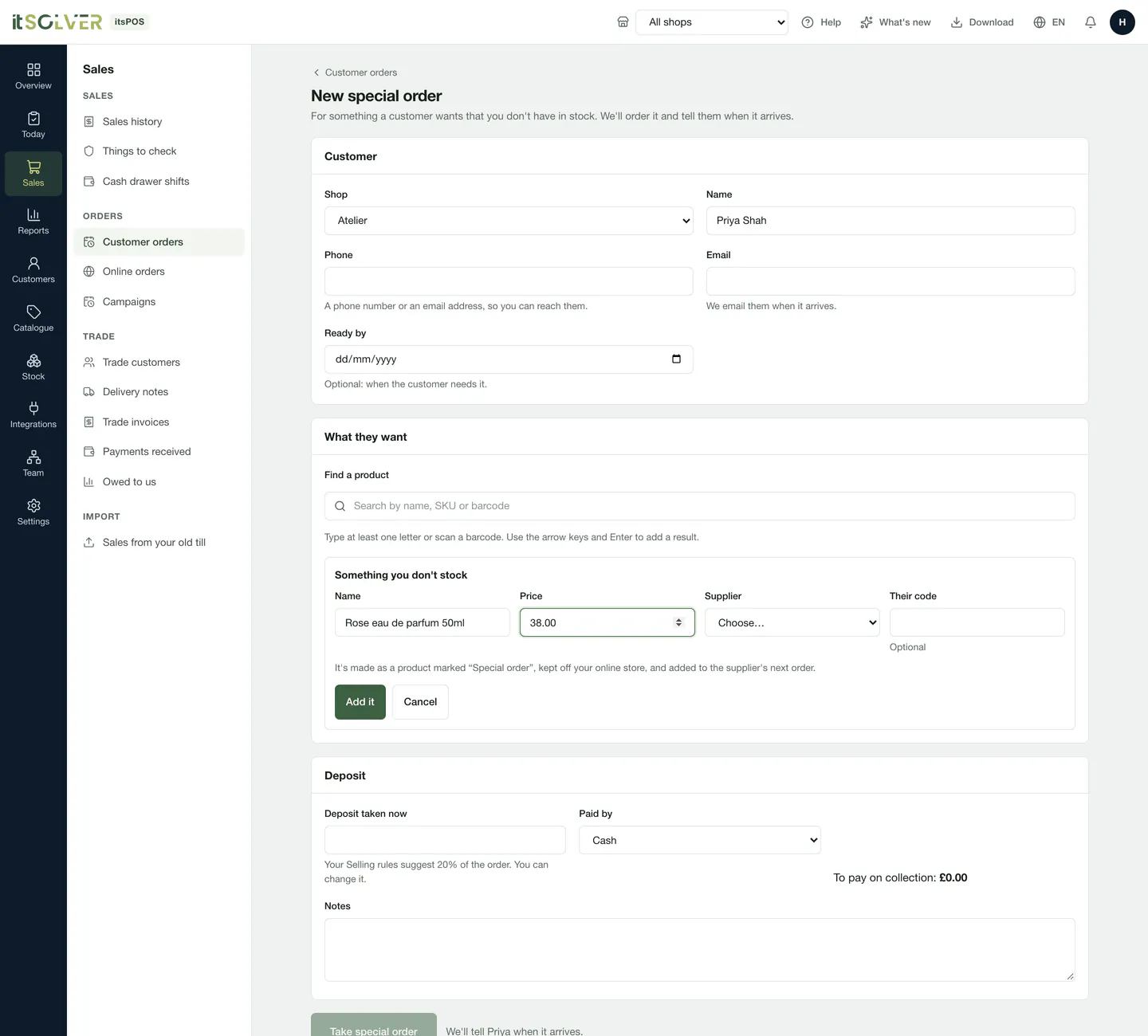
New special order For a product you stock, choose where it comes from under Order from: its main supplier, another supplier, or Put aside from stock to hold units you already have.
Use − and + for the quantity.
Deposit taken now starts at your Selling rules' suggestion ("Your Selling rules suggest 20% of the order. You can change it."), for example £7.60 on £38.00. Change it if you like, and choose Paid by. For cash, choose Where is the cash?. To pay on collection shows the rest.
Press Take special order. "Special order SO-000003 taken. It's on the supplier's next order. We'll tell the customer when it arrives."
What you see on the order
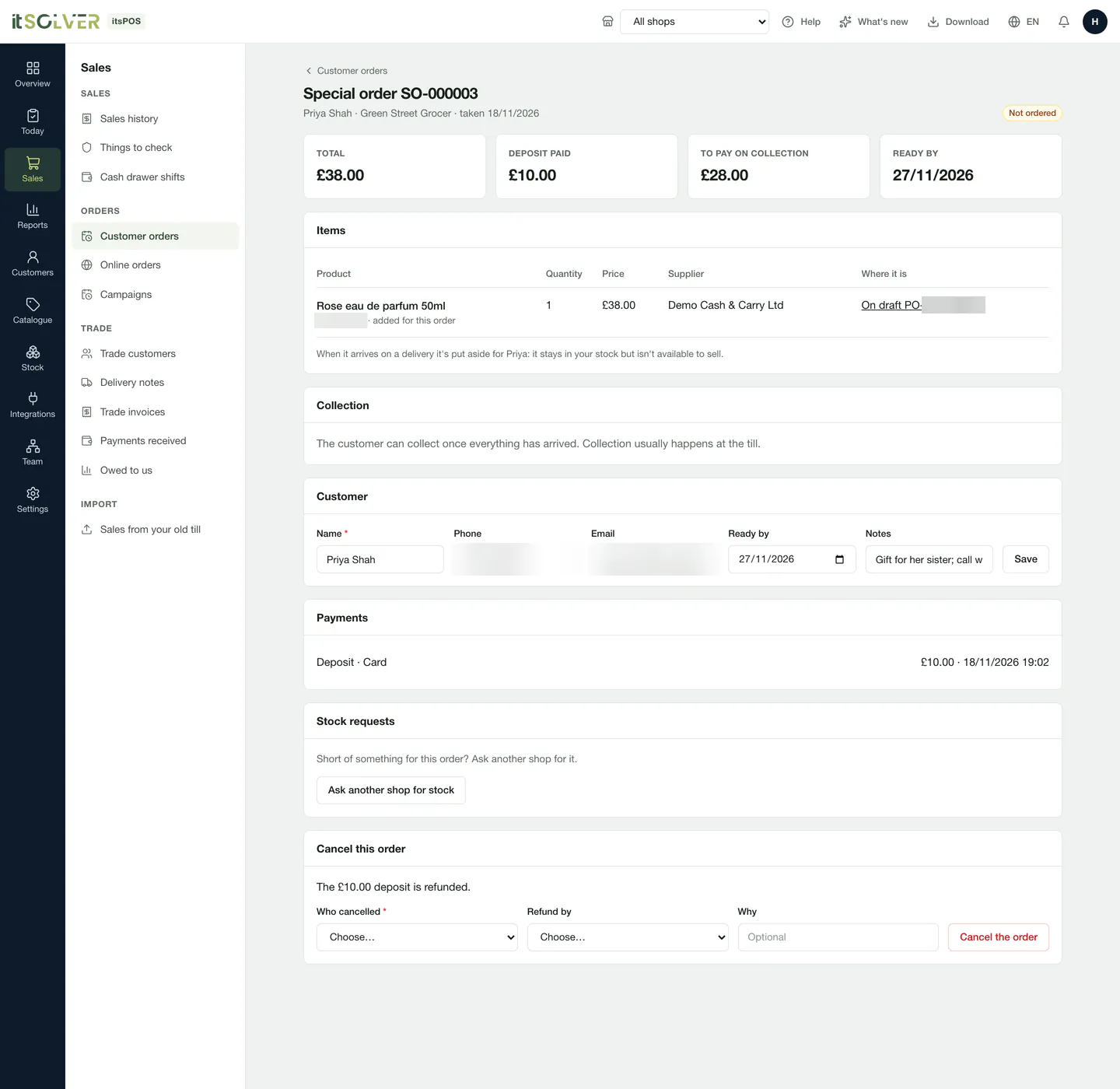
- Total, Deposit paid, To pay on collection and Ready by.
- Items with Supplier and Where it is: "On draft PO-2026-00009" until the purchase order is sent and received, then put aside for the customer.
- A product added for the order says "added for this order". It stays in your catalogue, off the online store.
- Payments, and Cancel this order at the bottom.
It has arrived: tell the customer
When the delivery with the item is received, it's put aside for the customer: it stays in your stock but isn't available to sell. If the customer has an email and your Selling rules email them, itsPOS emails them. Otherwise, under Tell the customer:
- press Email and their address to email them, or
- press I phoned them or Told them in person to note it.
The order says, for example, "Told by email on 18/11/2026 19:07." Items put aside from stock are ready straight away.
Collect it
The customer usually collects at the till: the cashier finds the order, takes the rest and hands it over (Collect an order). In the back office, under Collection, choose Balance paid by and press the collect button ("Collected: take £19.17").
Cancel it
- Under Cancel this order, choose Who cancelled: The customer, We did or The supplier (can't supply it).
- If the customer cancels after you ordered and your rules ask, choose Keep the deposit or Refund the deposit.
- Choose Refund by and, for cash, where the cash comes from. Type Why if you like.
- Press Cancel the order and confirm. "Special order cancelled. Anything put aside is back on sale."
A kept deposit can be refunded later by a manager: Refund the kept deposit on the cancelled order.
Scenario: a customer wants something you don't stock
Priya asks for a 50ml rose perfume. Take a special order with Not stocked? Add it, £38.00 from Demo Cash & Carry Ltd, £10.00 deposit by card. It goes on the draft purchase order to Demo Cash & Carry Ltd. When the delivery arrives, Priya gets an email, comes in and pays £28.00 at the till.
Still stuck?
The itsPOS support team is here 08:00 to 20:00 every day except Christmas Day.
- Call or WhatsApp: +44 7488 880320
- Email: support@itspos.io
- In the back office: Help › Contact support, or go to app.itspos.io/help/contact after you sign in
- On our website: itspos.io/contact
Tell us your shop's name and what you were trying to do. A screenshot of the screen helps.