

Real shop situations
A customer asks for cashback
A customer buys £24.80 of shopping, pays by card and asks for £20 cash back. Here's how to set cashback up once, and what the cashier does at the till.
For: Owners, Admins and Cashiers3 min read
Needs itsPOS Till 0.5.33 or later.
The situation
Green Street Grocer is the only shop on the street, and regulars ask for cash with their card payment. The owner wants to offer it, but never more than £50 at a time, and only when there's enough cash in the drawer. Cashback works with your card machine: the card machine charges the shopping and the cashback together, and the cash comes out of the drawer.
Card payments are on every plan; the itsPOS support team switches them on for your business when you ask.
Set it up in the back office
- Go to Settings › Card machine and choose the Shop.
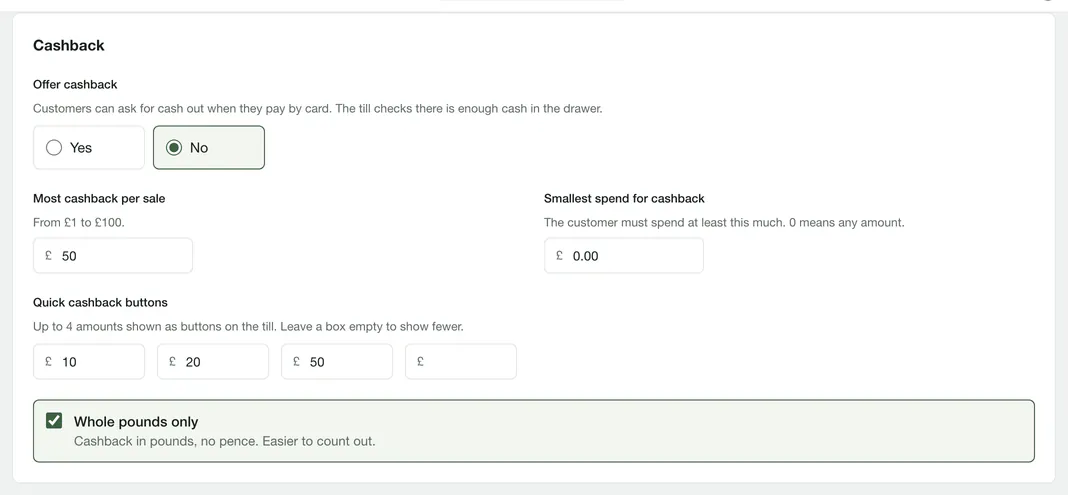
- Under Cashback, set Offer cashback to Yes. "Customers can ask for cash out when they pay by card. The till checks there is enough cash in the drawer."
- Most cashback per sale: for example £50 (from £1 to £100).
- Smallest spend for cashback: for example £5, or 0 for any amount.
- Quick cashback buttons: up to 4 amounts shown as buttons on the till, for example £10, £20 and £40.
- Whole pounds only: on, so nobody counts out pence.
- Save. Tills get the change within a minute.
Give cashback at the till
Scan the shopping as usual.
Tap Pay, then Cashback. The Card button under the basket never asks about cashback, so always go through Pay.
Tap £20.00 (or type the amount), then Done. Paying now shows "+ £20.00 cashback".
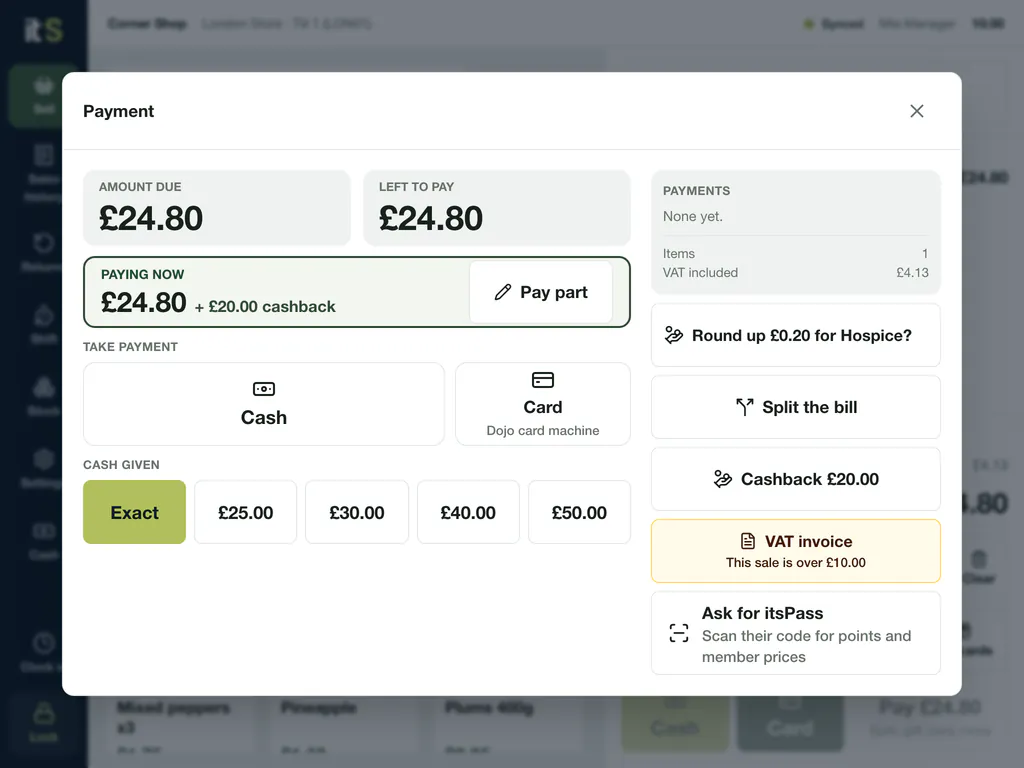
Tap Card. The card machine asks for £44.80: the shopping and the cashback together.
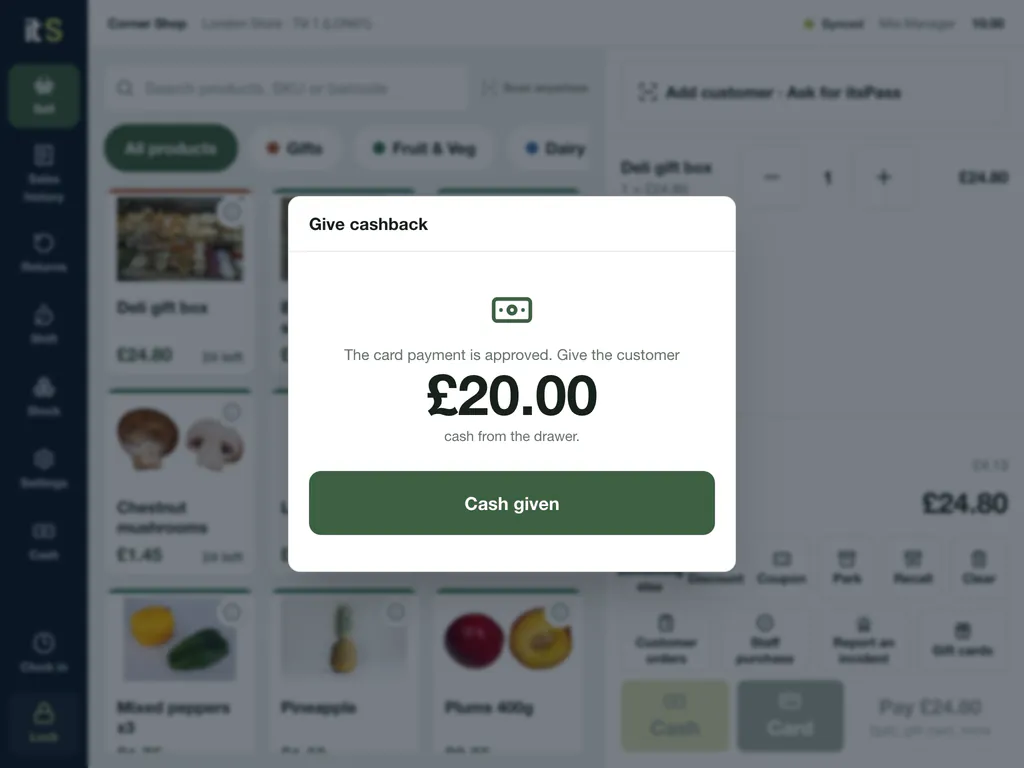
When the card is approved, the drawer opens and the till says "The card payment is approved. Give the customer £20.00 cash from the drawer." Count out the cash and tap Cash given.
Give cashback on the till
If something isn't right, the till says so before the card machine is asked, for example "Not enough cash in the drawer for £20.00 cashback.", "Cashback can be at most £50.00." or "Cashback needs a purchase of at least £5.00." Offer a smaller amount, or no cashback.
If the card machine approves the shopping but not the cashback, the till tells you not to give the cash.
What you'll see afterwards
- The receipt shows the shopping, the card payment of £44.80 and a line "Cashback paid out" −£20.00.
- The shift's expected cash goes down by £20.00, so the drawer still adds up at close. The Z report shows "Card cashback paid out" and "Card charged incl. cashback".
- The card machine's end-of-day total includes the cashback, and the till's card total does too, so they still match.
Guides used
- Taking payment at the till: the payment screen and cashback.
- How card payments work: how card payments work.
- Close the shift and cash up: the count at the end of the day.
- End of day card totals.
Still stuck?
The itsPOS support team is here 08:00 to 20:00 every day except Christmas Day.
- Call or WhatsApp: +44 7488 880320
- Email: support@itspos.io
- In the back office: Help › Contact support, or go to app.itspos.io/help/contact after you sign in
- On our website: itspos.io/contact
Tell us your shop's name and what you were trying to do. A screenshot of the screen helps.