

Real shop situations
Selling tobacco from 1 January 2027
From 1 January 2027 it's illegal to sell tobacco, herbal smoking products and cigarette papers to anyone born on or after 1 January 2009, whatever their age. itsPOS asks the question for you. Here's how to get ready.
For: Owners, Admins, Shop managers and Cashiers4 min read
Needs itsPOS Till 0.5.33 or later.
The situation
Green Street Grocer sells cigarettes, rolling tobacco and papers. On New Year's Day a young man who turned 18 in 2026 asks for 20 cigarettes. Before 2027 that was a normal age check. From 1 January 2027 he can never buy tobacco, because he was born after 1 January 2009. Staff need to ask the right question every time, and you need a record that they did.
Get ready in December
In the back office, open each tobacco product (Catalogue › Products) and check Kind of product is Tobacco (born before 1 Jan 2009). Rolling tobacco, herbal smoking products and cigarette papers too. Vapes go under Vapes and nicotine products instead: the 2009 rule isn't for them.
To do many at once, give the tobacco category the right age limit: Settings › Compliance › Age limits on categories, Change to Tobacco (born before 1 Jan 2009): 18 or over, then Save. Products follow their category unless they have their own.
On the same page, check Tobacco: check the date of birth (from 1 January 2027) is Yes. It's on to start with. You don't need to do anything on 1 January: every till switches on by its own clock at midnight, even offline.
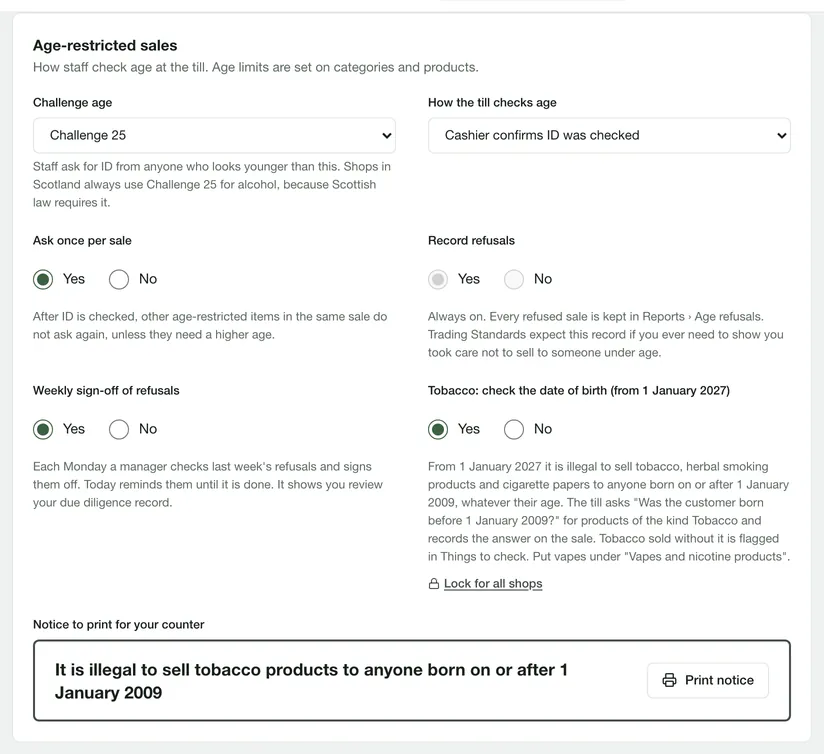
Settings › Compliance › Age-restricted sales Under Notice to print for your counter, press Print notice and put it up next to the till: "It is illegal to sell tobacco products to anyone born on or after 1 January 2009".
Check each shop that sells tobacco has Tobacco ticked under This shop is licensed to sell in Settings › Shops. Tills in a shop without it hide tobacco.
Tell your staff: from 1 January the question is "born before 1 January 2009?", not "18 or over?".
At the till from 1 January
- The cashier scans the cigarettes. The till asks "Was the customer born before 1 January 2009?".
- The cashier checks the ID and taps Yes, born before 2009, or types the date of birth from the ID on the keypad.
- A date of birth on or after 1 January 2009 is refused whatever the customer's age: "Customer was born on 3 March 2009. Tobacco can only be sold to people born before 1 January 2009." Tap Refuse sale: the refusal is recorded, without the internet too. Other things in the basket still sell.
- The answer is recorded on the line with who checked.
Online
- A tobacco product's page in your online store says "From 1 January 2027 this can only be sold to people born before 1 January 2009."
- A basket with tobacco says so, and at checkout the shopper must confirm they were born before 1 January 2009: "ID will be checked on collection or delivery." Check the ID when they collect or when you deliver.
What you'll see afterwards
- Tobacco sold without the question answered (for example on an old till that missed an update) shows in the back office's list of things to check as "Tobacco without the age check".
- Refusals are in the age refusals report, and each shop signs off last week's refusals in Settings › Compliance › Refusals: see Age checks.
- Tobacco is left out of promotions and loyalty points by law: Leave out of promotions and loyalty points is automatically yes for tobacco.
Guides used
Still stuck?
The itsPOS support team is here 08:00 to 20:00 every day except Christmas Day.
- Call or WhatsApp: +44 7488 880320
- Email: support@itspos.io
- In the back office: Help › Contact support, or go to app.itspos.io/help/contact after you sign in
- On our website: itspos.io/contact
Tell us your shop's name and what you were trying to do. A screenshot of the screen helps.