

Real shop situations
A price rise reaches the deli label scale
The cheese supplier puts its prices up and you raise Blue Stilton from £28.00 to £29.50 a kg. Your label scale at the deli counter needs the new price before the next customer, and the labels it prints must scan at the till at that price.
For: Owners, Admins and Shop managers4 min read
Needs itsPOS Till 0.5.35 or later.
The situation
Green Street Grocer's deli counter has a label scale. Staff weigh the cheese, the scale prints a label with a barcode, and the cashier scans the label at the till. The scale's prices come from itsPOS: when you change a price in the back office, itsPOS sends the scale a new file. Nobody types prices on the scale.
This needs the scale set up once in Settings › Hardware (see label scales) and the scale's label barcode matched to your tills (see Barcodes on scale labels).
Change the price
- In the back office, open Blue Stilton (from the counter) in Catalogue › Products.
- Change the price per kg from 28.00 to 29.50 and save. If your business uses price approval, approve it, or have a manager approve it.
- That's all you do. itsPOS makes a new file for every scale with Blue Stilton on it.
The price reaches the scale
While Send changes automatically is on for the scale, the new price goes to the scale within 5 minutes. It goes one of three ways, chosen on the scale's page under How the scale gets its files:
- A till in this shop puts them in the scale's folder: a till in the same shop writes the file into the folder the scale's own software watches. On that till, Send now sends at once.
- The itsPOS Scale Sync app on the scale's own Windows PC, which the itsPOS support team switches on for your shop when you ask: see The itsPOS Scale Sync app.
- I download the file and import it myself: press Download the file and import it in the scale's software.
Open Settings › Hardware and the scale. Its page shows the newest version, when it went and which till sent it, for example "Up to date: version 2 delivered".
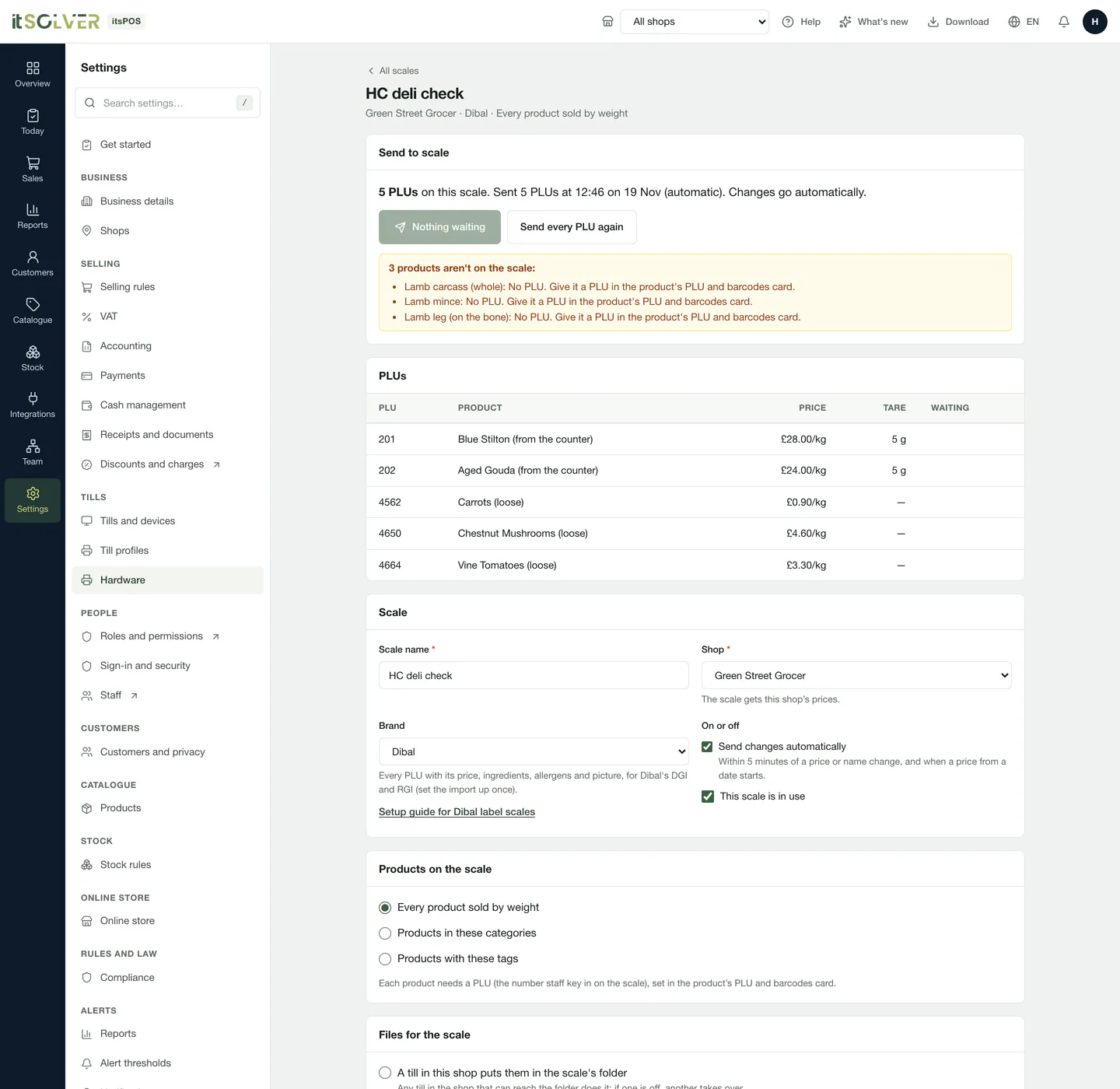
A scale's page in Settings › Hardware On the scale, call up PLU 201. It shows £29.50 per kg.
If the scale hasn't had the latest prices for 20 minutes, Settings › Hardware shows an amber alert on the scale. Check the till that sends the files is on, or download the file and import it.
Scan a label at the till
- Weigh a piece of Blue Stilton on the scale and print its label.
- Scan the label at the till. The till reads the PLU and the price from the barcode and adds Blue Stilton at the label's price.
- To check a label without selling, a manager types the label's barcode in Settings › Selling rules › Test a barcode and presses Test: it says which product and price the till would sell.
What you'll see afterwards
- The till sells the cheese at the price printed on the label, so the label and the receipt always agree.
- A label printed before the change still scans at its old price. Reprint labels for cheese already wrapped.
- Shelf-edge labels for Blue Stilton show up under Catalogue › Print labels as labels to reprint.
Guides used
- label scales: setting up the scale and testing it.
- Settings › Hardware: scales, PLUs and Send to scale.
- Barcodes on scale labels.
- Change a price.
- Set up loose and weighed items: PLUs and tare.
Still stuck?
The itsPOS support team is here 08:00 to 20:00 every day except Christmas Day.
- Call or WhatsApp: +44 7488 880320
- Email: support@itspos.io
- In the back office: Help › Contact support, or go to app.itspos.io/help/contact after you sign in
- On our website: itspos.io/contact
Tell us your shop's name and what you were trying to do. A screenshot of the screen helps.