

Real shop situations
Quarter-end VAT
Green Street Grocer's VAT quarter ended on 31 October. The owner and the accountant, Alia, need the return filed by 7 December, and nothing should change the quarter after it's filed.
For: Owners, Admins and Accountants3 min read
The situation
itsPOS works out the nine boxes of the VAT return from your sales, refunds and supplier invoices. It doesn't file the return itself: you or your accountant copy the boxes into your Making Tax Digital (MTD) software, or upload the CSV. After filing, you lock the books so a late sale from an offline till, or a refund dated in the quarter, can't change what you filed.
Your accountant can do all of this with the Accountant role, which sees reports and accounts but can't sell or change settings.
Check your VAT quarters once
In Settings › VAT › VAT quarters, choose the quarters on your VAT registration certificate, for example Quarters ending Apr, Jul, Oct, Jan. Check your VAT scheme on the same page: Standard accounting, Cash accounting or Flat Rate Scheme.
1 Check the boxes
Go to Reports › VAT return. Your last 8 VAT periods are listed with Box 1 VAT due on sales, Box 4 VAT reclaimed, Box 5 Net VAT, Box 6 and Box 7.
Tap the period, for example Aug–Oct 2026.
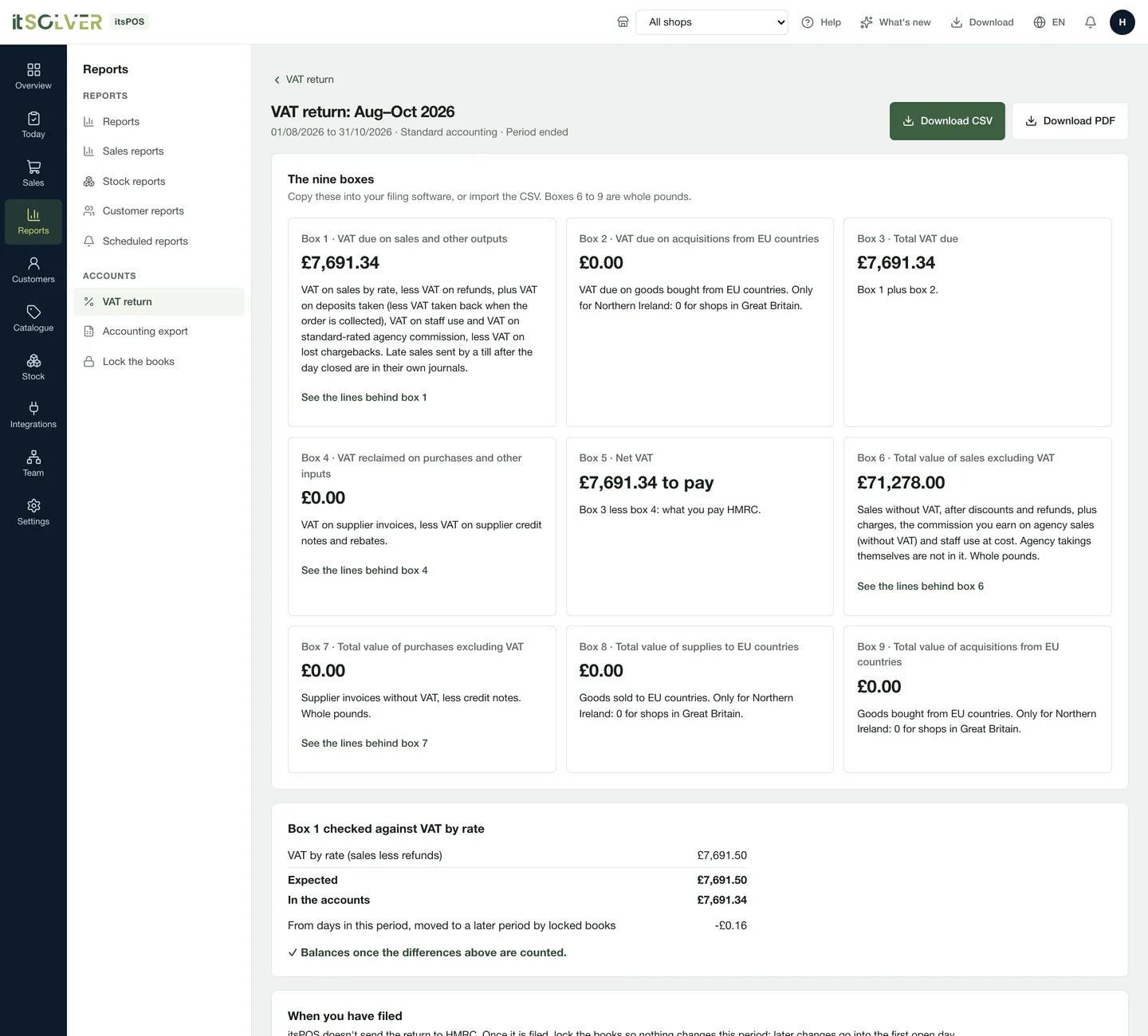
Reports › VAT return for Aug–Oct 2026 Check Box 1 checked against VAT by rate: it should say ✓ Balances. If it says "Doesn't balance", don't file: contact us with the period.
Tap See the lines behind box 1 (or 4, 6, 7) to see every amount in it. Check that every supplier invoice of the quarter is in box 4 and 7: a missing one means you reclaim less VAT.
2 Download and file
- Tap Download CSV for your MTD software or accountant, or Download PDF to keep.
- File the return with HMRC in your MTD software.
- Your accountant may also want the quarter's journals: Reports › Accounting export, choose the file (for example the Xero or QuickBooks journal), the dates and Export CSV.
3 Lock the books
Go to Reports › Lock the books.
In Lock the books up to, choose the last day of the quarter, 31 Oct 2026.
Tap Lock the books. itsPOS asks "Lock the books up to 31 October 2026? Changes for dates up to 31 October 2026 will go into the accounts on 1 November 2026. You can move the date back or unlock later."
Tap Lock the books again.
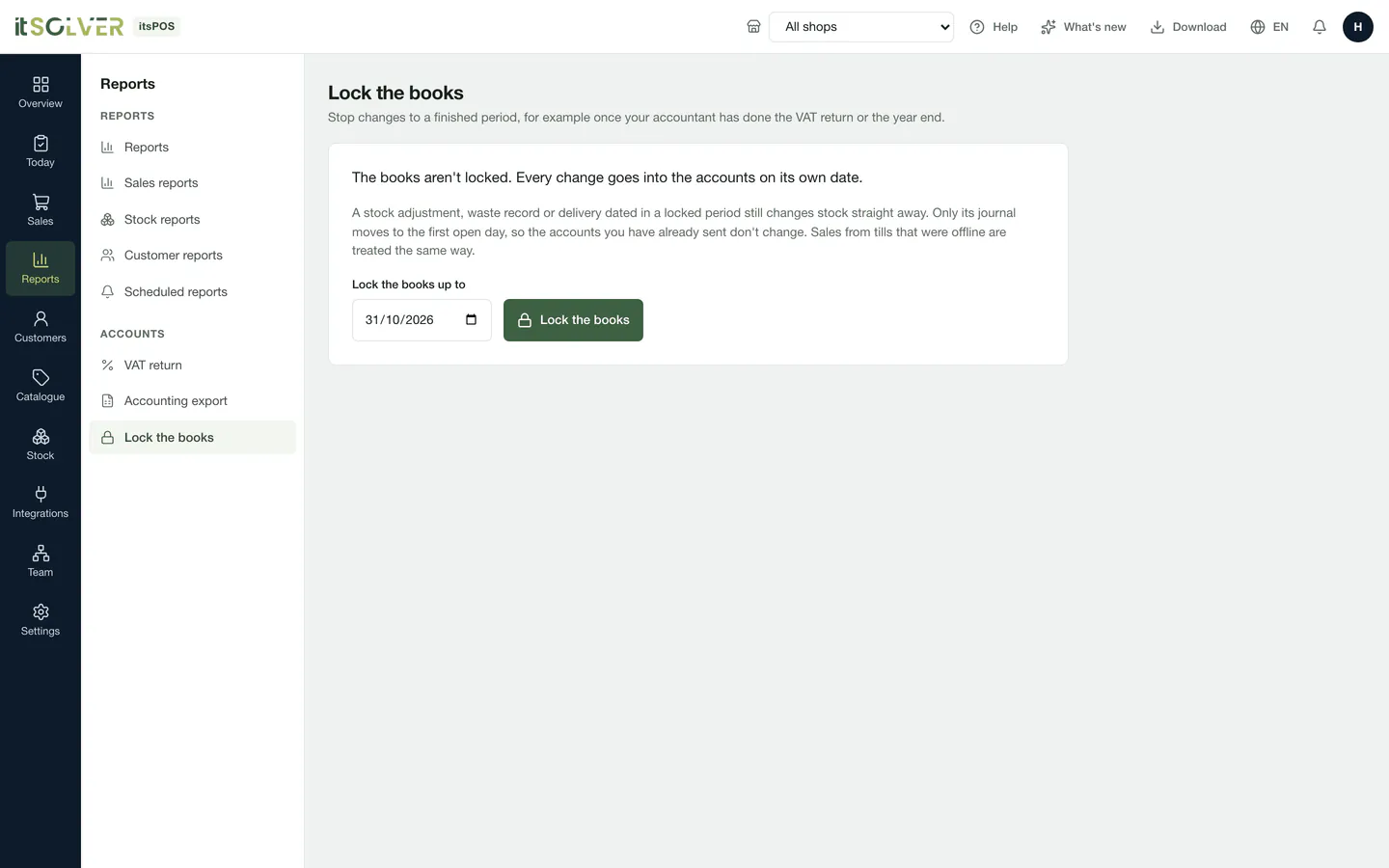
Reports › Lock the books
What you'll see afterwards
- A sale from 31 October that arrives late (a till that was offline) goes into the accounts on 1 November, in the next quarter. The VAT return lists it so box 1 still balances.
- The next quarter's return includes it, so nothing is lost or counted twice.
- If your accountant finds a mistake, an Owner, Admin or Accountant can move the date back or unlock, correct it, and lock again.
Guides used
- Your VAT return boxes.
- Lock the books after filing.
- Files for your accountant.
- VAT by rate.
- VAT rates: VAT quarters and your VAT scheme.
Still stuck?
The itsPOS support team is here 08:00 to 20:00 every day except Christmas Day.
- Call or WhatsApp: +44 7488 880320
- Email: support@itspos.io
- In the back office: Help › Contact support, or go to app.itspos.io/help/contact after you sign in
- On our website: itspos.io/contact
Tell us your shop's name and what you were trying to do. A screenshot of the screen helps.