

Real shop situations
Selling loose fruit by weight
Green Street Grocer starts selling loose vine tomatoes at £3.30 a kilo. This walks through setting up the product, the scale, weighing at the till, the receipt, and what the online store shows.
For: Owners, Admins, Shop managers and Cashiers5 min read
Needs itsPOS Till 0.5.35 or later.
The situation
Customers pick their own tomatoes into a paper bag and bring them to the till. The till has to weigh them, work out the price, and print a receipt with the weight and the price per kg, because UK law asks for that when you sell by weight. The online store can't weigh anything, so loose tomatoes are for the shop only.
Set up the product
In the back office, go to Catalogue › Products, choose Add product, then Sold by weight and Continue.
Type the Product name "Vine Tomatoes (loose)", choose the category Fruit & Veg and the VAT rate (zero for fresh fruit and veg).
Price per kg: 3.30. "Including VAT. The till works out the price from the weight."
In PLU and barcodes, type the PLU: 4664, the number your scale or label printer uses for it.
Under Selling rules, choose How it's weighed: on the till's scale.
Add a photo and choose Add product. Tills get it within a minute.
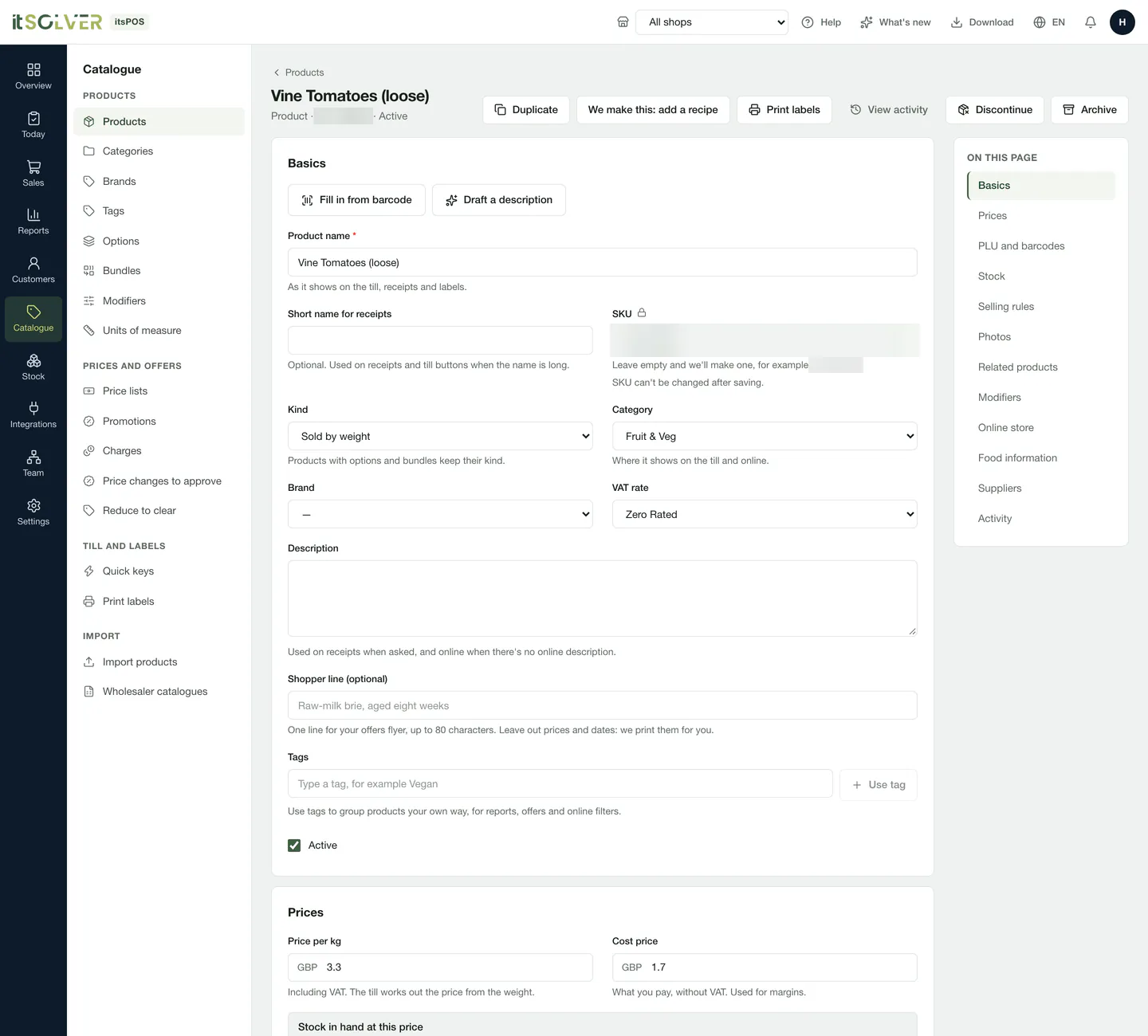
The product editor for Vine Tomatoes (loose)
Connect the scale
- Go to Settings › Till profiles, open the till profile and find Scale. Only Owners and Admins change it.
- Choose your scale, for example Datalogic Magellan 9800i or Dibal KS-400, and save. The till shows "Scale needs re-checking" and "Not for trade use": that's expected.
- Set up the scale on the till with its guide. For a Magellan, download and print its set-up guide for one cable or two cables: Set up a Datalogic Magellan 9800i scanner-scale.
- Settings › Compliance › Weighed goods lists each till's scale with Trade use on, Not for trade use or Needs re-checking. Weighed items always print a receipt is Required by law and can't be turned off.
- Once an approved verifier or Trading Standards has checked the scale and the till together in your shop, an Owner or Admin presses Switch on trade use on the till's row and ticks the declaration: see Selling by weight legally.
Until trade use is switched on, the scale's weights show "Not for trade use" on the till. Use a separate scale that is approved for trade, where the customer can see it, and type the weight instead. Every role that sells may type a weight to start with; your business can make it need a manager's approval, or not allowed, in Team › Roles.
Weigh at the till
Tap or scan Vine Tomatoes (loose). The till opens "Weigh Vine Tomatoes (loose)" with "£3.30 per kg".
Put the bag on the scale and wait until the weight stops changing.
Tap Add the weight from the scale. The till adds a line, for example 0.500 kg at £1.65.
Without an approved scale on the till, type the weight from your approved scale in grams, for example 500, and tap Add.
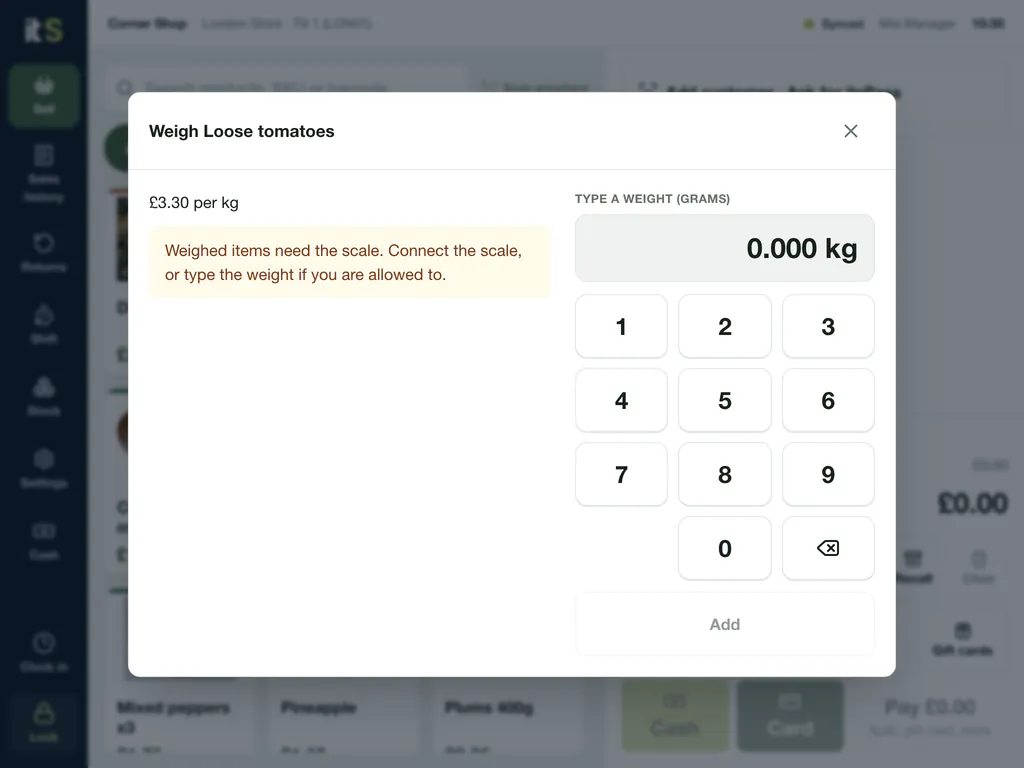
The weigh sheet on the till for Loose tomatoes at £3.30 per kg with no scale A second bag of the same tomatoes is weighed the same way. To take one weighing off, tap the line and use Remove on the Weighings tab.
Take payment as usual. The receipt always prints for a sale with weighed items. If the printer isn't working, the till stops at Printer needed until it is: see The printer stops on a busy Saturday.
What the receipt shows
Each weighed line shows the product, then the weight and the price per kg under it, for example "Vine Tomatoes (loose)" and "0.500 kg @ £3.30/kg £1.65". Two weighings of the same product show one row each.
Online
Products sold by weight aren't sold online. In your online store, Vine Tomatoes (loose) shows its price per kg and "Available in our shops", with no Add to basket button.
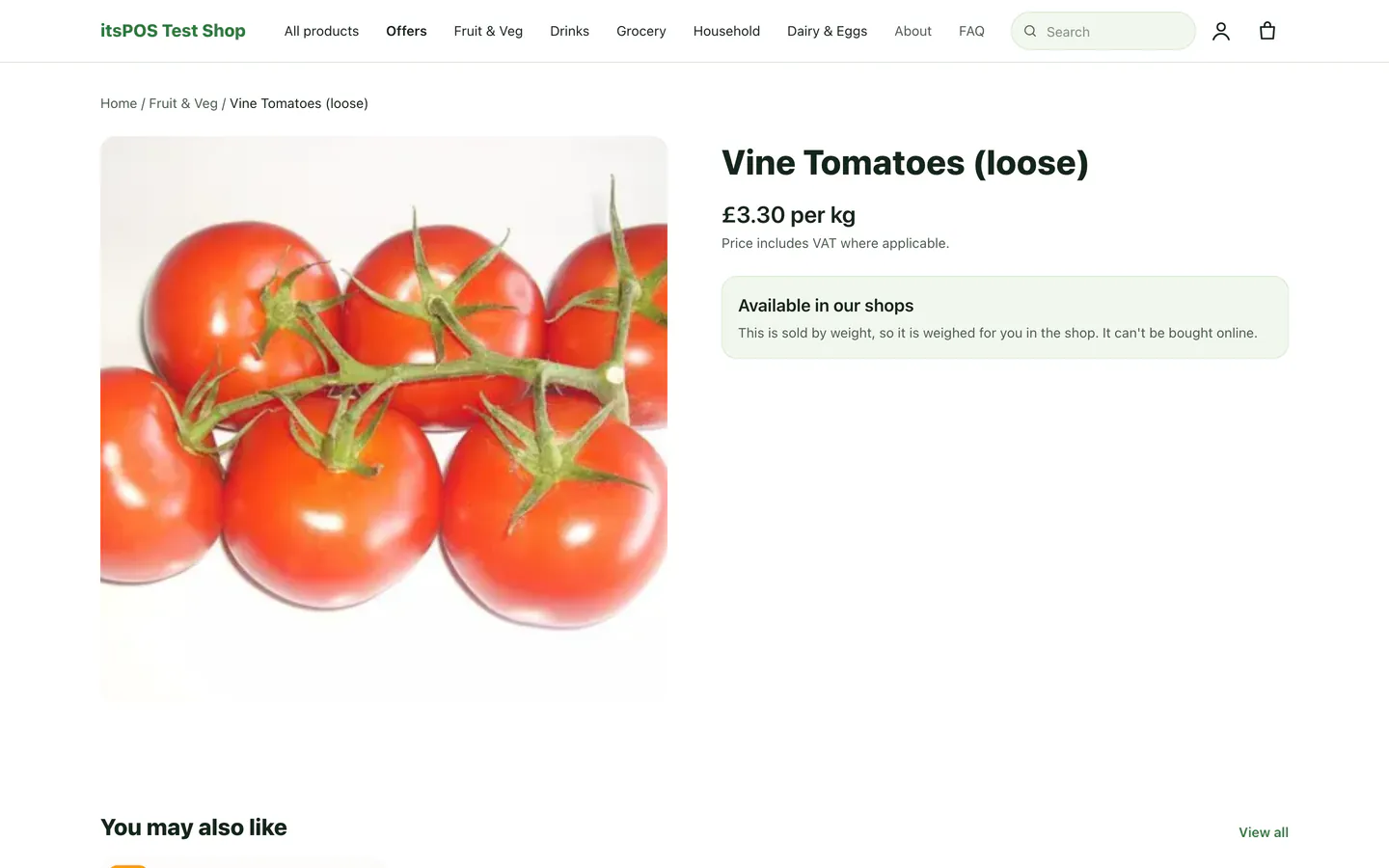
What you'll see afterwards
- Stock of a weighed product is kept in kg, so deliveries and counts weigh it too.
- Shelf labels show the price per kg, as the law asks: see Weighed goods and unit prices.
- Reports show weighed items in kg.
Guides used
- Set up loose and weighed items: price per kg, PLU, tare and how it's weighed.
- Sell by weight: the weigh sheet on the till.
- Selling by weight legally: approved scales, "Not for trade use" and typing a weight.
- Weighed goods and unit prices.
- Barcodes and weighed items: price labels from a counter scale and weighing the same product twice.
- Scale guides: Datalogic Magellan 9800i, with its set-up guides to print and Dibal KS-400.
Still stuck?
The itsPOS support team is here 08:00 to 20:00 every day except Christmas Day.
- Call or WhatsApp: +44 7488 880320
- Email: support@itspos.io
- In the back office: Help › Contact support, or go to app.itspos.io/help/contact after you sign in
- On our website: itspos.io/contact
Tell us your shop's name and what you were trying to do. A screenshot of the screen helps.