

Real shop situations
The card machine isn't linked
The till says Card machine not linked when a customer wants to pay by card. Keep serving: your card machine still takes cards on its own.
For: Owners, Admins, Shop managers and Cashiers3 min read
Needs itsPOS Till 0.5.33 or later.
The situation
Saturday lunchtime, a queue of six. A customer's basket comes to £24.80 and they want to pay by card. The cashier taps Card, but instead of sending the amount to the card machine the till says Card machine not linked: the shop's internet is down, or itsPOS can't reach the card payment partner for a moment.
Your card machine has its own mobile signal, so it can still take the payment. The till just can't send it the amount.
Card payments are on every plan; the itsPOS support team switches them on for your business when you ask.
Take the payment on the card machine
On the till, tap Card (or Pay, then Card) as usual. The till shows Card machine not linked, with the amount to take, here £24.80.
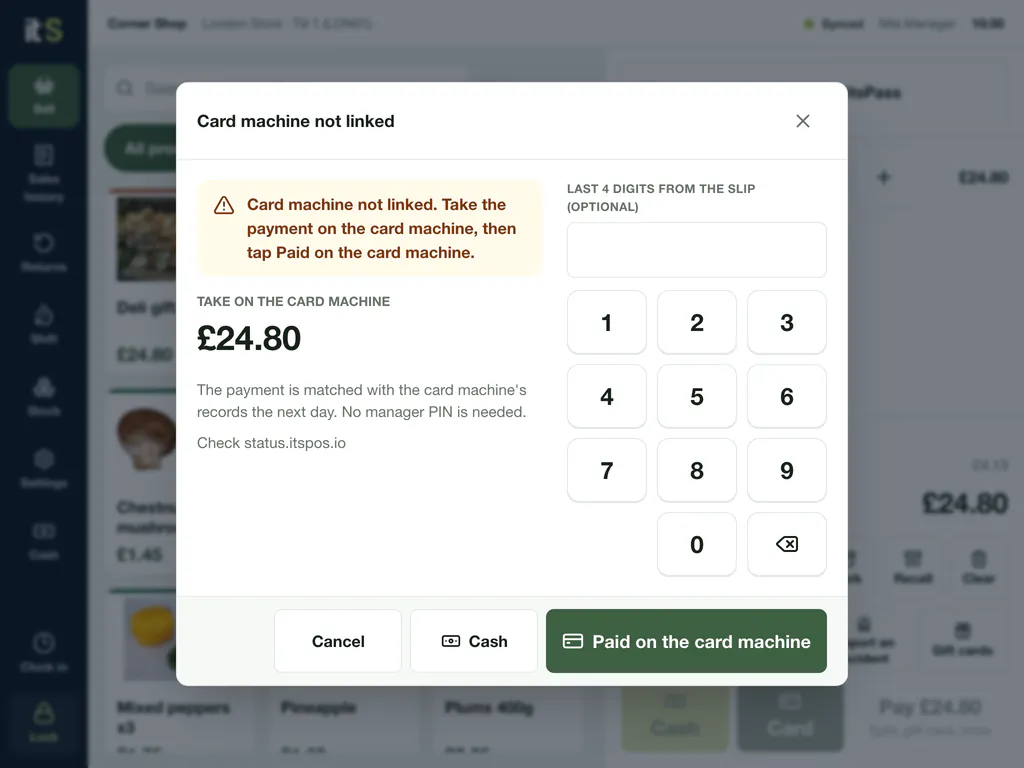
Card machine not linked on the till Key £24.80 into the card machine yourself and let the customer tap or insert their card.
When the card machine says the payment is approved, type the last 4 digits from the slip if you like. It helps the matching but you can leave it out.
Tap Paid on the card machine. No manager PIN is needed. The sale is saved and the receipt prints as usual, even with no internet.
If the card machine declines the card, tap Cancel and ask for another card, or tap Cash.
A refund works the same way: do the refund on the card machine, then tap Refunded on the card machine on the till.
Find out what's wrong
- If the internet is down, the till shows it at the top of the screen and keeps selling: see Broadband down for a day.
- If the internet works, look at status.itspos.io (the link is on the till's message) to see whether card payments are affected for everyone.
- In the back office, Settings › Card machine shows the card machine of each till in each shop. Check the till still has its card machine there.
- When the till can reach the card machine again, the Card machine not linked message goes away by itself and Card sends the amount to the machine again.
What you'll see afterwards
- The sale is in the till's sales history and in Sales › Sales history in the back office like any other card sale.
- The next morning itsPOS matches each payment taken this way with your card payment partner's own records. You don't need to do anything when they match.
- A payment that can't be matched, for example one keyed for the wrong amount, shows on the morning's list of things to check in the back office, so you can look into it.
- At the end of the day, the card machine's total is still checked against the till's card payments when the shift closes: see End of day card totals.
Guides used
- How card payments work: how card payments work with itsPOS.
- card machine: connecting the card machine to a till.
- Taking payment at the till: Card, Pay and the payment screen.
- Selling without the internet: what else works offline.
Still stuck?
The itsPOS support team is here 08:00 to 20:00 every day except Christmas Day.
- Call or WhatsApp: +44 7488 880320
- Email: support@itspos.io
- In the back office: Help › Contact support, or go to app.itspos.io/help/contact after you sign in
- On our website: itspos.io/contact
Tell us your shop's name and what you were trying to do. A screenshot of the screen helps.