

Stock
Who approves stock changes, and how much
Some stock changes wait for a manager before they change anything: big waste, big adjustments, counts that are far out. You set the amounts in Stock › Stock rules, and you can give each role its own limit.
For: Owners, Admins and Shop managers3 min read
The amounts
In Stock rules › Approvals (at cost, without VAT). Leave an amount empty if those documents never need approval.
| Setting | Default | What it does |
|---|---|---|
| Purchase orders above this amount need approval | empty | Bigger orders wait before you can send them |
| Supplier credits above this amount need approval | empty | Bigger credit notes wait |
| Supplier returns above this amount need approval | empty | Bigger returns wait |
| Waste above this amount needs approval | empty | Bigger waste records wait |
| All waste needs approval | off | Every waste record waits, whatever its value |
| Approve stock counts automatically up to this value | £500 | A count is approved straight away when no line is out by more than this value... |
| Approve stock counts automatically up to this difference (%) | 2% | ...or this percentage (empty: no percentage limit) |
| All stock counts need approval | off | Every count waits |
In Stock rules › Adjustments: Adjustments need approval (Over a value, the default, or Off) and Adjustments above this value need approval (£100). The value is what the adjustment adds or takes away, at cost.
Who may approve
To approve, a person needs the approve permission in their role (for example Waste: Approve). Owners, Admins and Shop managers have it; Supervisors, Cashiers and Stock staff don't.
- Someone who may approve, within their limit, records the change and it is completed at once.
- Anyone else's change over the amount waits and shows Waiting for approval. It changes nothing until it is approved.
- On the till, a manager can approve on the spot with their PIN or badge, within their own limit.
- A stock request needs someone other than the person who asked to approve it.
Limits for each role
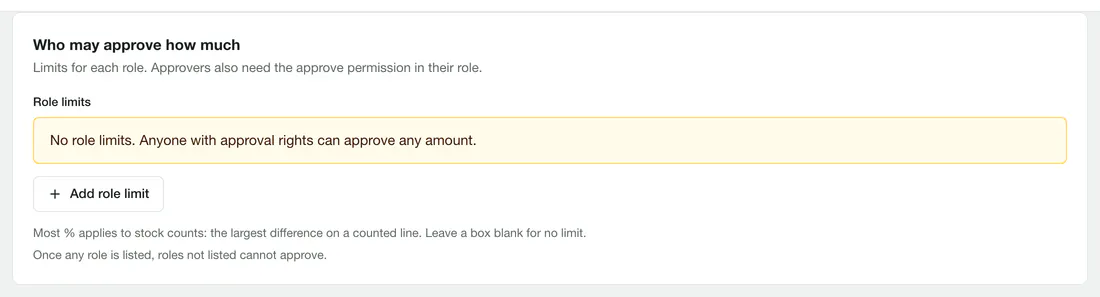
Stock rules › Who may approve how much gives each role a top amount.
- Press Add role limit.
- Choose the Role, for example Shop manager.
- Choose the Documents: All stock documents, or one kind (Purchase orders, Supplier credits, Supplier returns, Waste, Stock counts, Stock adjustments).
- Type the most it may approve in Most GBP, for example 20. Most % applies to stock counts: the largest difference on a counted line. Leave a box blank for no limit.
- Press Save changes.
"Once any role is listed, roles not listed cannot approve." So when you add a limit for Shop managers, also add Owner and Admin with All stock documents and no amount, or they can't approve.
Example: only managers approve waste over £20
Rows: Owner, all stock documents, no limit; Admin, all stock documents, no limit; Shop manager, Waste, £20. Waste above this amount needs approval: £5.
- Stan (Stock) records £6.10 of damaged Persil on the till: it waits for approval.
- Stan records £12.20 and Mia (Shop manager) approves with her PIN on the till: it is completed.
- Stan records £25.60 of batteries and Mia approves: it is over Mia's £20, so it still waits for an Owner or Admin in the back office.
Still stuck?
The itsPOS support team is here 08:00 to 20:00 every day except Christmas Day.
- Call or WhatsApp: +44 7488 880320
- Email: support@itspos.io
- In the back office: Help › Contact support, or go to app.itspos.io/help/contact after you sign in
- On our website: itspos.io/contact
Tell us your shop's name and what you were trying to do. A screenshot of the screen helps.