

Customers and itsPass
Automatic groups: New, Regular, Best, At risk and Lapsed
itsPOS puts every itsPass member in an automatic group from their visits: every night, and straight away after a sale. You don't add anyone by hand. A member keeps their own group (for example VIP or Staff) as well.
For: Owners, Admins and Shop managers3 min read
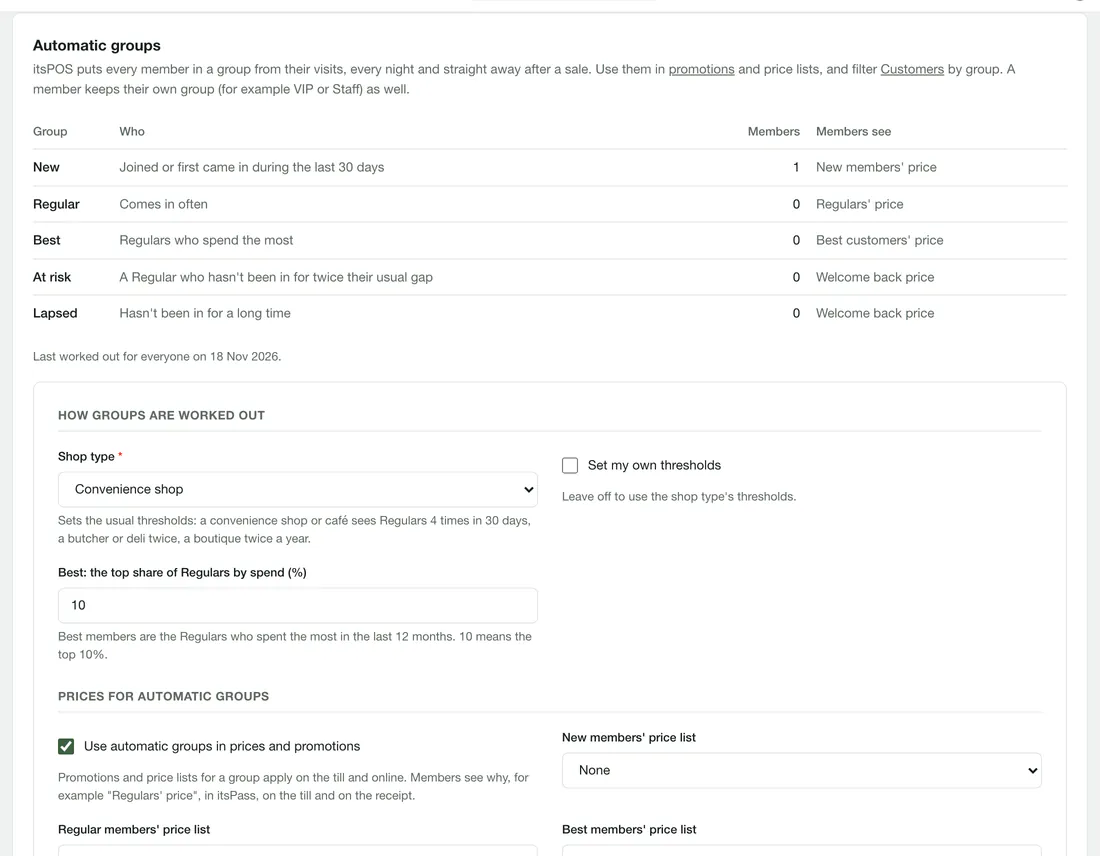
The five groups
| Group | Who | What members see on a price |
|---|---|---|
| New | Joined or first came in during the last 30 days | New members' price |
| Regular | Comes in often | Regulars' price |
| Best | Regulars who spend the most | Best customers' price |
| At risk | A Regular who hasn't been in for twice their usual gap | Welcome back price |
| Lapsed | Hasn't been in for a long time | Welcome back price |
Only itsPass members are in automatic groups; invited customers and trade accounts aren't.
How "often" is worked out
Under How groups are worked out on Customers › Groups:
- Shop type sets the usual thresholds: "a convenience shop or café sees Regulars 4 times in 30 days, a butcher or deli twice, a boutique twice a year". Our test shop is a Convenience shop.
- Set my own thresholds lets you choose the visits, days and when someone is at risk or lapsed instead.
- Best: the top share of Regulars by spend (%): 10 means the top 10% of Regulars by what they spent in the last 12 months.
Prices for each group
Tick Use automatic groups in prices and promotions, then choose a price list for any group, for example a Lapsed members' price list to welcome people back. "Best members get the Regulars' list too, unless they have their own. A customer group's list comes first." Press Save automatic groups: "Automatic groups saved."
Promotions can be for one automatic group too, and so can bonus points (Bonus points offers). On the till, a price given by a group shows the group's words, for example "Regulars' price", on screen and on the receipt.
Where else they show
- Customers › Customers: the Automatic group column and filter.
- Customers › Messages: send to one automatic group, for example a welcome-back offer to Lapsed members.
- The table on Customers › Groups says how many members are in each group today and when it was last worked out ("Last worked out for everyone on 18 Nov 2026.").
In itsPass
Members never see which automatic group they're in. When a price list or promotion is for their group, your shop's page in itsPass says so under Your level, for example "You get Regulars' price", and the till shows the same words.
A member can switch off Use my visits for groups in your shop's Choices in itsPass ("Ali's Deli may put regular shoppers in a group with their own prices or offers"). See What members share with you.
Still stuck?
The itsPOS support team is here 08:00 to 20:00 every day except Christmas Day.
- Call or WhatsApp: +44 7488 880320
- Email: support@itspos.io
- In the back office: Help › Contact support, or go to app.itspos.io/help/contact after you sign in
- On our website: itspos.io/contact
Tell us your shop's name and what you were trying to do. A screenshot of the screen helps.