

Customers and itsPass
Tiers: levels, colours and perks
Tiers reward your best customers: spend enough in 12 months and a member moves up to Silver or Gold, with perks such as faster earning, a % off or free delivery online. Our test shop has Silver from £250 and Gold from £750 with 5% off and free delivery online.
For: Owners, Admins and Shop managers3 min read
Before you start
- Owners, Admins and Shop managers set tiers on Customers › Loyalty. A business has up to 8 tiers.
- How long a member keeps a tier is on the Programme card: Keep a tier until the next review (months) (see Set up your loyalty programme).
Add or change tiers
- Go to Customers › Loyalty and scroll to Tiers. Each line is one tier, lowest first; press Add line for another.
- Tier: its name, for example Gold. Renaming a tier keeps it the same tier: its members (and the day they reached it), its group and the bonus points offers for it carry on under the new name.
- Spend needed: what a member spends in the last 12 months to reach it (£750). "They get its perks straight away."
- Colour: Bronze, Silver, Gold, Platinum, Black or another colour. Colours are darkened if needed so white text is easy to read.
- Spend for 1 point: leave it empty to earn like everyone else, or type less than the programme's to earn faster: 0.50 means 2 points for every £1.
- % off: gives the tier its own prices on the till and online. itsPOS makes a group for it, for example "Gold members".
- Free delivery (online store) and Days early: pre-orders and offers open to the tier that many days before everyone else.
- Press Save tiers: "Tiers saved."
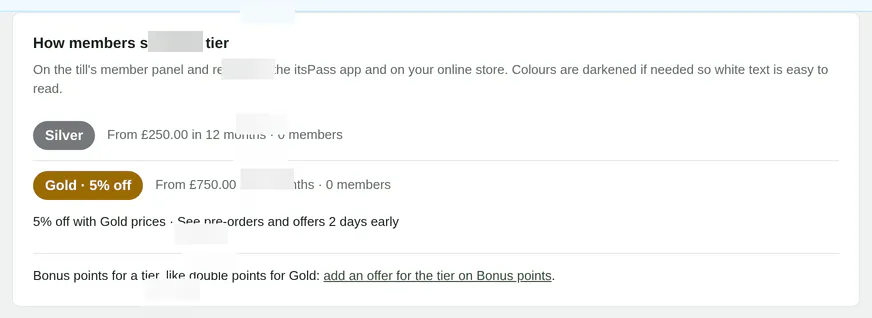
How members see their tier
The card under the tiers shows each one as members see it: "Gold · 5% off", "From £750.00 in 12 months", "5% off with Gold prices · Free delivery online", and how many members are in it. It shows on the till's member panel and receipt, in the itsPass app and on your online store.
For double points for Gold on some days, add a bonus points offer for the tier instead (Bonus points offers).
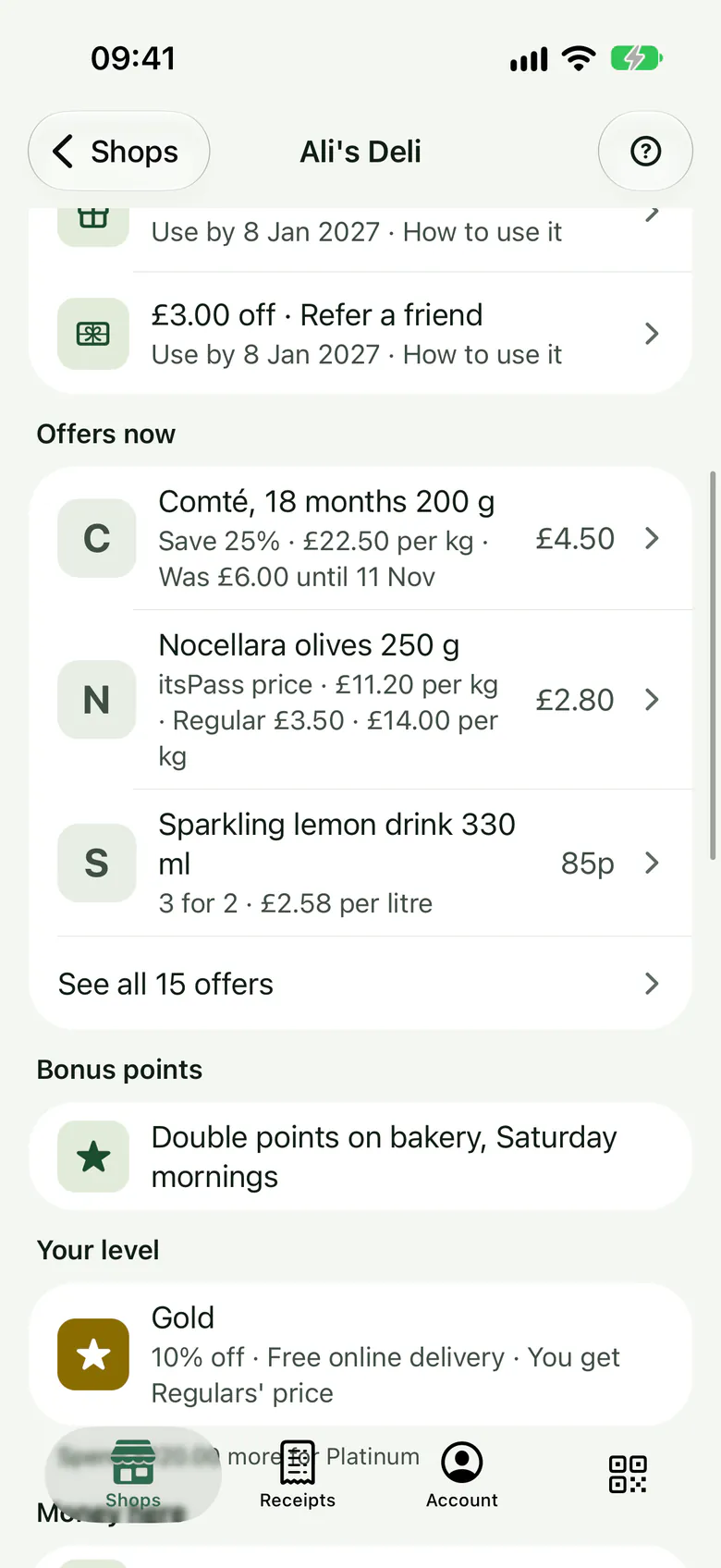
In itsPass, Your level on your shop's page shows their tier in its colour with its perks, and how far the next one is: "Spend £120.00 more for Platinum". Before the first tier: No level yet.
What happens next
- Members move up as soon as their spend in the last 12 months reaches a tier, and down only at their review.
- On the till: the member panel shows the tier chip, for example "Gold · 5% off", and the tier's prices apply when the member is on the sale, offline too.
- Online: signed-in members get their tier's prices and free delivery.
- Raising the spend needed, lowering a % off or taking a perk away is worse for members: it starts at least 30 days later (see Changing your programme fairly).
Still stuck?
The itsPOS support team is here 08:00 to 20:00 every day except Christmas Day.
- Call or WhatsApp: +44 7488 880320
- Email: support@itspos.io
- In the back office: Help › Contact support, or go to app.itspos.io/help/contact after you sign in
- On our website: itspos.io/contact
Tell us your shop's name and what you were trying to do. A screenshot of the screen helps.