

Customers and itsPass
A customer's page: wallet, history and what they share
Open a customer from Customers › Customers to see everything about them on one page, card by card. This guide uses Tess (CUS-000026), a made-up member in our test shop who joined at the till with a member slip: 91 points, a tab with £18.20 owed, no email or mobile.
For: Owners, Admins and Shop managers4 min read
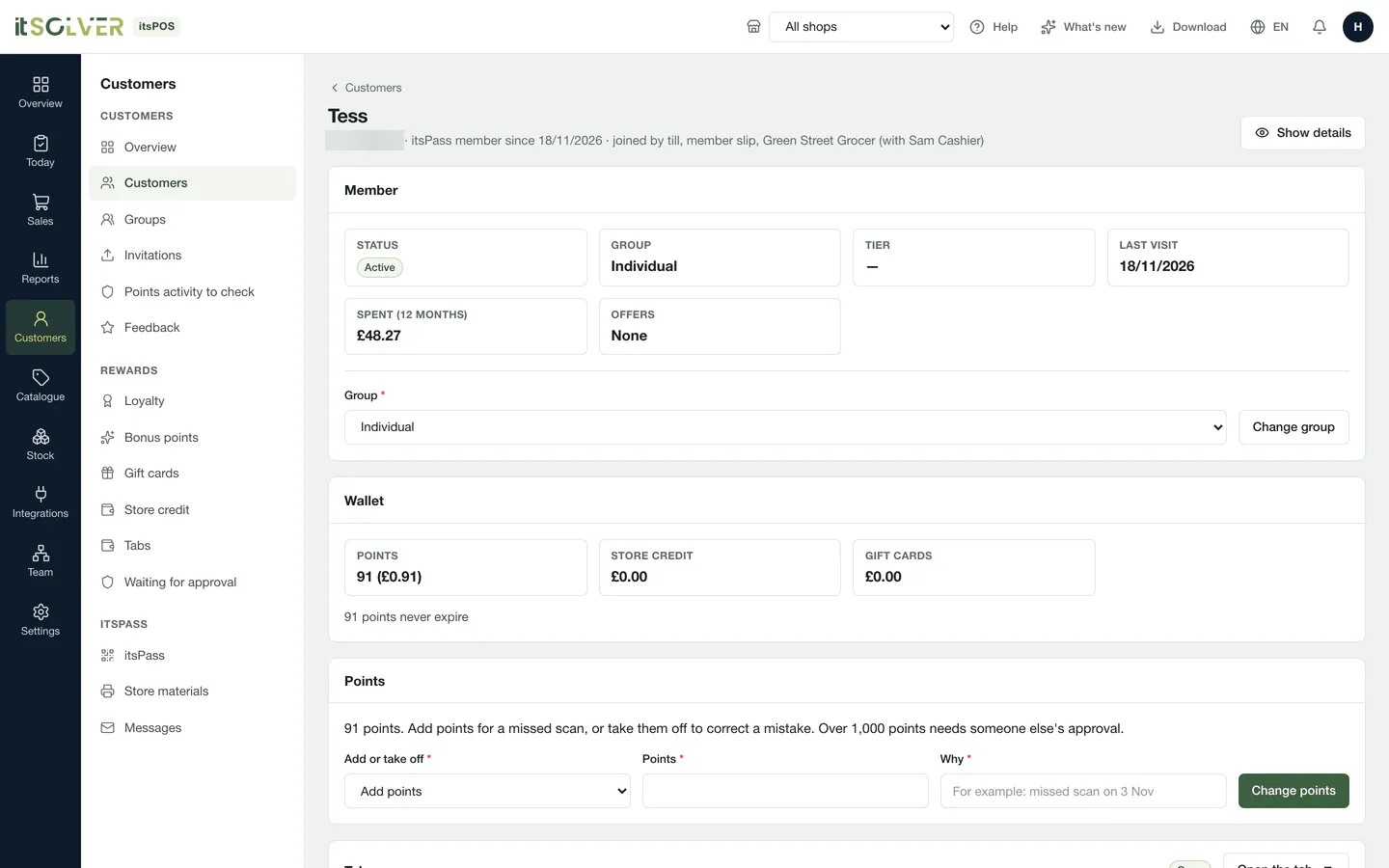
Under the name you see the customer number and how they came to you, for example "CUS-000026 · itsPass member since 18/11/2026 · joined by till, member slip, Green Street Grocer (with Sam Cashier)", or "Invited: not an itsPass member yet".
The buttons at the top
| Option | What it does | What staff or shoppers see | Also changes |
|---|---|---|---|
| Show details / Hide details | Shows the full email and phone instead of "m•••@example.com" | — | Nothing; who may see full details is a role setting |
| Change details | For invited customers only: name, email, phone, group, address, consent (see Add customers who aren't on itsPass yet). Members change their own details in itsPass | — | — (the till lists members and trade accounts, not invited customers) |
Member, Invited customer or Trade account card
| Option | What it does | What staff or shoppers see | Also changes |
|---|---|---|---|
| Status, Group, Tier, Last visit, Spent (12 months), Offers | Where they stand: their group, their tier (Silver, Gold), when they last bought, what they spent, and whether they agreed to offers | The tier shows on the till's member panel and receipt | — |
| Group and Change group | Moves them to another group: "Moved to VIP." | Their group's prices on the till when they're added to a sale, and online when they sign in | Bonus points and messages for a group |
Wallet
| Option | What it does | What staff or shoppers see | Also changes |
|---|---|---|---|
| Points | Their points and what they're worth, for example "91 (£0.91)", and when points expire ("91 points never expire") | The till's member panel; itsPass | What you owe on Customers › Overview |
| Stamps and Rewards ready | For a member when your shop gives stamps: how full their card is, for example "4 of 10", and how many rewards they can use. Stamp card says what's left ("6 more stamps for free coffee up to £3.50."), lists each reward ready with its use-by date ("Ready to use", or "In use at a till" while a sale uses it), and their latest stamps: "Stamps earned +1", "Card full: reward ready −10", "Reward used: Free coffee up to £3.50" | The same card on the till's member panel and in itsPass | Customers › Loyalty › Stamp card report |
| Store credit | What's left to spend, and the last entries | Pay › Store credit on the till | Customers › Store credit |
| Gift cards | Each card's last 4 numbers, balance and expiry | — | Customers › Gift cards |
Points
| Option | What it does | What staff or shoppers see | Also changes |
|---|---|---|---|
| Add or take off, Points, Why and Change points | Adds points for a missed scan or takes them off to correct a mistake. The reason is kept. "Points added. Balance 70 points." Over 1,000 points (your shop's limit) waits for someone else: "1,200 points are waiting for approval (WAP-2026-00003)." | The new balance on the till and in itsPass | History; Customers › Waiting for approval |
Only members collect points; invited customers get the points from their old card when they join (see Invite customers from your old till system).
Tab
For members only. Limit and Open a tab offer them a tab; once they accept it shows Owed, Left (for example "£31.80 of £50.00"), Last statement and Due. See Member tabs: buy now, pay later.
History
Visits per month for the last 12 months, then every sale, return, order, points change and store credit entry: When, What (a sale links to its receipt), Shop, Amount and Points. Points changed by staff show the reason, for example "Points changed by staff: Missed scan on Monday". Press Show older for more.
Shared with you
For members: "Members choose what to share in itsPass. Their first name is always shared." Email, Phone, Birth month (or "Not shared") and Paper receipts ("No paper, please" for members who chose itsPass receipts only).
Privacy
The consent history (what they agreed to or stopped, where and with which words), Download this customer's data (Owners and Admins) and Remove personal details. Removing details keeps their past sales in your reports. The Help Centre's privacy guide for signed-in shops has the steps for a data request.
Activity
Who added, changed, merged or switched off the record, and when, with what changed, for example "Changed by Help pictures · email receipts: no → yes".
Still stuck?
The itsPOS support team is here 08:00 to 20:00 every day except Christmas Day.
- Call or WhatsApp: +44 7488 880320
- Email: support@itspos.io
- In the back office: Help › Contact support, or go to app.itspos.io/help/contact after you sign in
- On our website: itspos.io/contact
Tell us your shop's name and what you were trying to do. A screenshot of the screen helps.