

Customers and itsPass
Welcome points and joining at the till: every option
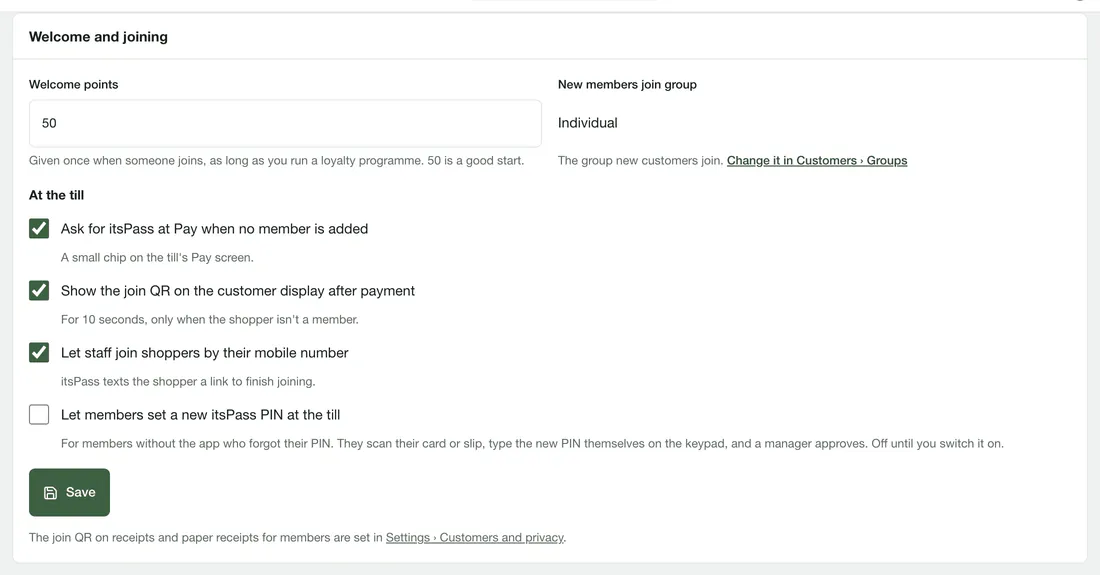
The Welcome and joining card on Customers › itsPass sets what a new member gets and how your tills help people join. Change an option, press Save ("itsPass settings saved.") and every till has it within a minute.
For: Owners, Admins and Shop managers3 min read
Owners, Admins and Shop managers change these. The settings are for your whole business, every shop.
Welcome and joining
| Option | What it does | What staff or shoppers see | Also changes |
|---|---|---|---|
| Welcome points | Points given once to each new member, from 0 to 100,000. "Given once when someone joins, as long as you run a loyalty programme. 50 is a good start." 0 gives none | The till and the join page your QR opens say "Get 50 points when you join"; the points are on the member's account as soon as they join | The checklist step "Choose welcome points" ticks when it's more than 0. Posters, counter cards and the staff script card print the welcome line, so Customers › Store materials marks what you printed as "Out of date" when it changes. It's the same number as Welcome points on Customers › Loyalty: change it in either place |
| New members join group | Shows the group every new member joins, for example "Individual". You change it in Customers › Groups ("Change it in Customers › Groups") | Nothing on its own | That group's price list applies to new members at the till and online. See Customer groups, their prices and perks |
Welcome points only go out while your loyalty programme runs. See Set up your loyalty programme.
At the till
| Option | What it does | What staff or shoppers see | Also changes |
|---|---|---|---|
| Ask for itsPass at Pay when no member is added (on to start with) | "A small chip on the till's Pay screen." | When nobody is on the sale, the basket button says "Add customer · Ask for itsPass", and Pay shows Ask for itsPass: "Scan their code for points and member prices". Off: no reminder | Nothing else |
| Show the join QR on the customer display after payment (on to start with) | "For 10 seconds, only when the shopper isn't a member." | The customer display shows your join QR after a sale without a member, then goes back to normal | Only tills with a customer display. See Customer display |
| Let staff join shoppers by their mobile number (on to start with) | "itsPass texts the shopper a link to finish joining." | The till's itsPass panel offers joining by mobile number. Off: staff can't join someone by phone; shoppers join from your QR or the app | Each text counts towards your plan's text allowance. See Join itsPass at the till |
| Let members set a new itsPass PIN at the till (off to start with) | "For members without the app who forgot their PIN. They scan their card or slip, type the new PIN themselves on the keypad, and a manager approves." | Set a new PIN in the till's PIN sheet. A manager always types their own PIN to approve | Team › Activity lists each new PIN with the till, cashier and manager, never the PIN. See Add a customer or itsPass member to a sale |
Settings elsewhere
"The join QR on receipts and paper receipts for members are set in Settings › Customers and privacy." See Paper receipts for members and the join QR on receipts.
Still stuck?
The itsPOS support team is here 08:00 to 20:00 every day except Christmas Day.
- Call or WhatsApp: +44 7488 880320
- Email: support@itspos.io
- In the back office: Help › Contact support, or go to app.itspos.io/help/contact after you sign in
- On our website: itspos.io/contact
Tell us your shop's name and what you were trying to do. A screenshot of the screen helps.