

Customers and itsPass
Add customers who aren't on itsPass yet
Most customers join your shop themselves with itsPass. Add a customer by hand when you need a record for someone who isn't on itsPass: a regular who orders specials, someone with store credit from your old till, or a customer who wants receipts by email. itsPOS calls them invited customers: when they join itsPass, they become a member.
For: Owners, Admins and Shop managers3 min read
Before you start
- Owners, Admins and Shop managers can add customers, in the back office only. The till doesn't add customer records: staff join the customer to itsPass instead (see Join itsPass at the till).
- Moving many customers from another till? Use Invite customers from your old till system instead: it brings their points too.
Add an invited customer
Go to Customers › Customers and press Add an invited customer.
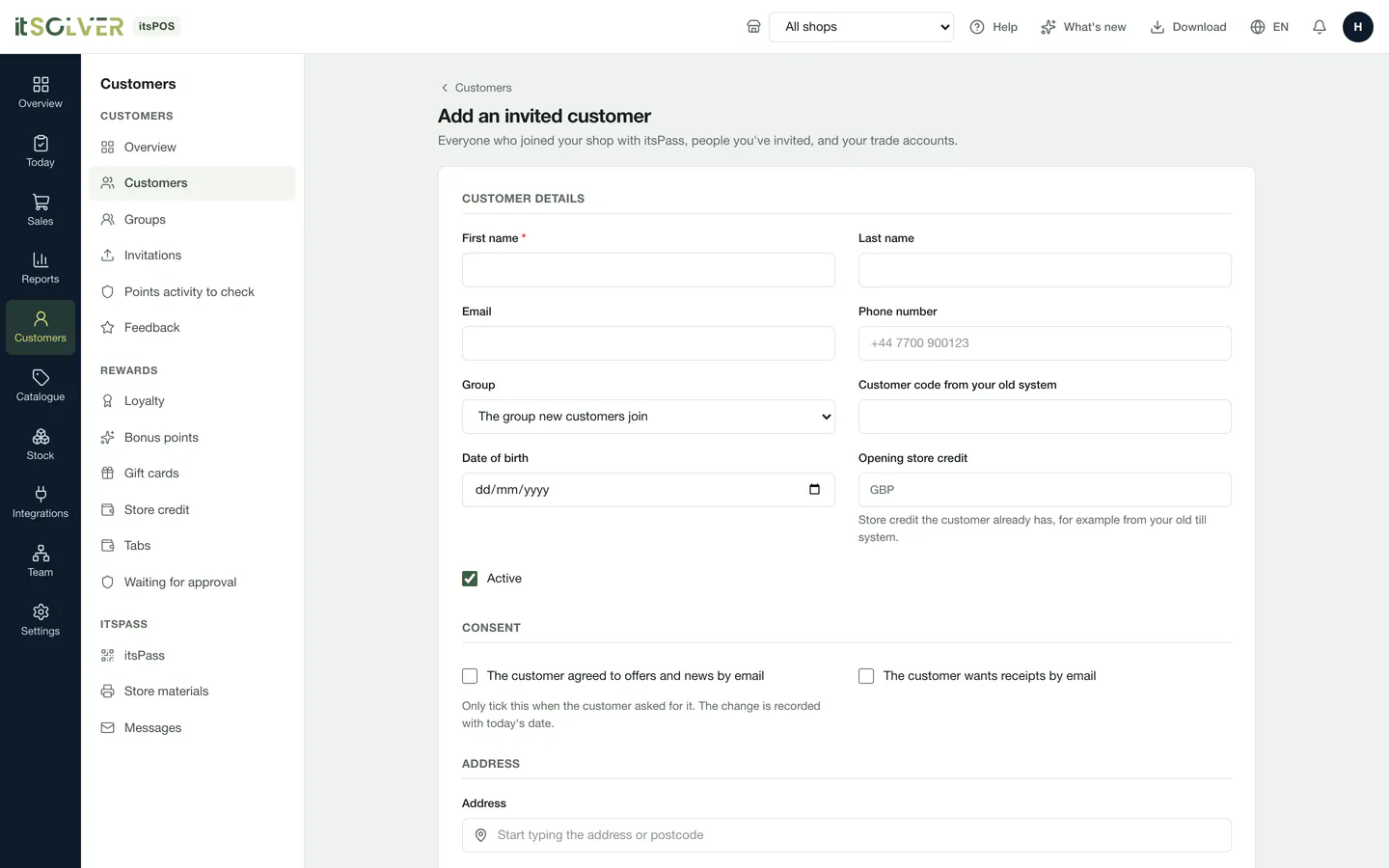
Add an invited customer Type the First name (the only box you must fill), then what you know: Last name, Email, Phone number (for example "+44 7700 900123"), Customer code from your old system and Date of birth.
Group: leave it on the group new customers join (Individual in our test shop) or choose another, for example VIP for their own prices.
Opening store credit: store credit they already have, for example from your old till system.
Under Consent, tick The customer agreed to offers and news by email only when the customer asked for it. "The change is recorded with today's date." Tick The customer wants receipts by email if they want emailed receipts.
Address: start typing the address or postcode and pick it from the list ("1 Deansgate, Manch" offers 1 Deansgate, Manchester); the town, county, postcode and country fill in. You can always type it yourself.
Press Add an invited customer.
If another customer already has that email or mobile number, itsPOS asks first, for example "Another customer has this mobile number" with "Dan Dupont (CUS-000031), invited customer: same mobile number". Press Open beside their name to go to their record instead, or Save anyway when it's someone else, for example family sharing a mobile. Change details asks the same when you change the email or mobile.
Change their details later
Open the customer and press Change details. Change what you need and press Save changes. Unticking The customer agreed to offers and news by email is recorded too: the Privacy card then shows "Offers by email · Stopped · Back office". Members change their own details in itsPass, so Change details isn't there for them.
What happens next
- The till doesn't list invited customers: Add customer on the till finds itsPass members and trade accounts.
- They don't collect points until they join itsPass, in the app or at the till. At the till they join by phone with their mobile number, proved with a 6-digit text code; if the number is already an itsPass member of your shop, the till puts that member on the sale, and if you invited them with points from an old card, the till offers to add those points (see Join itsPass at the till).
- Their sales show on their page under History, and in your customer reports.
If something goes wrong
- The same person twice: someone pressed Save anyway on the warning. Merge the two records on Possible duplicates (see Merge duplicate customers).
- No address found: keep typing, or type the address yourself.
Still stuck?
The itsPOS support team is here 08:00 to 20:00 every day except Christmas Day.
- Call or WhatsApp: +44 7488 880320
- Email: support@itspos.io
- In the back office: Help › Contact support, or go to app.itspos.io/help/contact after you sign in
- On our website: itspos.io/contact
Tell us your shop's name and what you were trying to do. A screenshot of the screen helps.