

Customers and itsPass
Set up your loyalty programme: every option
Customers › Loyalty is your loyalty programme: "Points your members earn and spend, in every shop and online. Every member is in this programme." The first card, Programme, sets how points are earned and what they're worth. The other cards are the stamp card, tiers, earn rates, Refer a friend and changes, each with its own guide.
For: Owners, Admins and Shop managers5 min read
Our test shop's programme is Rewards: 1 point for every £1, 100 points take £1 off, 50 welcome points.
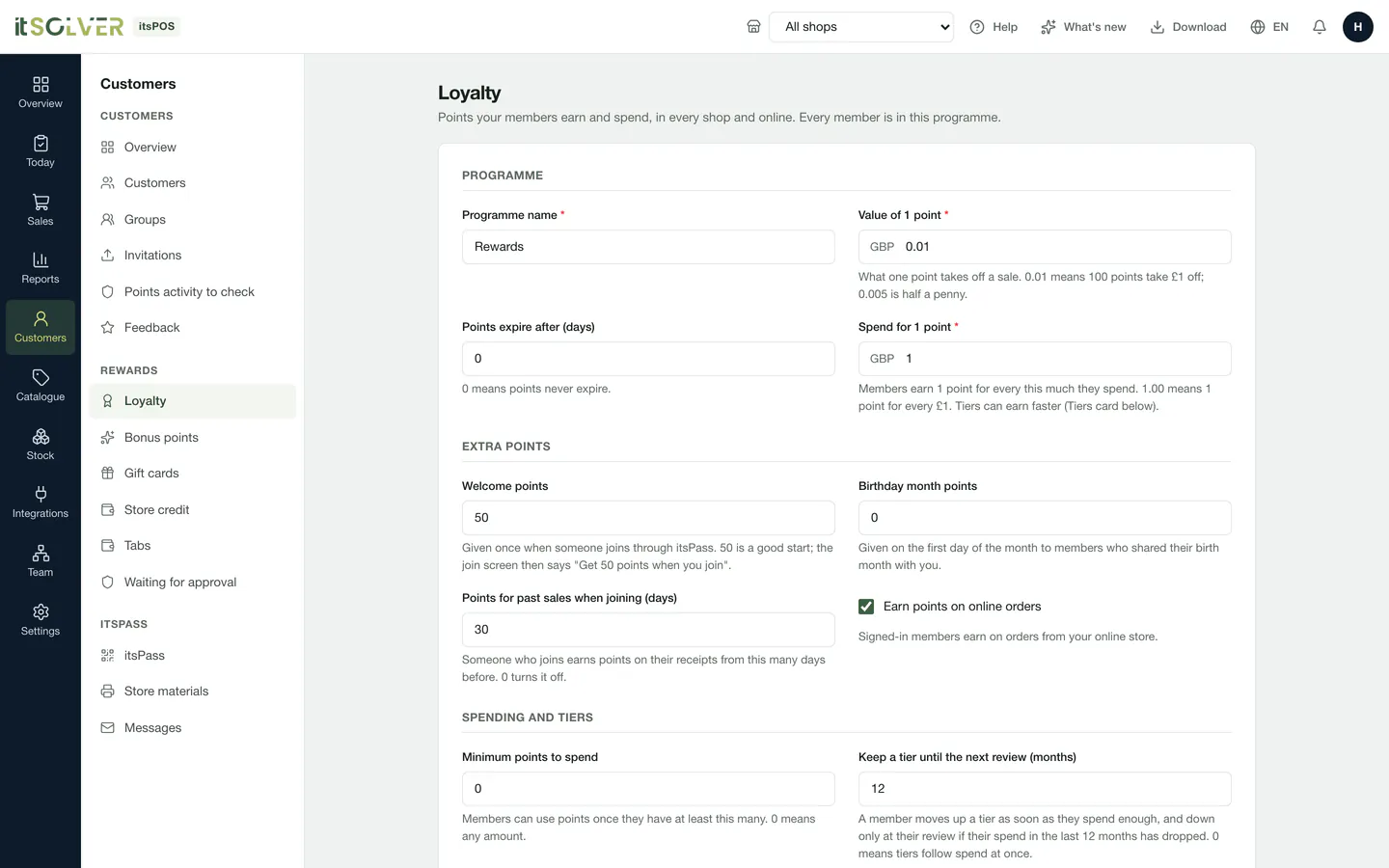
Owners, Admins and Shop managers can change it. Press Save changes at the bottom of the card. A change that's better for members starts at once ("This change is better for members, so it starts now. We'll let members know."); a change that's worse waits at least 30 days (see Changing your programme fairly).
Programme
| Option | What it does | What staff or shoppers see | Also changes |
|---|---|---|---|
| Programme name | Your programme's name, for example Rewards | The name on your shop card in itsPass | — |
| Value of 1 point | "What one point takes off a sale. 0.01 means 100 points take £1 off; 0.005 is half a penny." | The till's member panel shows points and their value, for example "91 (£0.91)" | What you owe on Customers › Overview; lowering it is a worse change |
| Points expire after (days) | "0 means points never expire." | The customer page says "91 points never expire" or when they expire; itsPass shows it | Expired points leave what you owe |
| Spend for 1 point | "Members earn 1 point for every this much they spend. 1.00 means 1 point for every £1." Tiers can earn faster (see Tiers) | The till's estimate at Pay and the receipt line, for example "+19 points" | Raising it is a worse change |
Extra points
| Option | What it does | What staff or shoppers see | Also changes |
|---|---|---|---|
| Welcome points | "Given once when someone joins through itsPass. 50 is a good start; the join screen then says 'Get 50 points when you join'." The same number is on Customers › itsPass | The join screen and the customer display's join QR: "Get 50 points when you join". Tess got 50 when she joined at the till | One welcome bonus per person at your business, ever |
| Birthday month points | "Given on the first day of the month to members who shared their birth month with you." | — | Only for members who share their birth month in itsPass |
| Points for past sales when joining (days) | "Someone who joins earns points on their receipts from this many days before. 0 turns it off." Default 30 | — | — |
| Earn points on online orders | "Signed-in members earn on orders from your online store." On by default | Points on online orders | — |
Spending and tiers
| Option | What it does | What staff or shoppers see | Also changes |
|---|---|---|---|
| Minimum points to spend | "Members can use points once they have at least this many. 0 means any amount." | The till refuses less: "Points can be spent from 500 points. Sam has 200." | — |
| Keep a tier until the next review (months) | "A member moves up a tier as soon as they spend enough, and down only at their review if their spend in the last 12 months has dropped. 0 means tiers follow spend at once." Default 12 | Their tier on the till and in itsPass | — |
What members earn on
Points are on what the customer pays after discounts, VAT included. Points used and products left out of loyalty earn nothing, and categories set to 0 on the earn rates card never earn (Newspapers & Cards in our test shop). In our test, Tess bought Nescafé (£9.50), three Tetley (£9.57) and The Times (£2.50): she earned 19 points.
In your accounts
The card Points and stamps in your accounts says how itsPOS records them: "Part of each sale is kept back until the points or stamps are used or expire (FRS 102). Using points or stamps is a discount, so VAT is on what the customer pays." Your accountant can change this in Settings › Accounting; the Deferred revenue report shows it.
On the till
The till shows the member's points on their panel and what they will earn at Pay, and prints it on the receipt. Members spend points at Pay (see Gift cards, store credit and points at the till).
In itsPass
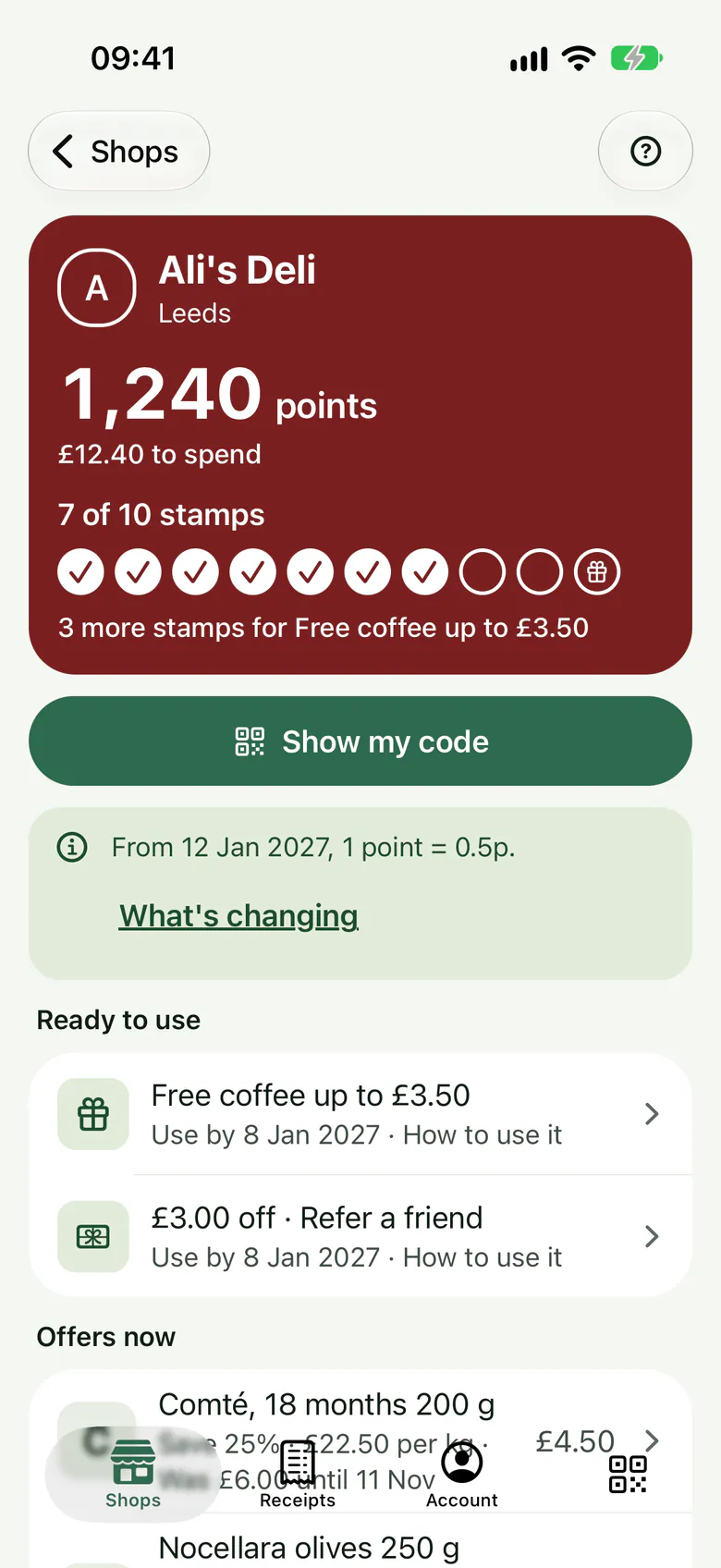
- Your shop's page shows the member's points and what they're worth, for example "1,240 points = £12.40" and "£12.40 to spend", with your Programme name above.
- My code shows the points at the shop with a reward ready, or else the shop they visited last, and so does their Wallet card.
- A receipt shows "12 points earned on this sale"; points added later arrive as a message behind the bell.
Still stuck?
The itsPOS support team is here 08:00 to 20:00 every day except Christmas Day.
- Call or WhatsApp: +44 7488 880320
- Email: support@itspos.io
- In the back office: Help › Contact support, or go to app.itspos.io/help/contact after you sign in
- On our website: itspos.io/contact
Tell us your shop's name and what you were trying to do. A screenshot of the screen helps.