

Customers and itsPass
Customers › Overview: your members and what you owe them
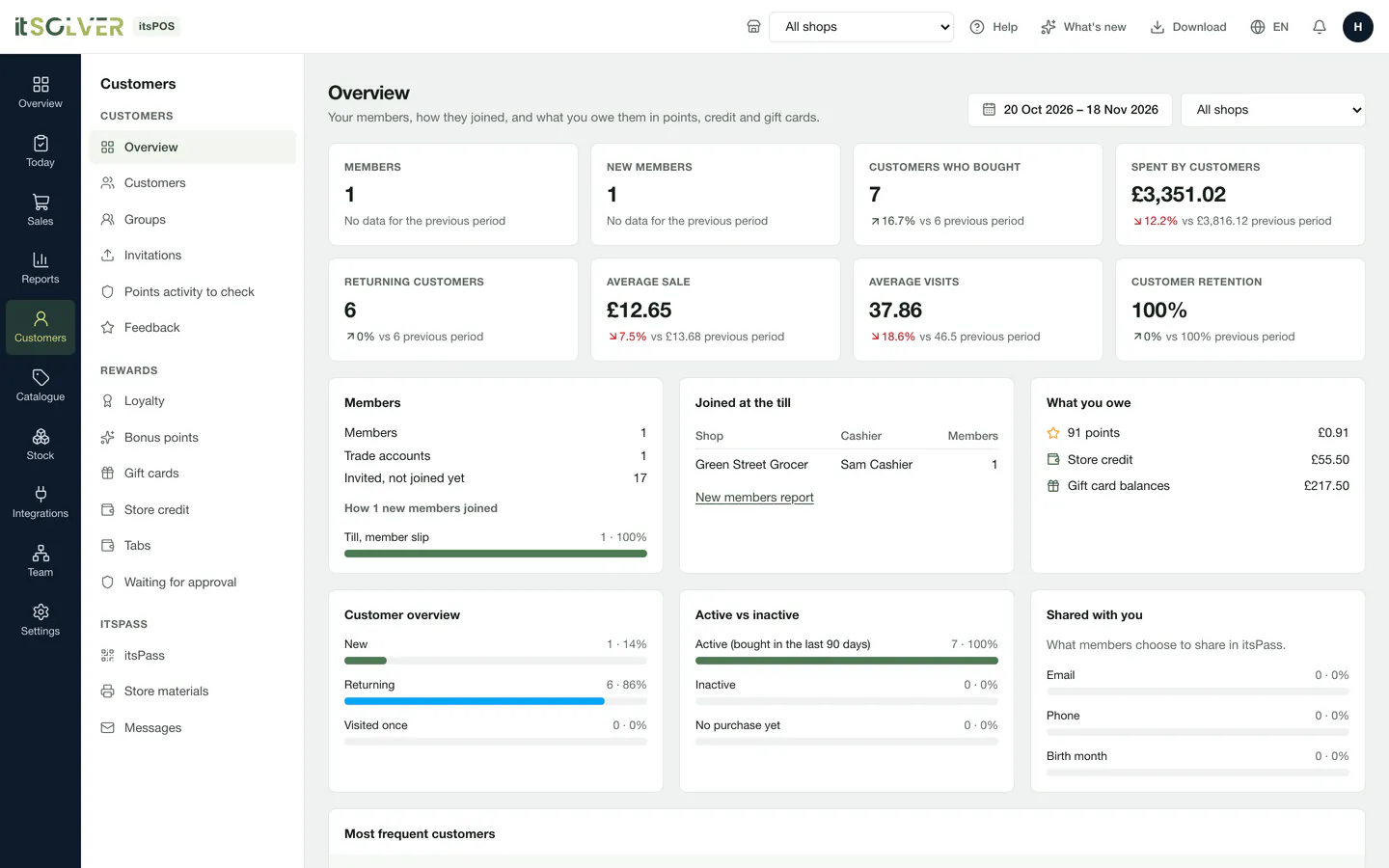
Customers › Overview is the first page of the Customers menu. It shows how many people shop with you as itsPass members, how often your known customers come back, and what you owe them in points, store credit and gift cards. Nothing on it can be changed: each card links to the page where you act.
For: Owners, Admins and Shop managers3 min read
What this page is for
Use it once a week to answer three questions: are more people joining, are your regulars still coming in, and how much do you owe customers that they haven't spent yet.
What you see
The figures are for the period at the top (the last 30 days to start with) and the shop you choose in Shop (or All shops). Each figure is compared with the period before.
- Members and New members: itsPass members of your shop, and how many joined in the period.
- Customers who bought, Spent by customers, Returning customers, Average sale, Average visits and Customer retention: about every sale with a customer on it, members, invited customers and trade accounts alike. In our test shop: 6 customers bought, spending £3,287.75, with an average sale of £12.55.
- Members, Trade accounts and Invited, not joined yet: how many of each kind you have.
- How new members joined: counter QR, receipt, the till and so on. Joined at the till shows each shop and cashier. When nobody joined: "Nobody joined at a till in this period. Staff can offer itsPass at Pay."
- What you owe: points members haven't spent (and what they're worth), Store credit and Gift card balances. In our test shop: £47.50 store credit and £100.00 on 3 active gift cards.
- Customer overview and Active vs inactive: new, returning and once-only customers; who bought in the last 90 days.
- Shared with you: how many members chose to share their email, phone or birth month with you in itsPass.
- Most frequent customers: visits, orders, total spend, last visit and shop.
- Loyalty insights: points earned and used, store credit outstanding and gift card balances.
What you can do
- Change the period or the shop at the top.
- Open the New members report or any customer from Most frequent customers.
- Shop managers see only their own shops' customers.
Where it shows up
The same figures are in Reports › Customer reports. What you owe also goes into your accounts: points and stamps are kept back until they're used (see Set up your loyalty programme).
Still stuck?
The itsPOS support team is here 08:00 to 20:00 every day except Christmas Day.
- Call or WhatsApp: +44 7488 880320
- Email: support@itspos.io
- In the back office: Help › Contact support, or go to app.itspos.io/help/contact after you sign in
- On our website: itspos.io/contact
Tell us your shop's name and what you were trying to do. A screenshot of the screen helps.