

Customers and itsPass
Points per £1 by category and product
Some things shouldn't earn points: the lottery, newspapers, stamps. Others you may want to push with more points. Earn rates on Customers › Loyalty gives a category or a product its own points per £1. In our test shop Newspapers & Cards earns nothing, so The Times and the National Lottery earn no points.
For: Owners, Admins and Shop managers2 min read
Before you start
- Owners, Admins and Shop managers can change earn rates.
- Everything you don't list earns the programme's rate (1 point per £1 in our test shop). Tobacco and infant formula never get bonus points.
Set the rates
Go to Customers › Loyalty and scroll to Earn rates.
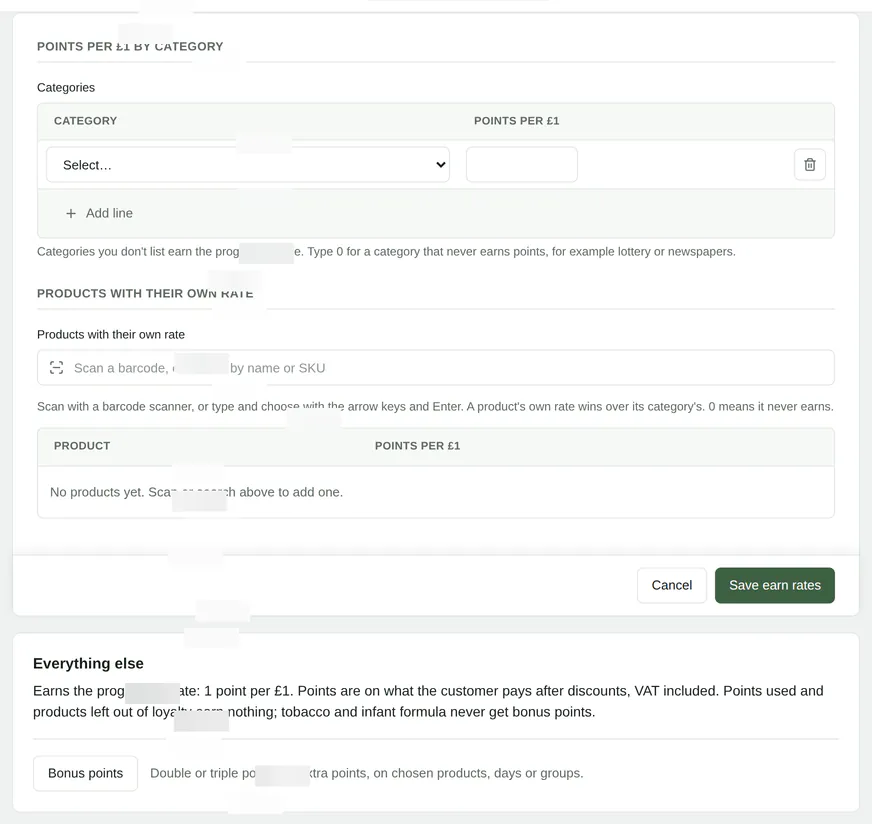
Earn rates Under Points per £1 by category, press Add line, choose the Category (Newspapers & Cards) and type the Points per £1: 0 means it never earns; 2 earns double.
Under Products with their own rate, scan a barcode or search for a product and type its rate. "A product's own rate wins over its category's. 0 means it never earns."
Press Save earn rates: "Earn rates saved."
What happens next
- The change log says, for example, "Newspapers & Cards: never earns (was the usual rate)". Lowering a rate is worse for members, so it starts at least 30 days after they're told (see Changing your programme fairly). With nobody holding points yet, it starts at once.
- Tills get the rates within a minute, and their estimate at Pay leaves those products out. Tess's test sale with The Times (£2.50) earned no points for the paper.
Still stuck?
The itsPOS support team is here 08:00 to 20:00 every day except Christmas Day.
- Call or WhatsApp: +44 7488 880320
- Email: support@itspos.io
- In the back office: Help › Contact support, or go to app.itspos.io/help/contact after you sign in
- On our website: itspos.io/contact
Tell us your shop's name and what you were trying to do. A screenshot of the screen helps.